- Community Home
- >
- Software
- >
- HPE OneView
- >
- Re: Appliance error
Categories
Company
Local Language
Forums
Discussions
- Integrity Servers
- Server Clustering
- HPE NonStop Compute
- HPE Apollo Systems
- High Performance Computing
Knowledge Base
Forums
- Data Protection and Retention
- Entry Storage Systems
- Legacy
- Midrange and Enterprise Storage
- Storage Networking
- HPE Nimble Storage
Discussions
Knowledge Base
Forums
Discussions
- Cloud Mentoring and Education
- Software - General
- HPE OneView
- HPE Ezmeral Software platform
- HPE OpsRamp Software
Knowledge Base
Discussions
Forums
Discussions
Discussion Boards
Discussion Boards
Discussion Boards
Discussion Boards
Discussion Boards
Discussion Boards
Discussion Boards
Discussion Boards
Discussion Boards
Discussion Boards
Discussion Boards
Discussion Boards
Discussion Boards
Discussion Boards
Discussion Boards
Discussion Boards
Discussion Boards
Discussion Boards
Discussion Boards
Discussion Boards
Discussion Boards
Discussion Boards
Discussion Boards
Community
Resources
Forums
Blogs
- Subscribe to RSS Feed
- Mark Topic as New
- Mark Topic as Read
- Float this Topic for Current User
- Bookmark
- Subscribe
- Printer Friendly Page

- Mark as New
- Bookmark
- Subscribe
- Mute
- Subscribe to RSS Feed
- Permalink
- Report Inappropriate Content
04-25-2022 03:13 AM - last edited on 04-26-2022 10:11 PM by support_s
04-25-2022 03:13 AM - last edited on 04-26-2022 10:11 PM by support_s
Appliance error
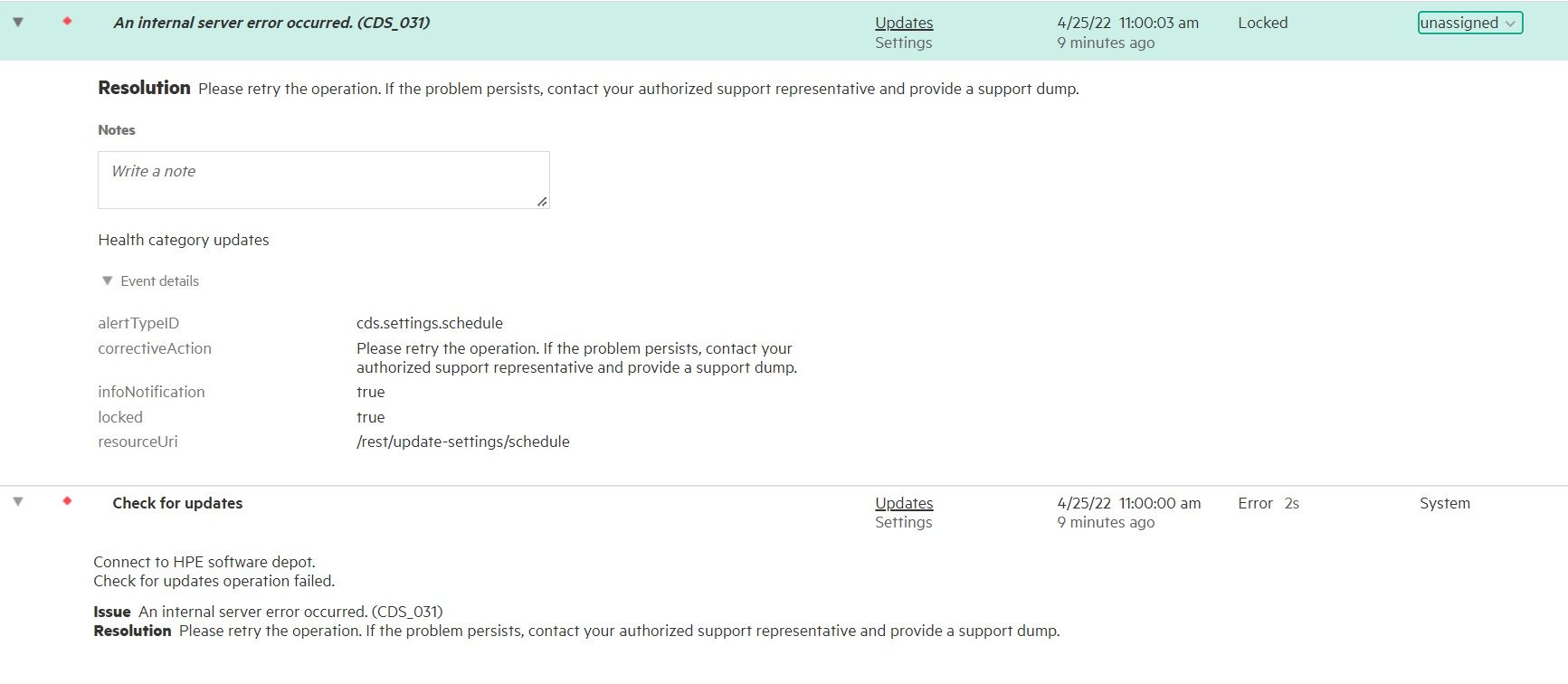
Just had this alarm appear on our OV, anyone else seen this and know how to clear it as the error is locked?
- Tags:
- OneView

- Mark as New
- Bookmark
- Subscribe
- Mute
- Subscribe to RSS Feed
- Permalink
- Report Inappropriate Content
04-26-2022 10:06 PM
04-26-2022 10:06 PM
Re: Appliance error
HI There,
What is that you are trying to perform?
Is it OneView upgarde or SPP Upgrade.
Locked Alerts are conditions that require physical resolution. You can't clear them through the UI or API.
Anyone with the appropriate role or Infrastructure Administator role, can clear Alerts/Activity that can be manually Cleared. This is not limited to the Administrator account within OneView.
Retry the operation and check if this goes through. If the issue persists, Log a support case for further analysis.
Cheers.
I work at HPE
HPE Support Center offers support for your HPE services and products when and how you need it. Get started with HPE Support Center today.
[Any personal opinions expressed are mine, and not official statements on behalf of Hewlett Packard Enterprise]

- Mark as New
- Bookmark
- Subscribe
- Mute
- Subscribe to RSS Feed
- Permalink
- Report Inappropriate Content
04-27-2022 12:12 AM
04-27-2022 12:12 AM
Re: Appliance error
I wasn't doing anything at the time the alarm just appeared in my inbox so went to check it out.
What physical action do I need to take to resolve this condition?

- Mark as New
- Bookmark
- Subscribe
- Mute
- Subscribe to RSS Feed
- Permalink
- Report Inappropriate Content
05-05-2022 09:21 AM
05-05-2022 09:21 AM
Re: Appliance error
Hi,
What version of OneView is currently installed? Was there a recent previuos update of OV?
Appears it has something to do with "Updates", in making that outbound connection. But unforunate in the past I have see it locked with this recomendation.

[Any personal opinions expressed are mine, and not official statements on behalf of Hewlett Packard Enterprise]
- Mark as New
- Bookmark
- Subscribe
- Mute
- Subscribe to RSS Feed
- Permalink
- Report Inappropriate Content
05-12-2022 02:31 AM
05-12-2022 02:31 AM
Re: Appliance error
@Mark-S Sorry for the delay was OoO last week.
We are currently running 6.50.00-0452161. This has been in the ground for a while and no recent updates have been installed.