GreenLake Administration
- Community Home
- >
- Storage
- >
- Entry Storage Systems
- >
- StoreEasy Storage
- >
- Re: System Retored or Not ??
StoreEasy Storage
1867257
Members
2410
Online
110509
Solutions
Forums
Categories
Company
Local Language
back
Forums
Discussions
- Integrity Servers
- Server Clustering
- HPE NonStop Compute
- HPE Apollo Systems
- High Performance Computing
Knowledge Base
Forums
- Data Protection and Retention
- Entry Storage Systems
- Legacy
- Midrange and Enterprise Storage
- Storage Networking
- HPE Nimble Storage
Discussions
Knowledge Base
Forums
Discussions
- Cloud Mentoring and Education
- Software - General
- HPE OneView
- HPE Ezmeral Software platform
- HPE OpsRamp Software
Knowledge Base
Discussions
Forums
Discussions
back
Discussion Boards
Discussion Boards
Discussion Boards
Discussion Boards
Discussion Boards
Discussion Boards
Discussion Boards
Discussion Boards
Discussion Boards
Discussion Boards
Discussion Boards
Discussion Boards
Discussion Boards
Discussion Boards
Discussion Boards
Discussion Boards
Discussion Boards
Discussion Boards
Discussion Boards
Discussion Boards
Discussion Boards
Discussion Boards
Discussion Boards
Blogs
Information
Community
Resources
Community Language
Language
Forums
Blogs
Topic Options
- Subscribe to RSS Feed
- Mark Topic as New
- Mark Topic as Read
- Float this Topic for Current User
- Bookmark
- Subscribe
- Printer Friendly Page

- Mark as New
- Bookmark
- Subscribe
- Mute
- Subscribe to RSS Feed
- Permalink
- Report Inappropriate Content
10-07-2004 05:02 AM
10-07-2004 05:02 AM
System Retored or Not ??
received two new HDD from HP and done a system restore.. the attached jpg file is what I now have does anybody see any problems with this??

2 REPLIES 2
- Mark as New
- Bookmark
- Subscribe
- Mute
- Subscribe to RSS Feed
- Permalink
- Report Inappropriate Content
10-07-2004 09:47 AM
10-07-2004 09:47 AM
Re: System Retored or Not ??
JP,
From the image you provided, your system restore is working correctly. The reason why you have extra space (895MB) on the two new HHDs is because they are not exactly the same as your two originals (i.e., Disk 0, Disk 1). The additional space on each drive (895MB) is usable (RAID0 or RAID1).
If you can do me a favor so I can do some checking .. can you give me the Disk Model for all 4 drives? I would really appreciate it!
Here is how to do it:
-Right click on My Computer, select Manage, select device Manager
-In the right pane, expand Disk drives
-For each drive, right click, select Properties
-Next to the disk drive icon, there should be Disk Model informmation (name and number)
If you will, please reply with this information for all 4 drives.
THANKS!
From the image you provided, your system restore is working correctly. The reason why you have extra space (895MB) on the two new HHDs is because they are not exactly the same as your two originals (i.e., Disk 0, Disk 1). The additional space on each drive (895MB) is usable (RAID0 or RAID1).
If you can do me a favor so I can do some checking .. can you give me the Disk Model for all 4 drives? I would really appreciate it!
Here is how to do it:
-Right click on My Computer, select Manage, select device Manager
-In the right pane, expand Disk drives
-For each drive, right click, select Properties
-Next to the disk drive icon, there should be Disk Model informmation (name and number)
If you will, please reply with this information for all 4 drives.
THANKS!
- Mark as New
- Bookmark
- Subscribe
- Mute
- Subscribe to RSS Feed
- Permalink
- Report Inappropriate Content
10-07-2004 11:01 PM
10-07-2004 11:01 PM
Re: System Retored or Not ??
Hi Keith,
THANKS FOR HELPING OUT!!
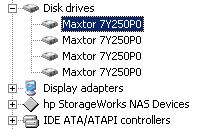
What i find strange is that all the four drives are "Maxtor 7Y250P0"
THANKS FOR HELPING OUT!!
What i find strange is that all the four drives are "Maxtor 7Y250P0"
The opinions expressed above are the personal opinions of the authors, not of Hewlett Packard Enterprise. By using this site, you accept the Terms of Use and Rules of Participation.
Company
Events and news
Customer resources
© Copyright 2026 Hewlett Packard Enterprise Development LP