GreenLake Administration
- Community Home
- >
- Servers and Operating Systems
- >
- HPE ProLiant
- >
- ProLiant Servers (ML,DL,SL)
- >
- HP System Management Homepage on DL360 G4
ProLiant Servers (ML,DL,SL)
1855696
Members
5600
Online
104103
Solutions
Forums
Categories
Company
Local Language
back
Forums
Discussions
Knowledge Base
Forums
- Data Protection and Retention
- Entry Storage Systems
- Legacy
- Midrange and Enterprise Storage
- Storage Networking
- HPE Nimble Storage
Discussions
Knowledge Base
Forums
Discussions
- Cloud Mentoring and Education
- Software - General
- HPE OneView
- HPE Ezmeral Software platform
- HPE OpsRamp
Knowledge Base
Discussions
Forums
Discussions
back
Discussion Boards
Discussion Boards
Discussion Boards
Discussion Boards
Discussion Boards
Discussion Boards
Discussion Boards
Discussion Boards
Discussion Boards
Discussion Boards
Discussion Boards
Discussion Boards
Discussion Boards
Discussion Boards
Discussion Boards
Discussion Boards
Discussion Boards
Discussion Boards
Discussion Boards
Discussion Boards
Discussion Boards
Discussion Boards
Discussion Boards
Blogs
Information
Community
Resources
Community Language
Language
Forums
Blogs
Topic Options
- Subscribe to RSS Feed
- Mark Topic as New
- Mark Topic as Read
- Float this Topic for Current User
- Bookmark
- Subscribe
- Printer Friendly Page

- Mark as New
- Bookmark
- Subscribe
- Mute
- Subscribe to RSS Feed
- Permalink
- Report Inappropriate Content
04-14-2011 11:48 PM
04-14-2011 11:48 PM
HP System Management Homepage on DL360 G4
Hi I installed a new Windows Server 2003 OS on a HP Proliant DL360 G4.
After that I installed the latest supported HP Support Pack for the server, which is currently v8.30.
Stopping the version control agent and restarting the SMH does not help.
In version control agent I upgraded all the components to the latest version.
The problem persists.
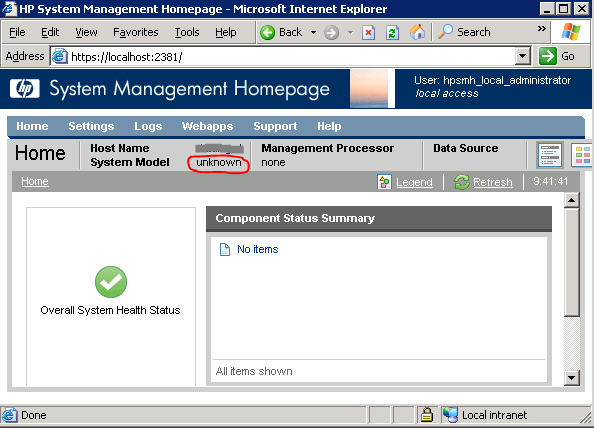
You can check the screenshot in the attachment.
Please help.
Andrej
After that I installed the latest supported HP Support Pack for the server, which is currently v8.30.
Stopping the version control agent and restarting the SMH does not help.
In version control agent I upgraded all the components to the latest version.
The problem persists.
You can check the screenshot in the attachment.
Please help.
Andrej
2 REPLIES 2
- Mark as New
- Bookmark
- Subscribe
- Mute
- Subscribe to RSS Feed
- Permalink
- Report Inappropriate Content
04-16-2011 09:10 AM
04-16-2011 09:10 AM
Re: HP System Management Homepage on DL360 G4
I noticed the data source in your screenshot does not have anything listed. Are you using SNMP or WBEM?
The truth is out there, but I forgot the URL..
- Mark as New
- Bookmark
- Subscribe
- Mute
- Subscribe to RSS Feed
- Permalink
- Report Inappropriate Content
04-20-2011 02:14 AM
04-20-2011 02:14 AM
Re: HP System Management Homepage on DL360 G4
That exactly is the problem - all the data sources are empty.
The server has both SNMP and WBEM (see attachment). I reinstalled the HP SMH but no change.
All HP services are running. The only HP service that is by default disabled is HP Insight Event Notifier.
Modules I can access inside HP SMH are HP version control agent and HP version control repository.
andrej
The server was installed last week. It was clean install.
The server has both SNMP and WBEM (see attachment). I reinstalled the HP SMH but no change.
All HP services are running. The only HP service that is by default disabled is HP Insight Event Notifier.
Modules I can access inside HP SMH are HP version control agent and HP version control repository.
andrej
The server was installed last week. It was clean install.

The opinions expressed above are the personal opinions of the authors, not of Hewlett Packard Enterprise. By using this site, you accept the Terms of Use and Rules of Participation.
Company
Events and news
Customer resources
© Copyright 2026 Hewlett Packard Enterprise Development LP