- Community Home
- >
- Servers and Operating Systems
- >
- HPE BladeSystem
- >
- BladeSystem - General
- >
- Re: HP VC NORMAL CONFIGURATION
Categories
Company
Local Language
Forums
Discussions
- Integrity Servers
- Server Clustering
- HPE NonStop Compute
- HPE Apollo Systems
- High Performance Computing
Knowledge Base
Forums
- Data Protection and Retention
- Entry Storage Systems
- Legacy
- Midrange and Enterprise Storage
- Storage Networking
- HPE Nimble Storage
Discussions
Knowledge Base
Forums
Discussions
- Cloud Mentoring and Education
- Software - General
- HPE OneView
- HPE Ezmeral Software platform
- HPE OpsRamp Software
Knowledge Base
Discussions
Forums
Discussions
Discussion Boards
Discussion Boards
Discussion Boards
Discussion Boards
Discussion Boards
Discussion Boards
Discussion Boards
Discussion Boards
Discussion Boards
Discussion Boards
Discussion Boards
Discussion Boards
Discussion Boards
Discussion Boards
Discussion Boards
Discussion Boards
Discussion Boards
Discussion Boards
Discussion Boards
Discussion Boards
Discussion Boards
Discussion Boards
Discussion Boards
Community
Resources
Forums
Blogs
- Subscribe to RSS Feed
- Mark Topic as New
- Mark Topic as Read
- Float this Topic for Current User
- Bookmark
- Subscribe
- Printer Friendly Page

- Mark as New
- Bookmark
- Subscribe
- Mute
- Subscribe to RSS Feed
- Permalink
- Report Inappropriate Content
04-22-2010 08:51 AM
04-22-2010 08:51 AM
linked/active
linked/standby
is this normal?, what's the meaning¿? only function one vc¿? the other is passive¿? thanks! ;)
Solved! Go to Solution.

- Mark as New
- Bookmark
- Subscribe
- Mute
- Subscribe to RSS Feed
- Permalink
- Report Inappropriate Content
04-22-2010 10:05 AM
04-22-2010 10:05 AM
Solutioni.e. Uplinkset A using ports from Module in Bay 1, and Uplinkset B using ports from Module in Bay 2.
Dave.
- Mark as New
- Bookmark
- Subscribe
- Mute
- Subscribe to RSS Feed
- Permalink
- Report Inappropriate Content
04-22-2010 11:09 AM
04-22-2010 11:09 AM
Re: HP VC NORMAL CONFIGURATION
What are the differences between linked/active/standby and linked/active/active?¿
I suppousse that in active/standby only one vc function, and the other is for HA.
I suppousse that in active/active the two functions and they make HA too?¿?¿.....
Very thankss!!!
- Mark as New
- Bookmark
- Subscribe
- Mute
- Subscribe to RSS Feed
- Permalink
- Report Inappropriate Content
04-23-2010 01:02 AM
04-23-2010 01:02 AM
Re: HP VC NORMAL CONFIGURATION
is for ha¿? only function one vc?
and linked/active linked/active¿?
are actives two? HA too¿?
please help me.


- Mark as New
- Bookmark
- Subscribe
- Mute
- Subscribe to RSS Feed
- Permalink
- Report Inappropriate Content
04-23-2010 01:10 AM
04-23-2010 01:10 AM
Re: HP VC NORMAL CONFIGURATION
When creating an uplink of agregated connections you'll only one as active unless you configure the switch side as a LACP trunk (I think Trunk is the correct term, I'm not a network person). Once that is complete your VC module will automatically see all connections in the group as active.
The stand-by connection you have now will only become active is the current active connection is dropped - unplug the cable as a test & observe.
As the previous poster says, when creating uplinks only choose connections from one module, don't span modules.
Julian.
- Mark as New
- Bookmark
- Subscribe
- Mute
- Subscribe to RSS Feed
- Permalink
- Report Inappropriate Content
04-23-2010 01:19 AM
04-23-2010 01:19 AM
Re: HP VC NORMAL CONFIGURATION
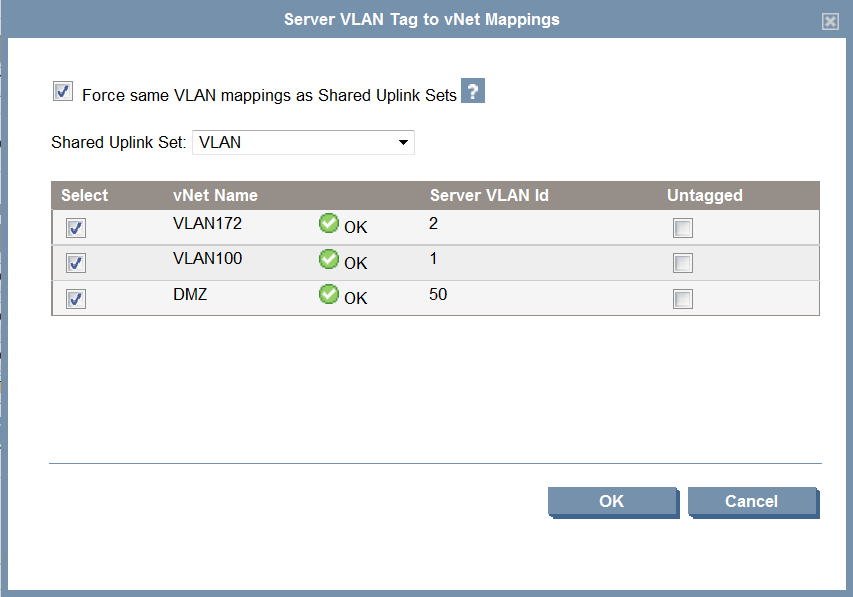
But when i try to configure the server, choose "multiple connections" in each nic, the system only let me choose one shared uplink.
How can i get HA if the nic only have one uplink vc¿?..
Thank you.
- Mark as New
- Bookmark
- Subscribe
- Mute
- Subscribe to RSS Feed
- Permalink
- Report Inappropriate Content
04-23-2010 01:31 AM
04-23-2010 01:31 AM
Re: HP VC NORMAL CONFIGURATION
I would configure 2 uplinks; one using connections from bay 1 & the second using connections from bay 2.
Present the two uplinkgs to the server on NIC1 & 2 and team.
Ideally you would also have your uplinks configured to two separate switches. This way you can loose a switch or a vc module without service interruption (note firmware updates etc).
If you havent seen it already the HP virtual connect cookbook has some useful info.
http://bizsupport.austin.hp.com/bc/docs/support/SupportManual/c01471917/c01471917.pdf
Julian.
- Mark as New
- Bookmark
- Subscribe
- Mute
- Subscribe to RSS Feed
- Permalink
- Report Inappropriate Content
04-23-2010 01:50 AM
04-23-2010 01:50 AM
Re: HP VC NORMAL CONFIGURATION
Is this the normal Conf¿?.
thanks...! ;)
- Mark as New
- Bookmark
- Subscribe
- Mute
- Subscribe to RSS Feed
- Permalink
- Report Inappropriate Content
04-23-2010 01:55 AM
04-23-2010 01:55 AM
Re: HP VC NORMAL CONFIGURATION
Creating an uplink spanning multiple vc's does work, but it's not good practise. I have done this in the past & I seem to remember big problems during firmware upgrades of VC modules.
Have a read through the cookbook as that gives you many supported scenarios providing HA.
Regards,
Julian.
- Mark as New
- Bookmark
- Subscribe
- Mute
- Subscribe to RSS Feed
- Permalink
- Report Inappropriate Content
04-23-2010 01:57 AM
04-23-2010 01:57 AM
Re: HP VC NORMAL CONFIGURATION
- Mark as New
- Bookmark
- Subscribe
- Mute
- Subscribe to RSS Feed
- Permalink
- Report Inappropriate Content
04-23-2010 06:55 AM
04-23-2010 06:55 AM
Re: HP VC NORMAL CONFIGURATION
NIC Ports always come in 2's or 4's. Odd numbers (1,3,5...) map to Left Ethernet module, even numbers (2,4...) map to Right Ethernet module.
Set up team using NIC 1 (IC Bay 1), and NIC 2 (IC Bay 2). If Ethernet module fails, NIC will fail over and use other path.
Create Uplinkset_A on VC Enet Module 1 and Uplinkset_B on VC Enet module 2. For each
VC VLAN you create, create an A and a B, i.e.
VLAN_23_A and VLAN_23_B )(set the external VLAN ID to be the same on the A vLan and the B vLan). Tell VLAN_23_A to use Uplinkset_A. Tel VLAN_23_B to use Uplinkset_B.
In the profile, assign VLAN_23_A to Ethernet port 1, and VLAN_23_B to Ethernet Port 2.
now if primary nic is active, the server will it will use Port 1 (VLAN_23_A) --> Uplinkset_A. If NIC fails over, it will use Port 2 (VLAN_23_B) --> Uplinkset_B
Dave.
- Mark as New
- Bookmark
- Subscribe
- Mute
- Subscribe to RSS Feed
- Permalink
- Report Inappropriate Content
04-23-2010 08:24 AM
04-23-2010 08:24 AM