
- Community Home
- >
- Networking
- >
- Switching and Routing
- >
- Comware Based
- >
- Packets dropped due to full GBP or insufficient ba...
Categories
Company
Local Language
Forums
Discussions
Knowledge Base
Forums
- Data Protection and Retention
- Entry Storage Systems
- Legacy
- Midrange and Enterprise Storage
- Storage Networking
- HPE Nimble Storage
Discussions
Knowledge Base
Forums
Discussions
- Cloud Mentoring and Education
- Software - General
- HPE OneView
- HPE Ezmeral Software platform
- HPE OpsRamp
Knowledge Base
Discussions
Forums
Discussions
Discussion Boards
Discussion Boards
Discussion Boards
Discussion Boards
Discussion Boards
Discussion Boards
Discussion Boards
Discussion Boards
Discussion Boards
Discussion Boards
Discussion Boards
Discussion Boards
Discussion Boards
Discussion Boards
Discussion Boards
Discussion Boards
Discussion Boards
Discussion Boards
Discussion Boards
Discussion Boards
Discussion Boards
Discussion Boards
Discussion Boards
Community
Resources
Forums
Blogs
- Subscribe to RSS Feed
- Mark Topic as New
- Mark Topic as Read
- Float this Topic for Current User
- Bookmark
- Subscribe
- Printer Friendly Page

- Mark as New
- Bookmark
- Subscribe
- Mute
- Subscribe to RSS Feed
- Permalink
- Report Inappropriate Content
05-06-2020 06:08 AM
05-06-2020 06:08 AM
Packets dropped due to full GBP or insufficient bandwidth
Hello,
We deploy video stream by comware switches.
However, on the interfaces of a switch (5510), I have a lot of lost packages.
For video it is problematic.
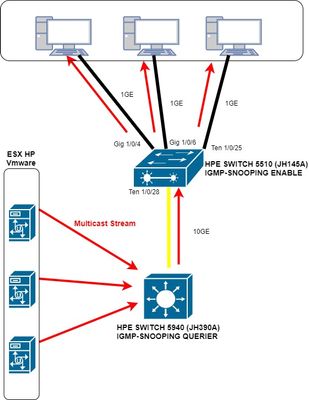
On the attached image, you will have an overview of the network topology.
Why do I have packages deleted on interfaces 1/0/4, 1/0/6, and Ten 1/0/25?
I don't have one on the Ten 1/0/28 interface.
I activated the "burst-mode enable" command but nothing helps.
Here is the result of the command:
<SW>display packet-drop interface gig 1/0/4
GigabitEthernet1/0/4:
Packets dropped due to full GBP or insufficient bandwidth: 6328369
Packets dropped due to Fast Filter Processor (FFP): 0
Packets dropped due to STP non-forwarding state: 0
<SW>display packet-drop interface gig 1/0/6
GigabitEthernet1/0/6:
Packets dropped due to full GBP or insufficient bandwidth: 235369
Packets dropped due to Fast Filter Processor (FFP): 0
Packets dropped due to STP non-forwarding state: 0
<SW>display packet-drop interface ten 1/0/25
Ten-GigabitEthernet1/0/25:
Packets dropped due to full GBP or insufficient bandwidth: 2944092
Packets dropped due to Fast Filter Processor (FFP): 0
Packets dropped due to STP non-forwarding state: 0
<SW>display packet-drop interface ten 1/0/28
Ten-GigabitEthernet1/0/28:
Packets dropped due to full GBP or insufficient bandwidth: 0
Packets dropped due to Fast Filter Processor (FFP): 0
Packets dropped due to STP non-forwarding state: 0
On the 5510 switch there are cameras plugged in and the result is the same, there are dropped packets.
The multicast streams are in one vlan and the unicast streams of the cameras are in another vlan.
Can you help me solve this problem?
thanks you
Regards

- Mark as New
- Bookmark
- Subscribe
- Mute
- Subscribe to RSS Feed
- Permalink
- Report Inappropriate Content
05-06-2020 10:10 AM
05-06-2020 10:10 AM
Re: Packets dropped due to full GBP or insufficient bandwidth
Hi,
Could you please share the display version output from the device?
Thanks!

- Mark as New
- Bookmark
- Subscribe
- Mute
- Subscribe to RSS Feed
- Permalink
- Report Inappropriate Content
05-06-2020 11:14 AM - edited 05-06-2020 11:25 AM
05-06-2020 11:14 AM - edited 05-06-2020 11:25 AM
Re: Packets dropped due to full GBP or insufficient bandwidth
Hello,
thank you for your reply.
[SW]display version
HPE Comware Software, Version 7.1.070, Release 3506P02
Copyright (c) 2010-2019 Hewlett Packard Enterprise Development LP
HPE 5510 24G 4SFP+ HI 1-slot Switch JH145A uptime is 7 weeks, 5 days, 20
hours, 58 minutes
Last reboot reason : User reboot
Boot image: flash:/5510hi-cmw710-boot-r3506p02.bin
Boot image version: 7.1.070, Release 3506P02
Compiled Dec 16 2019 11:00:00
System image: flash:/5510hi-cmw710-system-r3506p02.bin
System image version: 7.1.070, Release 3506P02
Compiled Dec 16 2019 11:00:00
Feature image(s) list:
flash:/5510hi-cmw710-freeradius-r3506p02.bin, version: 7.1.070
Compiled Dec 16 2019 11:00:00
Slot 1:
Uptime is 7 weeks,5 days,20 hours,58 minutes
5510 24G 4SFP+ HI 1-slot Switch with 2 Processor
BOARD TYPE: 5510 24G 4SFP+ HI 1-slot Switch
DRAM: 1984M bytes
FLASH: 512M bytes
PCB 1 Version: VER.A
Bootrom Version: 127
CPLD 1 Version: 003
Release Version: HPE 5510 24G 4SFP+ HI 1-slot Switch JH145A-3506P02
Patch Version : None
Reboot Cause : UserReboot
[SubSlot 0] 24GE+4SFP Plus
Regards
- Mark as New
- Bookmark
- Subscribe
- Mute
- Subscribe to RSS Feed
- Permalink
- Report Inappropriate Content
05-06-2020 03:16 PM
05-06-2020 03:16 PM
Re: Packets dropped due to full GBP or insufficient bandwidth
Hi,
It seems the device is running on latest software. Generally GBP Full bandwidth issue get resolve after enabling the burst mode but its already implemented.
1. Can you please check physical connectivity between interfaces 1/0/4, 1/0/6, and Ten 1/0/25 and end devices.
2. Please upgrade the NIC driver on conencting end devices.
3. If still problem persist then capture packets or log a ticket with support.
Thanks!
- Mark as New
- Bookmark
- Subscribe
- Mute
- Subscribe to RSS Feed
- Permalink
- Report Inappropriate Content
05-20-2020 09:18 AM
05-20-2020 09:18 AM
Re: Packets dropped due to full GBP or insufficient bandwidth
Hi,
Has my solution helped you resolve the query or do you need more assistance?
Thanks!
- Mark as New
- Bookmark
- Subscribe
- Mute
- Subscribe to RSS Feed
- Permalink
- Report Inappropriate Content
05-21-2020 11:51 PM
05-21-2020 11:51 PM
Re: Packets dropped due to full GBP or insufficient bandwidth
Hello,
Thank you for your reply.
I have checked the connection on the cable and the drivers for the network cards are up to date. Is it possible to add more memory to the port buffers?
There is available memory.
<SW>display memory
Memory statistics are measured in KB:
Slot 1:
Total Used Free Shared Buffers Cached FreeRatio
Mem: 2002116 424540 1577576 0 2744 154840 79.6%
-/+ Buffers/Cache: 266956 1735160
Swap: 0 0 0
LowMem: 1477828 168876 1308952 -- -- -- 88.6%
HighMem: 524288 255664 268624 -- -- -- 51.2%
What do you think ?
Regards,
- Mark as New
- Bookmark
- Subscribe
- Mute
- Subscribe to RSS Feed
- Permalink
- Report Inappropriate Content
09-13-2020 12:51 AM
09-13-2020 12:51 AM
Re: Packets dropped due to full GBP or insufficient bandwidth
i have same issue with hp 10500 (7.1.045, Release 7183) but i did not found command burst-mode
any idea what is solution
- Tags:
- 10500
- Mark as New
- Bookmark
- Subscribe
- Mute
- Subscribe to RSS Feed
- Permalink
- Report Inappropriate Content
09-13-2020 01:13 AM
09-13-2020 01:13 AM
Re: Packets dropped due to full GBP or insufficient bandwidth
Hi,
Can you please try like this:
[HPE-10500] burst-mode enable chassis <chassis number> slot <slot number>
But there are possibility that some of the Line card wont support this command.
Thanks!
- Mark as New
- Bookmark
- Subscribe
- Mute
- Subscribe to RSS Feed
- Permalink
- Report Inappropriate Content
09-13-2020 03:00 AM
09-13-2020 03:00 AM
Re: Packets dropped due to full GBP or insufficient bandwidth
thanks , i tried before but burst-mode not recongized command
- Mark as New
- Bookmark
- Subscribe
- Mute
- Subscribe to RSS Feed
- Permalink
- Report Inappropriate Content
09-23-2020 12:35 AM
09-23-2020 12:35 AM
Re: Packets dropped due to full GBP or insufficient bandwidth
Hi,
There are some series card's doesn't support this command.
Also.I believe the device is running on latest software version.
Thanks!
- Mark as New
- Bookmark
- Subscribe
- Mute
- Subscribe to RSS Feed
- Permalink
- Report Inappropriate Content
09-07-2021 05:58 AM
09-07-2021 05:58 AM
Re: Packets dropped due to full GBP or insufficient bandwidth
Hello. I have this problem. I have enabled the following commands on my core switch (HP 10508):
system-view
burst-mode enable chassis 1 slot 1
burst-mode enable chassis 2 slot 1
burst-mode enable chassis 1 slot 2
burst-mode enable chassis 2 slot 2
burst-mode enable chassis 1 slot 3
burst-mode enable chassis 2 slot 3
As you can see, we have an irf cluster consisting of two chassis.
After doing this, all the problems related to 1 Gbps have disappeared, no packet drops outbound and inbound associated to card supporting 1 Gbps interfaces..
But We have 4 slots with ten-gigabitethernet. Irf interfaces belong to these slots, as well as firewalls, synergy, etc.
Many packets drops are found on these interfaces and I don't know how to avoid them. I know packet drops are normal on irf interfaces, but I'm worried because many of packet drop bursts are related to firewall interfaces (Check Point firewalls in cluster mode).
These bursts affect snmpget queries and icmp on my network.
Is there another mechanism to avoid these bursts in slots that do not support "burst mode"?
- Mark as New
- Bookmark
- Subscribe
- Mute
- Subscribe to RSS Feed
- Permalink
- Report Inappropriate Content
09-07-2021 06:37 AM
09-07-2021 06:37 AM
Re: Packets dropped due to full GBP or insufficient bandwidth
Hello @JUANTRON ,
Is it a 10gig module?
Can you share the product number 'JXXXX" of 10gig module and chassis?
Is chaasis on latest software version, because sometimes packet drop issues might be others?
Also check if there are no layer 1 issues.
Thanks!
- Mark as New
- Bookmark
- Subscribe
- Mute
- Subscribe to RSS Feed
- Permalink
- Report Inappropriate Content
09-08-2021 09:18 AM
09-08-2021 09:18 AM
Re: Packets dropped due to full GBP or insufficient bandwidth
I can't apply "burst mode" feature in the following cards:
HP A10500 16-port 10-GbE SFP+ SC Module JC628A (BOARD TYPE: LSU1TGS16SC0)
HPE 10500 16p 1/10GbE SFP+ SF Mod JH193A (BOARD TYPE: LSUM2TGS16SF0)
But "burst mode" is applied in the following cards:
HP A10500 48-port Gig-T SE Module JC618A
HP 10500 16p GbE SFP/8p GbE Cmbo SE Mod JC763A
My two chassis are:
HP A10508 Switch Chassis JC612A
There are no layer 1 issues.
<CSALUD-SEV-001-SWLAN50>display version
HPE Comware Software, Version 7.1.070, Release 7585P07
Copyright (c) 2010-2020 Hewlett Packard Enterprise Development LP
HP 10508 uptime is 25 weeks, 5 days, 21 hours, 11 minutes
Last reboot reason : USER reboot
Boot image: flash:/10500-CMW710-BOOT-R7585P07.bin
Boot image version: 7.1.070, Release 7585P07
Compiled Jan 14 2020 11:00:00
System image: flash:/10500-CMW710-SYSTEM-R7585P07.bin
System image version: 7.1.070, Release 7585P07
Compiled Jan 14 2020 11:00:00
Can I apply cut-through to avoid packet drops? And, how?
"cut-through enable" command is not recognized (irf cluster mode)