- Community Home
- >
- Networking
- >
- Switching and Routing
- >
- Comware Based
- >
- The ARP packet rate(89pps) exceeded the rate limit...
Categories
Company
Local Language
Forums
Discussions
Forums
- Data Protection and Retention
- Entry Storage Systems
- Legacy
- Midrange and Enterprise Storage
- Storage Networking
- HPE Nimble Storage
Discussions
Forums
Discussions
Discussions
Forums
Discussions
Discussion Boards
Discussion Boards
Discussion Boards
Discussion Boards
Discussion Boards
Discussion Boards
Discussion Boards
Discussion Boards
Discussion Boards
Discussion Boards
Discussion Boards
Discussion Boards
Discussion Boards
Discussion Boards
Discussion Boards
Discussion Boards
Discussion Boards
Discussion Boards
Discussion Boards
Discussion Boards
Discussion Boards
Discussion Boards
Discussion Boards
Community
Resources
Forums
Blogs
- Subscribe to RSS Feed
- Mark Topic as New
- Mark Topic as Read
- Float this Topic for Current User
- Bookmark
- Subscribe
- Printer Friendly Page

- Mark as New
- Bookmark
- Subscribe
- Mute
- Subscribe to RSS Feed
- Permalink
- Report Inappropriate Content
10-10-2013 11:36 AM - edited 10-10-2013 11:57 AM
10-10-2013 11:36 AM - edited 10-10-2013 11:57 AM
The ARP packet rate(89pps) exceeded the rate limit (50pps) on interface...
Hello,
I have hundreds of those messages in my log of one of my switch stacks:
%Oct 10 06:23:16:033 2013 DOTAN1 ARP/4/RATELIMIT: The ARP packet rate(89pps) exceeded the rate limit(50pps) on interface GigabitEthernet9/0/26 in the last 60 seconds.
- on different interfaces
- all the time
- but there´s no loop (loop detection is on, with multiport, per vlan, action, semi shutdown)
- asking myself
- What limit? I didn´t set that one. So let´s set "arp rate limit disable"?
- What are normal values for "broadcast suppression" (for edge, servers,...)?
- These messages aren´t informational only?

- Mark as New
- Bookmark
- Subscribe
- Mute
- Subscribe to RSS Feed
- Permalink
- Report Inappropriate Content
10-10-2013 12:37 PM
10-10-2013 12:37 PM
Re: The ARP packet rate(89pps) exceeded the rate limit (50pps) on interface...
Hi Martin,
I've been seeing a lot of these on one of our sites. I haven't had a chance to chase down what is causing it, but I'm guessing it's a feature of recent firmware that is not particularly well-tuned by default. If anyone has any further info, I'd be keen to know more.
Paul

- Mark as New
- Bookmark
- Subscribe
- Mute
- Subscribe to RSS Feed
- Permalink
- Report Inappropriate Content
10-11-2013 06:04 AM
10-11-2013 06:04 AM
Re: The ARP packet rate(89pps) exceeded the rate limit (50pps) on interface...
I would be interested in that information as well. I started seeing that on our switches after we upgraded the firmware on them so my guess its something new in the firmware. But I haven't had a chance to track down what it is either.

- Mark as New
- Bookmark
- Subscribe
- Mute
- Subscribe to RSS Feed
- Permalink
- Report Inappropriate Content
10-11-2013 09:32 AM
10-11-2013 09:32 AM
Re: The ARP packet rate(89pps) exceeded the rate limit (50pps) on interface...
It's an awful lot of ARP packets, mind you. I'd be inclined to fire up Wireshark, or whatever, and see whether you have some antisocial nodes there. There could be some sort of scan happening (if only a harmless network inventory kind), or maybe some buggy nodes not properly rate-limiting their own ARPs.
- Mark as New
- Bookmark
- Subscribe
- Mute
- Subscribe to RSS Feed
- Permalink
- Report Inappropriate Content
10-11-2013 03:13 PM
10-11-2013 03:13 PM
Re: The ARP packet rate(89pps) exceeded the rate limit (50pps) on interface...
Hi Richard,
Our Ruckus wireless access points do sub-second ARP checking of their default gateway to verify connectivity. On the site where I'm seeing this, we have 20 access points. So 40 out of the 50 ARP requests in a second could easily be just those 20 APs. I'll do a bit of packet capture and see if there's anything else contributing, but it seems to me that this is just much too sensitive a warning, and 50 pps is much too low a level.
What would a conference or exhibition do where they often have 20K users in a building? If all their wifi APs were on a single 10 GbE backbone you'd see orders of magnitude more ARP than what I have...
Paul
- Mark as New
- Bookmark
- Subscribe
- Mute
- Subscribe to RSS Feed
- Permalink
- Report Inappropriate Content
10-11-2013 04:24 PM
10-11-2013 04:24 PM
Re: The ARP packet rate(89pps) exceeded the rate limit (50pps) on interface...
Last time I looked the recommendation was to rate limit ARPs to a maximum of 1/second, so I would count the behaviour of your APs as antisocial. However, as an old DECnet guy, I consider any use of the broadcast address as antisocial ;)
Coincidentally, this morning I was discussing moving some boxes that don't like excessive broadcasts and lock up onto a private network; here 'excessive' was more than about 10 pps. In the process of investigating, I found a few systems sending ARPs because their subnet mask was incorrectly set.
Anyway, I guess am trying to make two points:
- What a reasonable level is for you is way different from what it is for me; interesting to see a different perspective though.
- Having a good idea of what your baseline load is, and whether wierd stuff is going on is often worth it. Without that, there is no sensible way of answering the part of the original question about "normal" values for broadcast supression.
I like some of the Comware stuff but the "we put so many features in our switches, there's no time to document them all" approach can be a bit trying at times.
- Mark as New
- Bookmark
- Subscribe
- Mute
- Subscribe to RSS Feed
- Permalink
- Report Inappropriate Content
10-11-2013 06:52 PM
10-11-2013 06:52 PM
Re: The ARP packet rate(89pps) exceeded the rate limit (50pps) on interface...
Hi Richard,
I was mistaken about the ARP interval; it averages about 1.1-1.2 seconds; so it sounds like Ruckus have read the same recommendation as you. :-)
Here's a rather bizarre take on the error message:
Especially strange given that RSTP is enabled on all the switches on which I'm seeing this log message.
Another strange one here suggesting it's an actual broadcast storm:
It appears "arp rate-limit rate information <seconds>" can be used to reduce the frequency of this message, and that the 5500 and higher platforms have a tunable rate limit, but on the 5120s and 3100s there doesn't seem to be a command to do it.
Paul
- Mark as New
- Bookmark
- Subscribe
- Mute
- Subscribe to RSS Feed
- Permalink
- Report Inappropriate Content
01-28-2014 05:49 PM - edited 01-28-2014 06:00 PM
01-28-2014 05:49 PM - edited 01-28-2014 06:00 PM
Re: The ARP packet rate(89pps) exceeded the rate limit (50pps) on interface...
Hi folks,
Has anyone had any further progress on what causes these messages? I'm seeing rates up to 1000pps on the same network, and it's relatively small - certainly less than 300 nodes total.
I've found that 5120s do have some tunable parameters: my current firmware (Version 5.20.99, Release 2220P02) allows "arp rate-limit rate PPS drop" or "arp rate-limit disable" at the interface level, and a number of new "arp rate-limit" and "arp anti-attack" commands at the top level. Anyone experimented with these settings?
Paul
- Mark as New
- Bookmark
- Subscribe
- Mute
- Subscribe to RSS Feed
- Permalink
- Report Inappropriate Content
01-28-2014 08:15 PM
01-28-2014 08:15 PM
Re: The ARP packet rate(89pps) exceeded the rate limit (50pps) on interface...
Further to my last message, one of the switches on this site is reporting via syslog:
Jan 29 12:31:39 ... %%10ARP/4/RATELIMIT(l): The ARP packet rate(1000pps) exceeded the rate limit(50pps) on interface GigabitEthernet1/0/24 in the last 60 seconds.
Jan 29 12:32:39 ... %%10ARP/4/RATELIMIT(l): The ARP packet rate(1000pps) exceeded the rate limit(50pps) on interface GigabitEthernet1/0/24 in the last 60 seconds.
Yet over the timeframe in question, the switch reports something very different via SNMP:
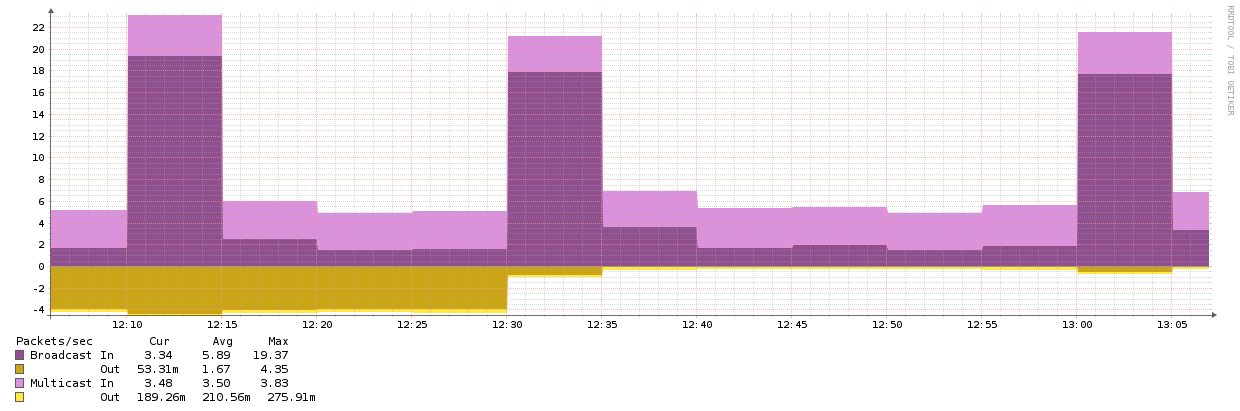
This seems to suggest that one or other measurement is not reporting the correct value, or the ARP rate limiter is reporting instantaneous values rather than sustained ones. My SNMP poller runs every 5 minutes and thus reports the change averaged over the period. An average of 18 pps between 12:30 and 12:35 seems completely reasonable given there are 20 APs using ARP-based polling to ensure their default gateway is alive.
Would I be better off just disabling this feature?
Paul
- Mark as New
- Bookmark
- Subscribe
- Mute
- Subscribe to RSS Feed
- Permalink
- Report Inappropriate Content
01-29-2014 11:35 AM
01-29-2014 11:35 AM
Re: The ARP packet rate(89pps) exceeded the rate limit (50pps) on interface...
Well, i disabled it everywhere. a arp packet rate of 1000 pps? How many clients do you have behind that port?
(Btw, which OID is used for broadcast / multicast monitoring?)
- Mark as New
- Bookmark
- Subscribe
- Mute
- Subscribe to RSS Feed
- Permalink
- Report Inappropriate Content
01-29-2014 02:21 PM
01-29-2014 02:21 PM
Re: The ARP packet rate(89pps) exceeded the rate limit (50pps) on interface...
Hi Michael,
The port in question is the uplink of the switch. The number of clients behind that port should be in the order of 100-200. Not necessarily all on the same VLAN.
I'd have to dig into the code to find out about the non-unicast packet counters, but I'd be reasonably confident that it's somewhere in the standard interface MIB.
Paul

- Mark as New
- Bookmark
- Subscribe
- Mute
- Subscribe to RSS Feed
- Permalink
- Report Inappropriate Content
01-31-2014 01:32 AM
01-31-2014 01:32 AM
Re: The ARP packet rate(89pps) exceeded the rate limit (50pps) on interface...
We have an installation with 5120 that were reporting this as well on the uplink ports (3 in a BAGG) to the CORE switches.
The fix here was to do the right configuration and only allow the VLANs to be used, as someone (lazy) had just done the 'port trunk permit vlan all' :-)
Cheers

- Mark as New
- Bookmark
- Subscribe
- Mute
- Subscribe to RSS Feed
- Permalink
- Report Inappropriate Content
04-24-2014 12:43 PM
04-24-2014 12:43 PM
Re: The ARP packet rate(89pps) exceeded the rate limit (50pps) on interface...
I came across this discussion when researching the same issue, looks like the "arp rate-limit" was turned on by default in code R2220. Just thought I'd add this incase anyone is also searching for an answer. Here is the link to the HP document about this change.

- Mark as New
- Bookmark
- Subscribe
- Mute
- Subscribe to RSS Feed
- Permalink
- Report Inappropriate Content
06-19-2014 08:56 AM
06-19-2014 08:56 AM
Re: The ARP packet rate(89pps) exceeded the rate limit (50pps) on interface...
Hi,
I am having the same issue on a HP A5800-24G-SFP running Comware Software, Version 5.20.105.
I see these messages on all the uplink BAGG interfaces on this particular switch:
%%10ARP/4/ARPRateOverSpeed(t): -Slot=2; 1.3.6.1.4.1.25506.2.110.1.1.0.1: The ARP packet rate execeeds the rate limit.
%%10ARP/4/RATELIMIT(l): -Slot=2; The ARP packet rate(101pps) exceeded the rate limit(100pps) on interface GigabitEthernet2/0/2 in the last 60 seconds.
What is interesting is that this is not happening all the time, but it seems like almost everytime when a BAGG is decomissioned or created on any switch in the Datacenter that is not necessarly directty connected to this particular one.
The order of events seems to like this:
BAGG created or dicomisisoned
Topology Change sent out, every switch, including this troubling one recieves it
ARP packet rate on the troubling switch, on uplinks (this switch is only connected to other switches) show up in syslog
- Mark as New
- Bookmark
- Subscribe
- Mute
- Subscribe to RSS Feed
- Permalink
- Report Inappropriate Content
06-19-2014 09:02 AM
06-19-2014 09:02 AM
Re: The ARP packet rate(89pps) exceeded the rate limit (50pps) on interface...
I have found Comware switches themselves some of the worst offenders in sending ARPs. On topology change, they seem to want to refresh their entire ARP cache.
- Mark as New
- Bookmark
- Subscribe
- Mute
- Subscribe to RSS Feed
- Permalink
- Report Inappropriate Content
06-19-2014 10:55 AM
06-19-2014 10:55 AM
Re: The ARP packet rate(89pps) exceeded the rate limit (50pps) on interface...
is there anyway this can be fixed?

- Mark as New
- Bookmark
- Subscribe
- Mute
- Subscribe to RSS Feed
- Permalink
- Report Inappropriate Content
06-27-2014 11:46 PM
06-27-2014 11:46 PM
Re: The ARP packet rate(89pps) exceeded the rate limit (50pps) on interface...
Either you can alter the default value of 400 to something different (default was raised from 50 to 400 in R2221) through:
arp rate-limit xxx
Or you can just disable logging when arp rate-limit is violated:
info-center source ARP channel 4 log level errors
undo snmp-agent trap enable arp rate-limit
Look here for more info: http://comaware.wordpress.com/2013/12/13/arp-ratelimit-spamming-logbuffer/
- Mark as New
- Bookmark
- Subscribe
- Mute
- Subscribe to RSS Feed
- Permalink
- Report Inappropriate Content
07-18-2014 02:28 PM
07-18-2014 02:28 PM
Re: The ARP packet rate(89pps) exceeded the rate limit (50pps) on interface...
it's interesting the these message is dislayed for BAGG that have a status of DOWN. How can the ARP rate-limit exceed on a down interface?
- Mark as New
- Bookmark
- Subscribe
- Mute
- Subscribe to RSS Feed
- Permalink
- Report Inappropriate Content
07-21-2014 12:58 PM
07-21-2014 12:58 PM
Re: The ARP packet rate(89pps) exceeded the rate limit (50pps) on interface...
Are the members who belongs to this BAGG down aswell?
- Mark as New
- Bookmark
- Subscribe
- Mute
- Subscribe to RSS Feed
- Permalink
- Report Inappropriate Content
07-22-2014 04:59 PM
07-22-2014 04:59 PM
Re: The ARP packet rate(89pps) exceeded the rate limit (50pps) on interface...
That BAGG does not even have interfaces associated to it; there is just the configuration of the interface left, as somebody probably forgot to clean up:
dis link-aggregation verbose Bridge-Aggregation 20
Loadsharing Type: Shar -- Loadsharing, NonS -- Non-Loadsharing
Port Status: S -- Selected, U -- Unselected
Flags: A -- LACP_Activity, B -- LACP_Timeout, C -- Aggregation,
D -- Synchronization, E -- Collecting, F -- Distributing,
G -- Defaulted, H -- Expired
Aggregation Interface: Bridge-Aggregation20
Aggregation Mode: Static
Loadsharing Type: Shar
Port Status Priority Oper-Key
--------------------------------------------------------------------------------
Also, is it normal that after a stp topology change, the switches refresh their ARP cache? this is what I noticed during some testing; i have added a new switch into the network, topology change was generated, switches refreshed their cache, and the "The ARP packet rate(89pps) exceeded the rate limit (100pps) on interface" was filling the logs on these two particular switches we usually get these messages.
- Mark as New
- Bookmark
- Subscribe
- Mute
- Subscribe to RSS Feed
- Permalink
- Report Inappropriate Content
07-23-2014 05:21 AM - edited 07-29-2014 03:11 PM
07-23-2014 05:21 AM - edited 07-29-2014 03:11 PM
Re: The ARP packet rate(89pps) exceeded the rate limit (50pps) on interface...
That would depending on how far away this topology change occurs. If this particular device is part of this change and suddently hosts are seen through gi 0/2 instead of previous gi 0/1 then of course you will get a mac/arp "flap".
There is also a setting regarding if you want to log mac-flapping or not:
mac-flapping notification enable
- Mark as New
- Bookmark
- Subscribe
- Mute
- Subscribe to RSS Feed
- Permalink
- Report Inappropriate Content
07-23-2014 04:13 PM
07-23-2014 04:13 PM
Re: The ARP packet rate(89pps) exceeded the rate limit (50pps) on interface...
The access switches only keep ARP entries of the other switches' management IPs; I dont understand why, when adding a new switch to the topology, the whole ARP table needs to be refreshed; and why not only add the entry for the new switch.
Also, I still cannot explain how do ARP exceeds the rate-linit on a BAGG that is down.
This is very annoying.
- Mark as New
- Bookmark
- Subscribe
- Mute
- Subscribe to RSS Feed
- Permalink
- Report Inappropriate Content
10-24-2014 10:21 AM
10-24-2014 10:21 AM
Re: The ARP packet rate(89pps) exceeded the rate limit (50pps) on interface...
Something interesting..... we used to get the ARP packet rate exceeds logs from three 10G switches in the network; recently, we have upgraded the firmware on one of them (the one that was reporting the most) to Comware Software, Version 5.20.105, Release 1808P27. After the upgrade, there are no more ARP exceeds reported from this switch (HP A5800-24G-SFP), but still getting them from the other 2, different platform (HP A5820AF-24XG) which run on Comware Software, Version 5.20.105, Feature 1805P02-US.
I dont know exactly what changed in the new software to stop these; we did not make changes to the configuration.
- Mark as New
- Bookmark
- Subscribe
- Mute
- Subscribe to RSS Feed
- Permalink
- Report Inappropriate Content
10-26-2014 02:49 PM
10-26-2014 02:49 PM
Re: The ARP packet rate(89pps) exceeded the rate limit (50pps) on interface...
Read the release notes and you shall see...

- Mark as New
- Bookmark
- Subscribe
- Mute
- Subscribe to RSS Feed
- Permalink
- Report Inappropriate Content
11-06-2014 12:50 PM
11-06-2014 12:50 PM
Re: The ARP packet rate(89pps) exceeded the rate limit (50pps) on interface...
ARP rate limit is not needed if the switch does not serve as the access device for the users. By default its packet rate limit is 100 pps.
50 pps if not configured by the administrator, then it is an error un the software that the later upgrade has reverted to 100 pps. Therefore it is not anymore 50 pps and 89 pps is not a pic.
A server and/or a gateway can send a huge number of ARP packets. This attribute - and the ARP gateway protection - is usefull only at the access of the internetwork block.