- Community Home
- >
- Software
- >
- HPE OneView
- >
- After importing, blade server can not be accessed
Categories
Company
Local Language
Forums
Discussions
Forums
- Data Protection and Retention
- Entry Storage Systems
- Legacy
- Midrange and Enterprise Storage
- Storage Networking
- HPE Nimble Storage
Discussions
Forums
Discussions
Discussions
Forums
Discussions
Discussion Boards
Discussion Boards
Discussion Boards
Discussion Boards
- BladeSystem Infrastructure and Application Solutions
- Appliance Servers
- Alpha Servers
- BackOffice Products
- Internet Products
- HPE 9000 and HPE e3000 Servers
- Networking
- Netservers
- Secure OS Software for Linux
- Server Management (Insight Manager 7)
- Windows Server 2003
- Operating System - Tru64 Unix
- ProLiant Deployment and Provisioning
- Linux-Based Community / Regional
- Microsoft System Center Integration
Discussion Boards
Discussion Boards
Discussion Boards
Discussion Boards
Discussion Boards
Discussion Boards
Discussion Boards
Discussion Boards
Discussion Boards
Discussion Boards
Discussion Boards
Discussion Boards
Discussion Boards
Discussion Boards
Discussion Boards
Discussion Boards
Discussion Boards
Discussion Boards
Discussion Boards
Discussion Boards
Community
Resources
Forums
Blogs
- Subscribe to RSS Feed
- Mark Topic as New
- Mark Topic as Read
- Float this Topic for Current User
- Bookmark
- Subscribe
- Printer Friendly Page

- Mark as New
- Bookmark
- Subscribe
- Mute
- Subscribe to RSS Feed
- Permalink
- Report Inappropriate Content
07-31-2017 06:27 AM - edited 07-31-2017 06:40 AM
07-31-2017 06:27 AM - edited 07-31-2017 06:40 AM
After importing, blade server can not be accessed
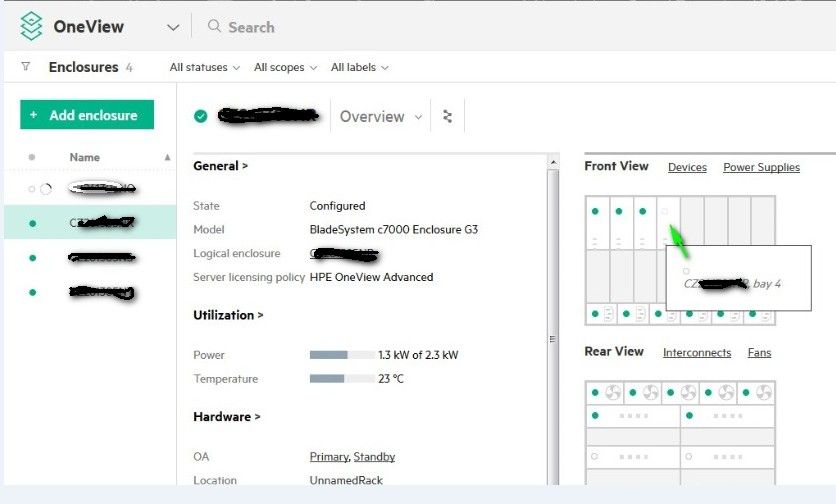
After importing, a blade serveur can not be accessed

- Mark as New
- Bookmark
- Subscribe
- Mute
- Subscribe to RSS Feed
- Permalink
- Report Inappropriate Content
07-31-2017 06:37 AM
07-31-2017 06:37 AM
Re: After importing, blade server can not be accessed
What do you mean ?
Under ilo ?
JY
- Mark as New
- Bookmark
- Subscribe
- Mute
- Subscribe to RSS Feed
- Permalink
- Report Inappropriate Content
07-31-2017 06:43 AM
07-31-2017 06:43 AM
Re: After importing, blade server can not be accessed
I have imported all servers from the C7000 chassis into oneview and it is the only server that comes in this form
- Mark as New
- Bookmark
- Subscribe
- Mute
- Subscribe to RSS Feed
- Permalink
- Report Inappropriate Content
07-31-2017 07:06 AM
07-31-2017 07:06 AM
Re: After importing, blade server can not be accessed
What are message under OV console for this server ?
JY
- Mark as New
- Bookmark
- Subscribe
- Mute
- Subscribe to RSS Feed
- Permalink
- Report Inappropriate Content
07-31-2017 07:14 AM
07-31-2017 07:14 AM
Re: After importing, blade server can not be accessed
Servers are Gen9. I have no error on oneview console. But I changed it motherboard.
- Mark as New
- Bookmark
- Subscribe
- Mute
- Subscribe to RSS Feed
- Permalink
- Report Inappropriate Content
07-31-2017 07:20 AM
07-31-2017 07:20 AM
Re: After importing, blade server can not be accessed
- Mark as New
- Bookmark
- Subscribe
- Mute
- Subscribe to RSS Feed
- Permalink
- Report Inappropriate Content
07-31-2017 07:34 AM
07-31-2017 07:34 AM
Re: After importing, blade server can not be accessed
The serial number is correct but I suspect the License!!
- Mark as New
- Bookmark
- Subscribe
- Mute
- Subscribe to RSS Feed
- Permalink
- Report Inappropriate Content
07-31-2017 07:38 AM
07-31-2017 07:38 AM
Re: After importing, blade server can not be accessed
- Mark as New
- Bookmark
- Subscribe
- Mute
- Subscribe to RSS Feed
- Permalink
- Report Inappropriate Content
07-31-2017 08:01 AM
07-31-2017 08:01 AM
Re: After importing, blade server can not be accessed
to remove the enclosure or server blade from oneview?
- Mark as New
- Bookmark
- Subscribe
- Mute
- Subscribe to RSS Feed
- Permalink
- Report Inappropriate Content
07-31-2017 08:07 AM
07-31-2017 08:07 AM
Re: After importing, blade server can not be accessed
JY
- Mark as New
- Bookmark
- Subscribe
- Mute
- Subscribe to RSS Feed
- Permalink
- Report Inappropriate Content
07-31-2017 08:13 AM
07-31-2017 08:13 AM
Re: After importing, blade server can not be accessed
OK, I will comeback to you tomorrow after this action
- Mark as New
- Bookmark
- Subscribe
- Mute
- Subscribe to RSS Feed
- Permalink
- Report Inappropriate Content
07-31-2017 08:23 AM
07-31-2017 08:23 AM
Re: After importing, blade server can not be accessed
Tell me, afrter replacing th motherboard of a server, The License must be enter again ILO console or Oneview console?
- Mark as New
- Bookmark
- Subscribe
- Mute
- Subscribe to RSS Feed
- Permalink
- Report Inappropriate Content
07-31-2017 08:54 AM
07-31-2017 08:54 AM
Re: After importing, blade server can not be accessed
jy
- Mark as New
- Bookmark
- Subscribe
- Mute
- Subscribe to RSS Feed
- Permalink
- Report Inappropriate Content
07-31-2017 09:16 AM
07-31-2017 09:16 AM
Re: After importing, blade server can not be accessed
Ok, I will try to do tomorrow onsite and comeback to you!!

- Mark as New
- Bookmark
- Subscribe
- Mute
- Subscribe to RSS Feed
- Permalink
- Report Inappropriate Content
07-31-2017 10:01 AM
07-31-2017 10:01 AM
Re: After importing, blade server can not be accessed
Please provide more information about your environment.
- What version of HPE OneView are you using?
- What is the server in Bay 4 supposed to be?
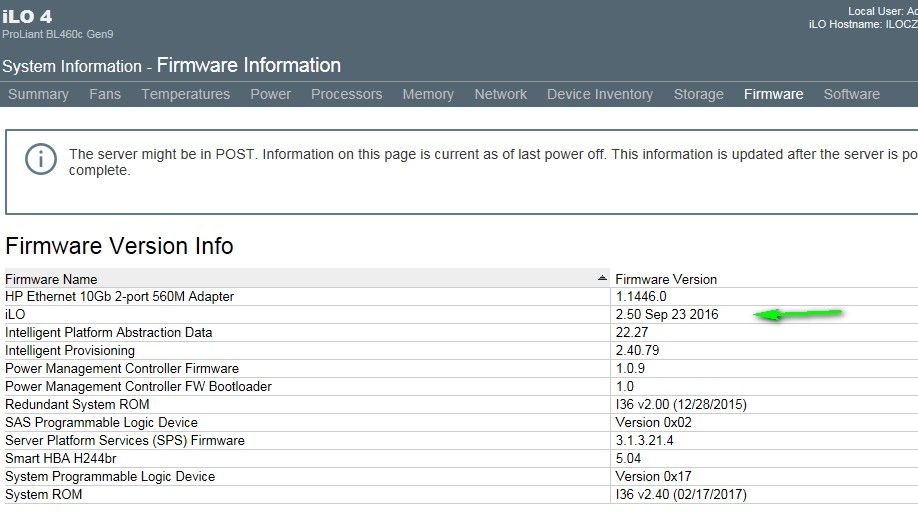
- Can you verify the iLO firmware version for the server in Bay 4?
- Have you reviewed this Customer Advisory?
[Any personal opinions expressed are mine, and not official statements on behalf of Hewlett Packard Enterprise]

- Mark as New
- Bookmark
- Subscribe
- Mute
- Subscribe to RSS Feed
- Permalink
- Report Inappropriate Content
08-01-2017 12:59 AM
08-01-2017 12:59 AM
Re: After importing, blade server can not be accessed
Hi, I installed 3.007 and updated 3.10 version.
The server in Bay4 is BL460c Gen9. I will chech the ILO firmware version today onsite but know that I uploaded the last bundle firmware Service Pack for ProLiant 2017.07.1. I will review the Customer Advisory
- Mark as New
- Bookmark
- Subscribe
- Mute
- Subscribe to RSS Feed
- Permalink
- Report Inappropriate Content
08-01-2017 03:17 AM
08-01-2017 03:17 AM
Re: After importing, blade server can not be accessed
This is my ILO version
- Mark as New
- Bookmark
- Subscribe
- Mute
- Subscribe to RSS Feed
- Permalink
- Report Inappropriate Content
08-01-2017 10:03 AM
08-01-2017 10:03 AM
Re: After importing, blade server can not be accessed
This is an infrastructure issue, not OneView. So please follow the steps in the Customer Advisory I linked to above. If that still does not solve your issue, please open a support case to further triage this issue.
[Any personal opinions expressed are mine, and not official statements on behalf of Hewlett Packard Enterprise]
- Mark as New
- Bookmark
- Subscribe
- Mute
- Subscribe to RSS Feed
- Permalink
- Report Inappropriate Content
08-02-2017 02:26 AM
08-02-2017 02:26 AM
Re: After importing, blade server can not be accessed
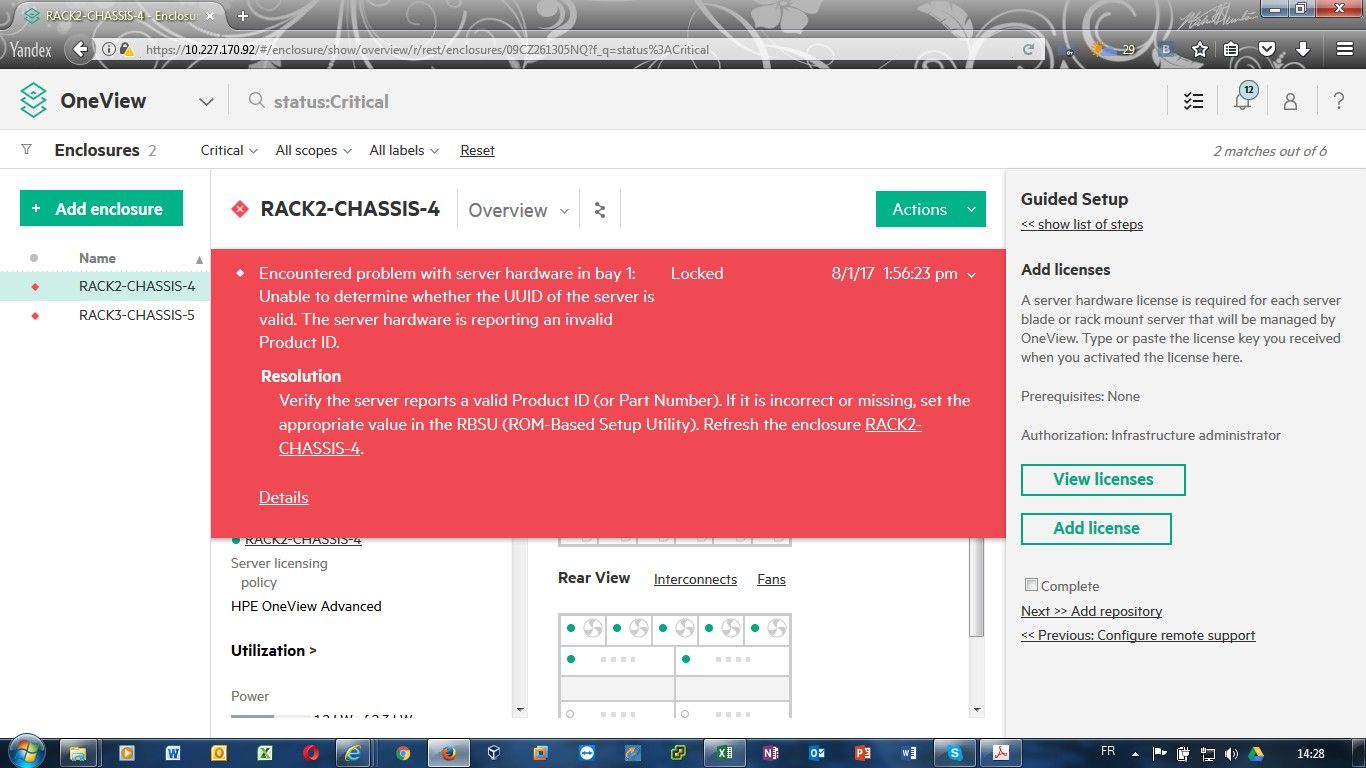
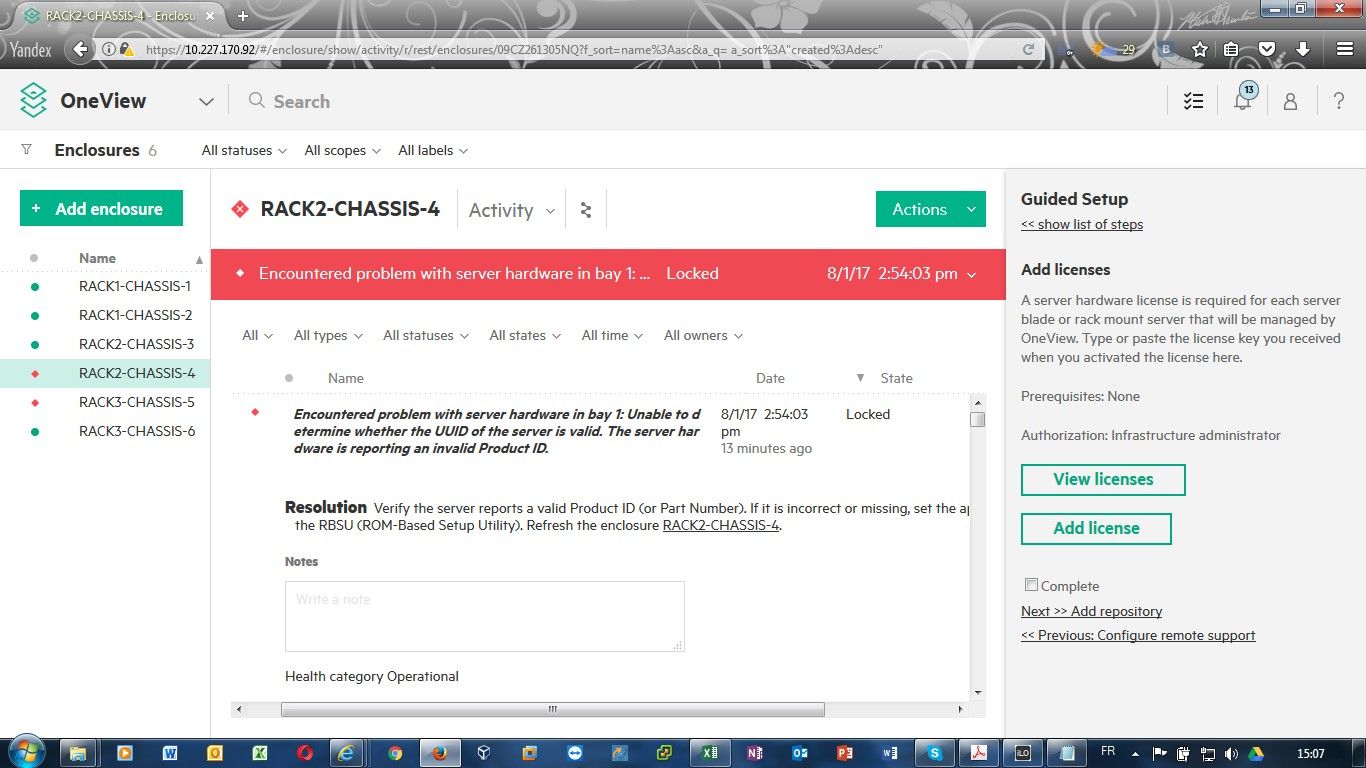
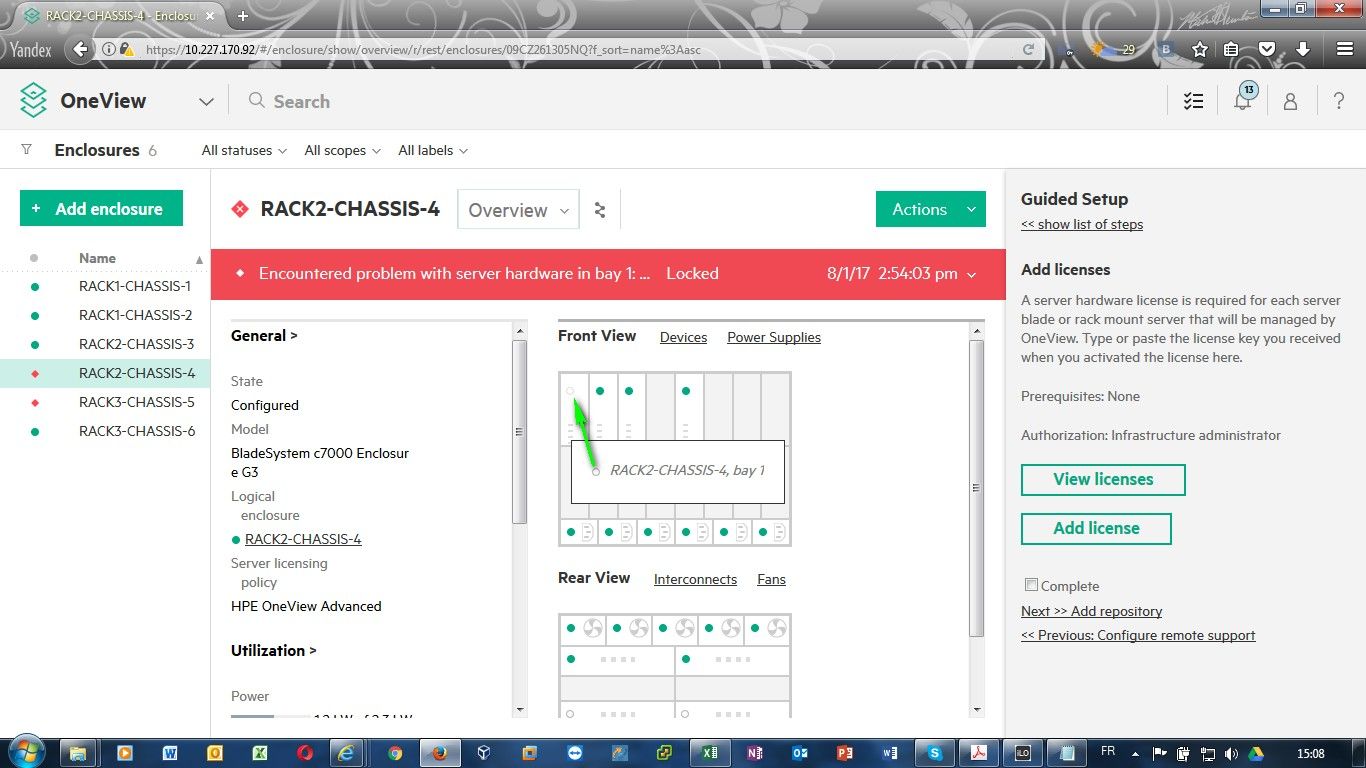
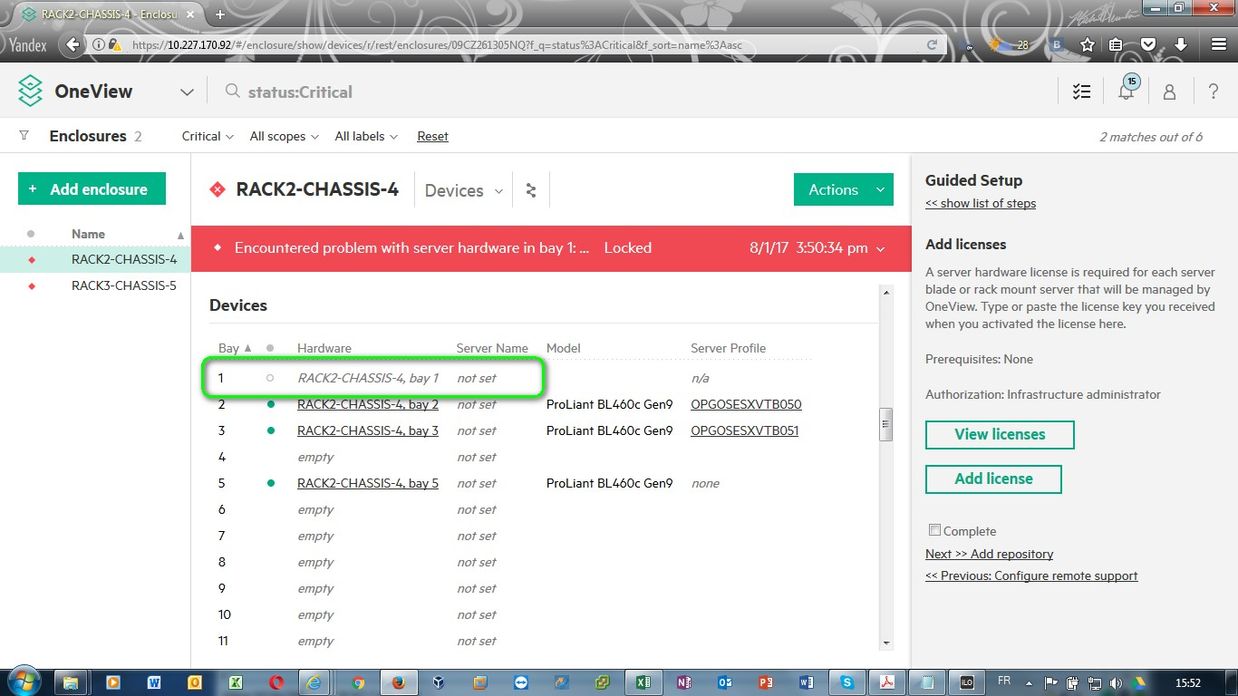
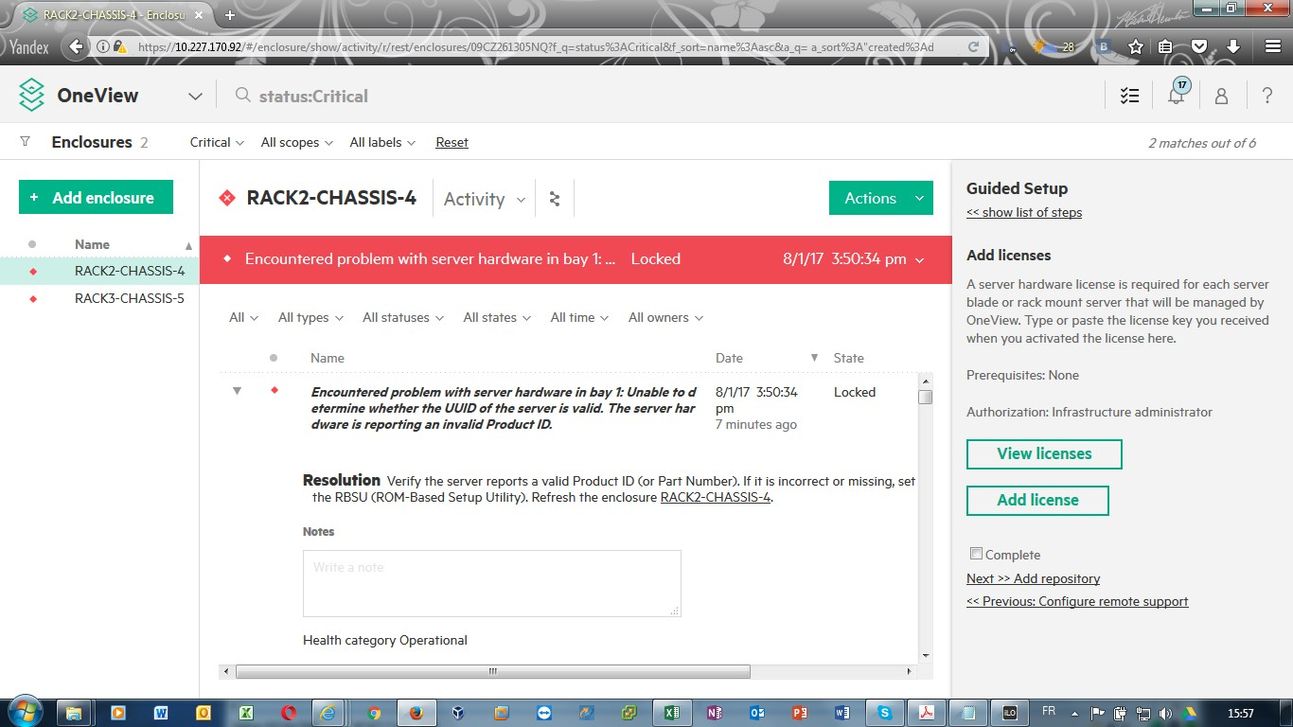
I replaced motherboard, I modified product and serial number, I updated ILO to 2.54. Above screenshots
- Mark as New
- Bookmark
- Subscribe
- Mute
- Subscribe to RSS Feed
- Permalink
- Report Inappropriate Content
08-02-2017 05:06 AM
08-02-2017 05:06 AM
Re: After importing, blade server can not be accessed
- Mark as New
- Bookmark
- Subscribe
- Mute
- Subscribe to RSS Feed
- Permalink
- Report Inappropriate Content
08-02-2017 05:11 AM
08-02-2017 05:11 AM
Re: After importing, blade server can not be accessed
After each action, i refresh, sometime i reapply the configuration.
- Mark as New
- Bookmark
- Subscribe
- Mute
- Subscribe to RSS Feed
- Permalink
- Report Inappropriate Content
08-02-2017 05:13 AM
08-02-2017 05:13 AM
Re: After importing, blade server can not be accessed
Log/connect on ilo
Reset ilo
then
Refresh server under ov
- Mark as New
- Bookmark
- Subscribe
- Mute
- Subscribe to RSS Feed
- Permalink
- Report Inappropriate Content
08-02-2017 05:20 AM
08-02-2017 05:20 AM
Re: After importing, blade server can not be accessed
I reseted ILO already from ilo console before refreshing on oneview
- Mark as New
- Bookmark
- Subscribe
- Mute
- Subscribe to RSS Feed
- Permalink
- Report Inappropriate Content
08-03-2017 03:41 AM
08-03-2017 03:41 AM
Re: After importing, blade server can not be accessed
Hi sorry but error persist
- Mark as New
- Bookmark
- Subscribe
- Mute
- Subscribe to RSS Feed
- Permalink
- Report Inappropriate Content
08-03-2017 05:47 AM
08-03-2017 05:47 AM
Re: After importing, blade server can not be accessed
Hi evrybody, my problem is ok with this command: reset server (bay number). Thank all