- Community Home
- >
- Storage
- >
- Entry Storage Systems
- >
- MSA Storage
- >
- Re: CRITICAL UPDATE MSA
Categories
Company
Local Language
Forums
Discussions
Knowledge Base
Forums
- Data Protection and Retention
- Entry Storage Systems
- Legacy
- Midrange and Enterprise Storage
- Storage Networking
- HPE Nimble Storage
Discussions
Knowledge Base
Forums
Discussions
- Cloud Mentoring and Education
- Software - General
- HPE OneView
- HPE Ezmeral Software platform
- HPE OpsRamp
Knowledge Base
Discussions
Forums
Discussions
Discussion Boards
Discussion Boards
Discussion Boards
Discussion Boards
Discussion Boards
Discussion Boards
Discussion Boards
Discussion Boards
Discussion Boards
Discussion Boards
Discussion Boards
Discussion Boards
Discussion Boards
Discussion Boards
Discussion Boards
Discussion Boards
Discussion Boards
Discussion Boards
Discussion Boards
Discussion Boards
Discussion Boards
Discussion Boards
Discussion Boards
Community
Resources
Forums
Blogs
- Subscribe to RSS Feed
- Mark Topic as New
- Mark Topic as Read
- Float this Topic for Current User
- Bookmark
- Subscribe
- Printer Friendly Page

- Mark as New
- Bookmark
- Subscribe
- Mute
- Subscribe to RSS Feed
- Permalink
- Report Inappropriate Content
06-25-2021 01:16 AM - edited 06-26-2021 05:56 AM
06-25-2021 01:16 AM - edited 06-26-2021 05:56 AM
CRITICAL UPDATE MSA
"Good" day!
I'm having big problems with firmware J212P01 for MSA2012i!
I know that you do not support the functioning this MSA. But I need help. Please! Help me... I do not know what to do...
I installed the firmware J212PO1 on MSA2012i, but numerous errors appeared, physical and logical disks were missing...
I took advice from: https://downloads.hpe.com/pub/softlib2/software1/pubsw-linux/p487091724/v83834/537811-008_MSA2000_Jxx2P01_fw_relnotes.html#v9738434
"If the show disks command fails to display the disks correctly, communications within the controller have failed. To reestablish communication, cycle power on the system and repeat the show disks command. (Do not restart the controllers; cycle power on the controller enclosure.)"
Show disks command from all controllers is successful.
I’m dumb and didn’t do this: "If the show disks command from all controllers is successful, perform the firmware update process again."
I came to work in the morning and that's it. MSA controllers is not available!!!
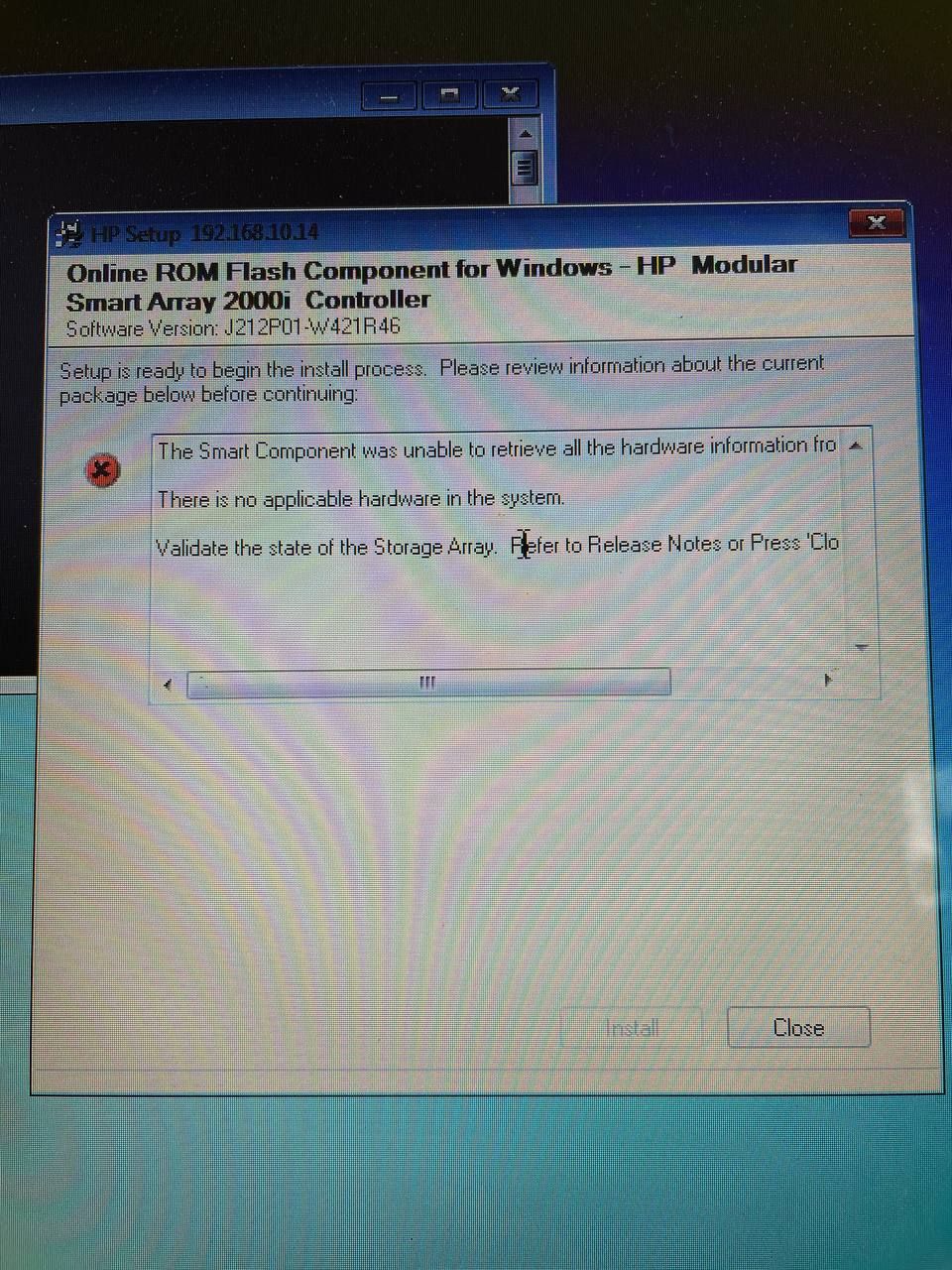
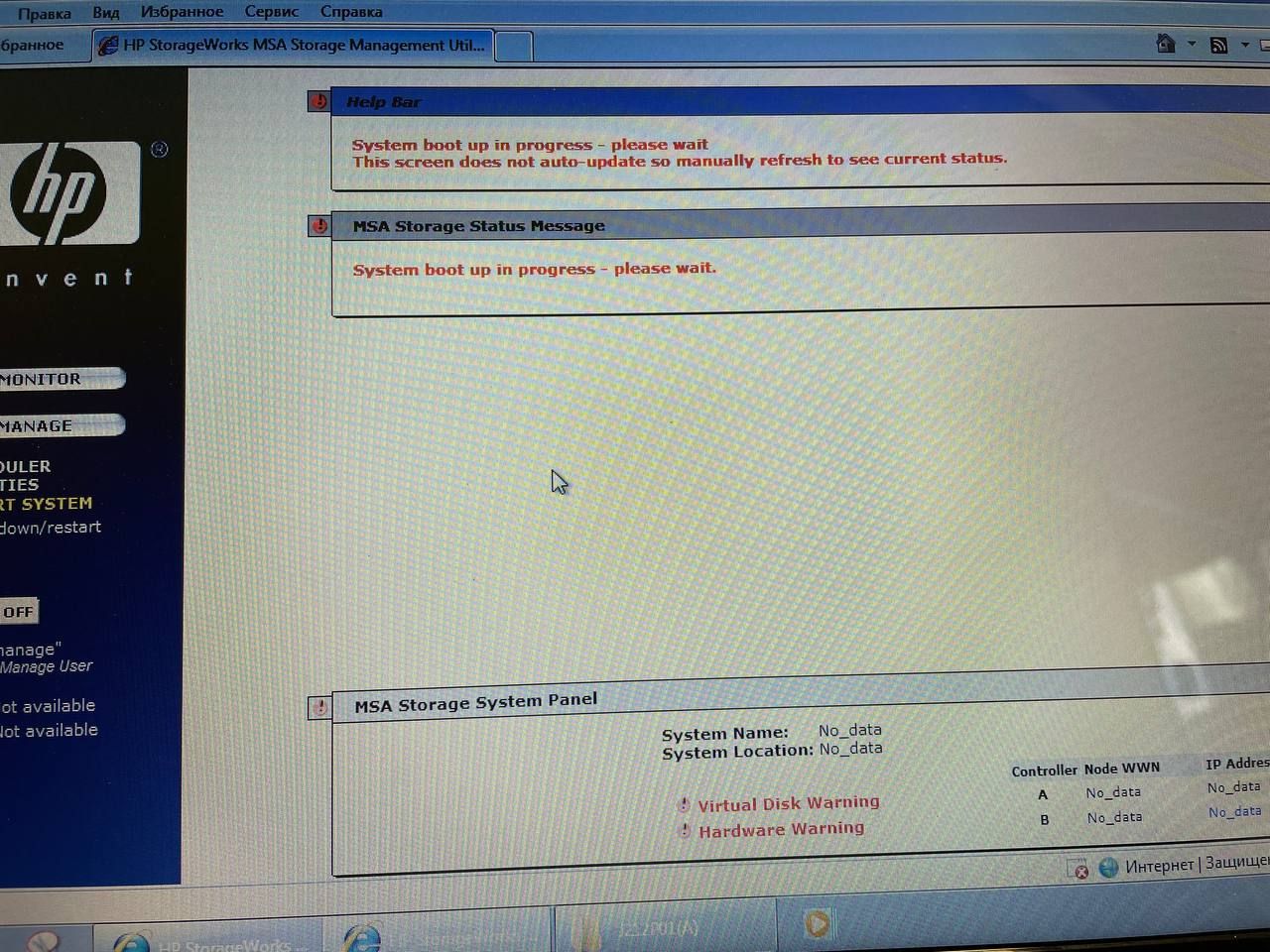
I cannot update it again... Rebooting doesn't help...
That's important for me..
Please!
Catherine.
- Tags:
- msa

- Mark as New
- Bookmark
- Subscribe
- Mute
- Subscribe to RSS Feed
- Permalink
- Report Inappropriate Content
06-26-2021 07:07 AM
06-26-2021 07:07 AM
Re: CRITICAL UPDATE MSA
Try below steps,
Disconnect MSA from your servers or shutdown your server.
Then shutdown MSA.
Then remove all drives half of the bay so that Controllers can't detect them.
Take out Controller B half way as well.
Power on Controller A alone and check if you are able to access Controller A or not. You can try Serial cable as well and try to check.
Do the same for Controller B as well. This will help to understand in what state controllers are.
If any of the Controller not responding then its possible that it's gone bad. Try updating firmware again for that controller only without other controller and other drives present.
Hope this helps!
Regards
Subhajit
I am an HPE employee
If you feel this was helpful please click the KUDOS! thumb below!
******************************************************************************
I work at HPE
HPE Support Center offers support for your HPE services and products when and how you need it. Get started with HPE Support Center today.
[Any personal opinions expressed are mine, and not official statements on behalf of Hewlett Packard Enterprise]
