- Community Home
- >
- Storage
- >
- Entry Storage Systems
- >
- MSA Storage
- >
- MSA active/active Failed Redundancy Path (error 40...
Categories
Company
Local Language
Forums
Discussions
Knowledge Base
Forums
- Data Protection and Retention
- Entry Storage Systems
- Legacy
- Midrange and Enterprise Storage
- Storage Networking
- HPE Nimble Storage
Discussions
Knowledge Base
Forums
Discussions
- Cloud Mentoring and Education
- Software - General
- HPE OneView
- HPE Ezmeral Software platform
- HPE OpsRamp
Knowledge Base
Discussions
Forums
Discussions
Discussion Boards
Discussion Boards
Discussion Boards
Discussion Boards
Discussion Boards
Discussion Boards
Discussion Boards
Discussion Boards
Discussion Boards
Discussion Boards
Discussion Boards
Discussion Boards
Discussion Boards
Discussion Boards
Discussion Boards
Discussion Boards
Discussion Boards
Discussion Boards
Discussion Boards
Discussion Boards
Discussion Boards
Discussion Boards
Discussion Boards
Community
Resources
Forums
Blogs
- Subscribe to RSS Feed
- Mark Topic as New
- Mark Topic as Read
- Float this Topic for Current User
- Bookmark
- Subscribe
- Printer Friendly Page

- Mark as New
- Bookmark
- Subscribe
- Mute
- Subscribe to RSS Feed
- Permalink
- Report Inappropriate Content
11-06-2014 12:23 AM - edited 11-06-2014 12:33 AM
11-06-2014 12:23 AM - edited 11-06-2014 12:33 AM
MSA active/active Failed Redundancy Path (error 409) In ACU
Hi,
I've just upgraded our MSA1000 to active/active, and everything went smoothly.
This MSA100 is connected to a two HP StorageWorks 2/8q fiber switches, one controller to one switch, and the other controller to the other switch. Servers are connected to fiber switches, one fiber cable to one fiber switch, the other fiber cable is connected to the other fiber switch.
The issue is that in ACU, we got Failed Redundancy Path (error 409) In ACU.
I can't guess what is the solution, as both controlles displays no error.
ACU version is latest one, 9.40.12.0.
Also, have installed MPIO.
Does anybody how to solve it?
Regards,

- Mark as New
- Bookmark
- Subscribe
- Mute
- Subscribe to RSS Feed
- Permalink
- Report Inappropriate Content
11-06-2014 12:42 AM
11-06-2014 12:42 AM
Re: MSA active/active Failed Redundancy Path (error 409) In ACU
Do you use the correct MPIO for active/active?
Hope this helps!
Regards
Torsten.
__________________________________________________
There are only 10 types of people in the world -
those who understand binary, and those who don't.
__________________________________________________
No support by private messages. Please ask the forum!
If you feel this was helpful please click the KUDOS! thumb below!

- Mark as New
- Bookmark
- Subscribe
- Mute
- Subscribe to RSS Feed
- Permalink
- Report Inappropriate Content
11-07-2014 04:26 AM - edited 11-07-2014 07:22 AM
11-07-2014 04:26 AM - edited 11-07-2014 07:22 AM
Re: MSA active/active Failed Redundancy Path (error 409) In ACU
Yes,
I'm using it.
I've tried to connect directly a server to the MSA1000, and happens the same.
Then, I tried connecting only to one controller (this is, disconnecting one of the controller's fiber cable), opened CLI window, and typed "controller all show", and showed me both internal controller and MSA1000.
Then I did the same for the other controller, this is, disconnecting one and connecting the other one. Then, ACU CLI only show the internal controller, but not the MSA1000.
Could it be that as was this second controller on the MSA set as standby, needs to be configured with cable attached to it?
Thanks
- Mark as New
- Bookmark
- Subscribe
- Mute
- Subscribe to RSS Feed
- Permalink
- Report Inappropriate Content
11-07-2014 07:17 AM
11-07-2014 07:17 AM
Re: MSA active/active Failed Redundancy Path (error 409) In ACU
Maybe you need to check selective storage presentation and/or zoning again?
Hope this helps!
Regards
Torsten.
__________________________________________________
There are only 10 types of people in the world -
those who understand binary, and those who don't.
__________________________________________________
No support by private messages. Please ask the forum!
If you feel this was helpful please click the KUDOS! thumb below!
- Mark as New
- Bookmark
- Subscribe
- Mute
- Subscribe to RSS Feed
- Permalink
- Report Inappropriate Content
11-07-2014 07:31 AM
11-07-2014 07:31 AM
Re: MSA active/active Failed Redundancy Path (error 409) In ACU
Hi Torsten,
Sorry for the inconvenience, but how do I do so?
Thanks a lot.
- Mark as New
- Bookmark
- Subscribe
- Mute
- Subscribe to RSS Feed
- Permalink
- Report Inappropriate Content
11-07-2014 07:39 AM - edited 11-07-2014 07:52 AM
11-07-2014 07:39 AM - edited 11-07-2014 07:52 AM
Re: MSA active/active Failed Redundancy Path (error 409) In ACU
On the server connected to the MSA, run ACU and check for SSP (right column in the example picture below).
Also connect to the switch (if there is any) and check the zoning settings.
Each server HBA must be allowed to access the LUN in question.


Hope this helps!
Regards
Torsten.
__________________________________________________
There are only 10 types of people in the world -
those who understand binary, and those who don't.
__________________________________________________
No support by private messages. Please ask the forum!
If you feel this was helpful please click the KUDOS! thumb below!
- Mark as New
- Bookmark
- Subscribe
- Mute
- Subscribe to RSS Feed
- Permalink
- Report Inappropriate Content
11-07-2014 07:56 AM
11-07-2014 07:56 AM
Re: MSA active/active Failed Redundancy Path (error 409) In ACU
I see,
But now, I don't have any volumes created at all.
BTW, how is that if I connect both MSA controllers directly to a server do the same? I mean, get the same error?
I understand that if is something concerning switches (that I already have, two StorageWorks 2/8q), connecting the controllers to the server, should not have this error, shouldn't?
Thanks
- Mark as New
- Bookmark
- Subscribe
- Mute
- Subscribe to RSS Feed
- Permalink
- Report Inappropriate Content
11-07-2014 08:02 AM
11-07-2014 08:02 AM
Re: MSA active/active Failed Redundancy Path (error 409) In ACU
As said, make sure that each server HBA can access the LUN in question.
If a switch is connected, configure the zoning accordingly.
If you enable SSP in the MSA, configure the LUNs to the WWN of the server.
Hope this helps!
Regards
Torsten.
__________________________________________________
There are only 10 types of people in the world -
those who understand binary, and those who don't.
__________________________________________________
No support by private messages. Please ask the forum!
If you feel this was helpful please click the KUDOS! thumb below!

- Mark as New
- Bookmark
- Subscribe
- Mute
- Subscribe to RSS Feed
- Permalink
- Report Inappropriate Content
11-12-2014 02:16 AM - edited 11-12-2014 02:16 AM
11-12-2014 02:16 AM - edited 11-12-2014 02:16 AM
Re: MSA active/active Failed Redundancy Path (error 409) In ACU
Try connecting both HBAs to the same switch, then the other one, and temporarily turn off zoning too. If this works then you likely have a config or switch firmware issue. Also check the HBAs have the same firmware / revision (assuming they are the same model) in case the new MSA controller code does not like one of them.
How to assign points on this new forum? Click the Kudos Star!
- Mark as New
- Bookmark
- Subscribe
- Mute
- Subscribe to RSS Feed
- Permalink
- Report Inappropriate Content
11-12-2014 06:19 AM - edited 11-12-2014 06:20 AM
11-12-2014 06:19 AM - edited 11-12-2014 06:20 AM
Re: MSA active/active Failed Redundancy Path (error 409) In ACU
Hi,
I've alredy connected both controllers to the same switch, as well as server, and nothing. Also, connected them to the other switch, and the same.
There are no zones configured at switch level.
I have to say that I have no LUN's created by now.
What makes me feel something is wrong at MSA level, is that on ACU I can disable the standby controller, seems as althoug it has been upgrade and active/active, is not configured to be active/active. Am I wrong?
I remember you LCD panels doesn't show errors.
Regards,
- Mark as New
- Bookmark
- Subscribe
- Mute
- Subscribe to RSS Feed
- Permalink
- Report Inappropriate Content
11-13-2014 05:54 AM
11-13-2014 05:54 AM
Re: MSA active/active Failed Redundancy Path (error 409) In ACU
Hi,
I've run ACI CLI, and got the following:
MSA1000 in SGM05011PZ
Bus Interface: Fibre Channel
WWN: 500805F30012C4A0
Serial Number: P56350GX3R506X
Chassis Serial Number: SGM05011PZ
Chassis Name: SGM05011PZ
RAID 6 (ADG) Status: Enabled
Controller Status: OK
Redundancy State: Active
Redundancy Status: OK
Redundancy Mode: Active-Active
Preferred Path Mode: Automatic
Chassis Slot: 1
Hardware Revision: A
Firmware Version: 7.10
Cache Board Present: True
Cache Status: Not Configured
Total Cache Size: 0 MB
Total Cache Memory Available: 256 MB
No-Battery Write Cache: Disabled
Chassis Slot 1 Battery Info
Cache Backup Power Source: Batteries
Battery/Capacitor Count: 1
Battery/Capacitor Status: OK
Host Bus Adapter Slot: 1
SATA NCQ Supported: False
I can only see one controller, right?
- Mark as New
- Bookmark
- Subscribe
- Mute
- Subscribe to RSS Feed
- Permalink
- Report Inappropriate Content
11-13-2014 06:29 AM
11-13-2014 06:29 AM
Re: MSA active/active Failed Redundancy Path (error 409) In ACU
It does look that way, are you able to get onto the CLI on the other controller? Try >show connections and see if the server HBA's WWNs are seen from the storage side, you could also attach the output from >show tech_support to a post.
How to assign points on this new forum? Click the Kudos Star!
- Mark as New
- Bookmark
- Subscribe
- Mute
- Subscribe to RSS Feed
- Permalink
- Report Inappropriate Content
11-13-2014 06:35 AM
11-13-2014 06:35 AM
Re: MSA active/active Failed Redundancy Path (error 409) In ACU
>show tech_support
would be the best.
Inspect the device, are there 2 controllers? How about the LEDs at the front of the controllers, How about the LEDs at the FC connections?
Hope this helps!
Regards
Torsten.
__________________________________________________
There are only 10 types of people in the world -
those who understand binary, and those who don't.
__________________________________________________
No support by private messages. Please ask the forum!
If you feel this was helpful please click the KUDOS! thumb below!
- Mark as New
- Bookmark
- Subscribe
- Mute
- Subscribe to RSS Feed
- Permalink
- Report Inappropriate Content
11-13-2014 07:08 AM - edited 11-13-2014 07:08 AM
11-13-2014 07:08 AM - edited 11-13-2014 07:08 AM
Re: MSA active/active Failed Redundancy Path (error 409) In ACU
I'm sorry, but I'm getting :
Error: Syntax error at "tech_support"
I'm running ACU CLI from Windows 2008 R2 machine, connected to the fiber switch. It's the same machine I run the output from where I got the previous information posted.
Should I have the serial cable and connect to the console to run "show tech_support?
Leds are the same for both controllers.
Thanks
- Mark as New
- Bookmark
- Subscribe
- Mute
- Subscribe to RSS Feed
- Permalink
- Report Inappropriate Content
11-13-2014 07:11 AM
11-13-2014 07:11 AM
Re: MSA active/active Failed Redundancy Path (error 409) In ACU
>> Should I have the serial cable and connect to the console to run "show tech_support?
Yes, it is a command for the serial CLI. Use 19200 baud.
How about the LEDs at the FC connection`?
Hope this helps!
Regards
Torsten.
__________________________________________________
There are only 10 types of people in the world -
those who understand binary, and those who don't.
__________________________________________________
No support by private messages. Please ask the forum!
If you feel this was helpful please click the KUDOS! thumb below!
- Mark as New
- Bookmark
- Subscribe
- Mute
- Subscribe to RSS Feed
- Permalink
- Report Inappropriate Content
11-13-2014 07:26 AM - edited 11-13-2014 08:42 AM
11-13-2014 07:26 AM - edited 11-13-2014 08:42 AM
Re: MSA active/active Failed Redundancy Path (error 409) In ACU
Both leds are ok.
I've tried to put controller 2 as first controller, and removed primary controller.
I can access the MSA, so discard second controller be faulty.
- Mark as New
- Bookmark
- Subscribe
- Mute
- Subscribe to RSS Feed
- Permalink
- Report Inappropriate Content
11-13-2014 07:43 AM
11-13-2014 07:43 AM
Re: MSA active/active Failed Redundancy Path (error 409) In ACU
I've done photo of the controller leds:
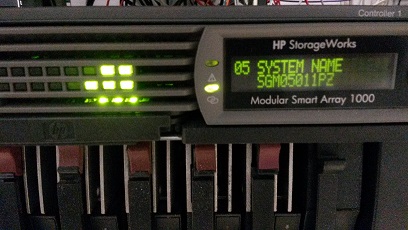
Be aware that the first led on the right top is binking.
Regards,
- Mark as New
- Bookmark
- Subscribe
- Mute
- Subscribe to RSS Feed
- Permalink
- Report Inappropriate Content
11-13-2014 08:44 AM
11-13-2014 08:44 AM
Re: MSA active/active Failed Redundancy Path (error 409) In ACU
As I've exchange controllers, and happen the same, could it be the Fiber Channel I/O module?
But leds are ok on both fiber channel modules.
I'm so frustated.
- Mark as New
- Bookmark
- Subscribe
- Mute
- Subscribe to RSS Feed
- Permalink
- Report Inappropriate Content
11-13-2014 08:50 AM
11-13-2014 08:50 AM
Re: MSA active/active Failed Redundancy Path (error 409) In ACU
The show tech_support output would be ideal.
However, each controller is directly connected to the FC modul behind. You may try to swap the moduls and see if you can access now the other controller.
IIRC you should see both controllers (or even one of them in this case) in physical view of ACU. Could you check this?
Hope this helps!
Regards
Torsten.
__________________________________________________
There are only 10 types of people in the world -
those who understand binary, and those who don't.
__________________________________________________
No support by private messages. Please ask the forum!
If you feel this was helpful please click the KUDOS! thumb below!
- Mark as New
- Bookmark
- Subscribe
- Mute
- Subscribe to RSS Feed
- Permalink
- Report Inappropriate Content
11-14-2014 03:30 AM
11-14-2014 03:30 AM
Re: MSA active/active Failed Redundancy Path (error 409) In ACU
Well, I've already done it, and it's the same.
BTW, the WWN should be one for every controller, or is only one for the MSA?
Regards,
- Mark as New
- Bookmark
- Subscribe
- Mute
- Subscribe to RSS Feed
- Permalink
- Report Inappropriate Content
11-14-2014 05:16 AM - edited 11-14-2014 12:40 PM
11-14-2014 05:16 AM - edited 11-14-2014 12:40 PM
Re: MSA active/active Failed Redundancy Path (error 409) In ACU
IIRC the system has a single node WWN but 2 port WWN. This usually means one of the digits is different.
But maybe this system has 2 totally different WWN, but surely not the same.
Hope this helps!
Regards
Torsten.
__________________________________________________
There are only 10 types of people in the world -
those who understand binary, and those who don't.
__________________________________________________
No support by private messages. Please ask the forum!
If you feel this was helpful please click the KUDOS! thumb below!
- Mark as New
- Bookmark
- Subscribe
- Mute
- Subscribe to RSS Feed
- Permalink
- Report Inappropriate Content
11-17-2014 12:30 AM
11-17-2014 12:30 AM
Re: MSA active/active Failed Redundancy Path (error 409) In ACU
Well, finally I've archived to buy a MSA1000 serial cable, and expect to have it next week.
Once I have it, I'll connect to both controllers and got reports.
I'll post them so that anybody can help me.
Thanks,
- Mark as New
- Bookmark
- Subscribe
- Mute
- Subscribe to RSS Feed
- Permalink
- Report Inappropriate Content
11-24-2014 02:54 AM
11-24-2014 02:54 AM
Re: MSA active/active Failed Redundancy Path (error 409) In ACU
Hello,
I've just received my cable.
This is the result running "show tech_support" on primay controller:
CLI-1> show tech_support
CLI-1> show version -all
MSA1000 Firmware Revision: 7.20b200 (SGM05011PZ)
Build Time: 2009-09-22 06:44:01
MSA1000 Hardware Revision: a [AutoRev: 0x030000]
Fibre Module AutoRev: 0x010000
Box 1a PROLIANT 4L7I DB Rev: 1.86 (SGM05011PZ)
Box 1b PROLIANT 4L7I DT Rev: 1.86 (SGM05011PZ)
Disk Drives:
B T L BOX BAY GB Model Rev. Serial No.
0 0 0 1 1 300.0 COMPAQ BD3008A4C6 HPB4 3KR2JFQD00007701H2R6
0 1 0 1 2 300.0 COMPAQ BD3008A4C6 HPB4 3KR2RGHA000097064AFF
0 2 0 1 3 300.0 COMPAQ BD3008A4C6 HPB4 3KR2FBJ800007701ZN69
0 3 0 1 4 300.0 COMPAQ BD3008A4C6 HPB4 3KR2BLM600007701VRE0
0 4 0 1 5 300.0 COMPAQ BD3008A4C6 HPB4 3KR2RJ39000097064A0F
0 5 0 1 6 300.0 COMPAQ BD3008A4C6 HPB4 3KR2RHVG0000970649XS
0 8 0 1 7 146.8 COMPAQ BF14689BC5 HPB1 DN01P6301BNW0611
1 0 0 1 8 146.8 COMPAQ BF14688577 HPB2 AN01P5C02REL0549
1 1 0 1 9 146.8 COMPAQ BF1468B26B HPB9 3LN4F7Y300009840USWK
1 2 0 1 10 146.8 COMPAQ BF1468A4BB HPB4 K804PK7K
1 3 0 1 11 146.8 COMPAQ BF1468A4CC HPB5 3KN0QM4S00007618A3CW
1 4 0 1 12 146.8 COMPAQ BF1468A4CC HPB5 3KN13G4N000076302GVP
1 5 0 1 13 146.8 COMPAQ BF1468B26B HPB9 3LN7EPGC00009929XE0W
CLI-1> show profile
Profile name = Default (Default) Mode value = (00002405)
Mode 0 = Peripheral Device LUN Addressing
Mode 1 = Legacy Failover
Mode 2 = Logical volumes connect as available on Backup Controller
Mode 3 = Product ID of 'MSA1000 VOLUME' (only if Active-Standby mode)
Mode 4 = Normal bad block handling
Mode 5 = Logout selected initiators on TPRLO
Mode 6 = Fault management events not reported through Unit Attention
Mode 7 = Do not send FCP response info with SCSI status
Mode 8 = Do not send Unit Attention on failover
Mode 9 = SCSI inquiry revision field contains the actual version
Mode 10 = SCSI inquiry vendor ID='HP'
Mode 11 = Power On Reset Unit Attention generated on FC Login or Logout
Mode 12 = Ignore Force Unit Access on Write
Mode 13 = Admit Target Port on Reservation
Mode 14 = Asymmetrical Active/Active Operating Mode
Profile name = Windows
Type = Standard Mode value = (00002405)
Mode 0 = Peripheral Device LUN Addressing
Mode 1 = Legacy Failover
Mode 2 = Logical volumes connect as available on Backup Controller
Mode 3 = Product ID of 'MSA1000 VOLUME' (only if Active-Standby mode)
Mode 4 = Normal bad block handling
Mode 5 = Logout selected initiators on TPRLO
Mode 6 = Fault management events not reported through Unit Attention
Mode 7 = Do not send FCP response info with SCSI status
Mode 8 = Do not send Unit Attention on failover
Mode 9 = SCSI inquiry revision field contains the actual version
Mode 10 = SCSI inquiry vendor ID='HP'
Mode 11 = Power On Reset Unit Attention generated on FC Login or Logout
Mode 12 = Ignore Force Unit Access on Write
Mode 13 = Admit Target Port on Reservation
Mode 14 = Asymmetrical Active/Active Operating Mode
Profile name = Windows (degraded performance)
Type = Standard Mode value = (00003405)
Mode 0 = Peripheral Device LUN Addressing
Mode 1 = Legacy Failover
Mode 2 = Logical volumes connect as available on Backup Controller
Mode 3 = Product ID of 'MSA1000 VOLUME' (only if Active-Standby mode)
Mode 4 = Normal bad block handling
Mode 5 = Logout selected initiators on TPRLO
Mode 6 = Fault management events not reported through Unit Attention
Mode 7 = Do not send FCP response info with SCSI status
Mode 8 = Do not send Unit Attention on failover
Mode 9 = SCSI inquiry revision field contains the actual version
Mode 10 = SCSI inquiry vendor ID='HP'
Mode 11 = Power On Reset Unit Attention generated on FC Login or Logout
Mode 12 = Enforce Force Unit Access on Write
Mode 13 = Admit Target Port on Reservation
Mode 14 = Asymmetrical Active/Active Operating Mode
Profile name = OpenVMS
Type = Standard Mode value = (00003473)
Mode 0 = Peripheral Device LUN Addressing
Mode 1 = Asymmetric Failover
Mode 2 = Logical volumes connect as unavailable on Backup Controller
Mode 3 = Product ID of 'MSA1000 VOLUME' (only if Active-Standby mode)
Mode 4 = VMS shadow style bad block handling
Mode 5 = Logout all initiators on TPRLO
Mode 6 = Fault management events reported through Unit Attention
Mode 7 = Do not send FCP response info with SCSI status
Mode 8 = Do not send Unit Attention on failover
Mode 9 = SCSI inquiry revision field contains the actual version
Mode 10 = SCSI inquiry vendor ID='HP'
Mode 11 = Power On Reset Unit Attention generated on FC Login or Logout
Mode 12 = Enforce Force Unit Access on Write
Mode 13 = Admit Target Port on Reservation
Mode 14 = Asymmetrical Active/Active Operating Mode
Profile name = Tru64
Type = Standard Mode value = (00003563)
Mode 0 = Peripheral Device LUN Addressing
Mode 1 = Asymmetric Failover
Mode 2 = Logical volumes connect as unavailable on Backup Controller
Mode 3 = Product ID of 'MSA1000 VOLUME' (only if Active-Standby mode)
Mode 4 = Normal bad block handling
Mode 5 = Logout all initiators on TPRLO
Mode 6 = Fault management events reported through Unit Attention
Mode 7 = Do not send FCP response info with SCSI status
Mode 8 = Send Unit Attention on failover
Mode 9 = SCSI inquiry revision field contains the actual version
Mode 10 = SCSI inquiry vendor ID='HP'
Mode 11 = Power On Reset Unit Attention generated on FC Login or Logout
Mode 12 = Enforce Force Unit Access on Write
Mode 13 = Admit Target Port on Reservation
Mode 14 = Asymmetrical Active/Active Operating Mode
Profile name = Linux
Type = Standard Mode value = (000034a7)
Mode 0 = Peripheral Device LUN Addressing
Mode 1 = Asymmetric Failover
Mode 2 = Logical volumes connect as available on Backup Controller
Mode 3 = Product ID of 'MSA1000 VOLUME' (only if Active-Standby mode)
Mode 4 = Normal bad block handling
Mode 5 = Logout all initiators on TPRLO
Mode 6 = Fault management events not reported through Unit Attention
Mode 7 = Send FCP response info with SCSI status
Mode 8 = Do not send Unit Attention on failover
Mode 9 = SCSI inquiry revision field contains the actual version
Mode 10 = SCSI inquiry vendor ID='HP'
Mode 11 = Power On Reset Unit Attention generated on FC Login or Logout
Mode 12 = Enforce Force Unit Access on Write
Mode 13 = Admit Target Port on Reservation
Mode 14 = Asymmetrical Active/Active Operating Mode
Profile name = Solaris
Type = Standard Mode value = (000034a7)
Mode 0 = Peripheral Device LUN Addressing
Mode 1 = Asymmetric Failover
Mode 2 = Logical volumes connect as available on Backup Controller
Mode 3 = Product ID of 'MSA1000 VOLUME' (only if Active-Standby mode)
Mode 4 = Normal bad block handling
Mode 5 = Logout all initiators on TPRLO
Mode 6 = Fault management events not reported through Unit Attention
Mode 7 = Send FCP response info with SCSI status
Mode 8 = Do not send Unit Attention on failover
Mode 9 = SCSI inquiry revision field contains the actual version
Mode 10 = SCSI inquiry vendor ID='HP'
Mode 11 = Power On Reset Unit Attention generated on FC Login or Logout
Mode 12 = Enforce Force Unit Access on Write
Mode 13 = Admit Target Port on Reservation
Mode 14 = Asymmetrical Active/Active Operating Mode
Profile name = Netware
Type = Standard Mode value = (000034a7)
Mode 0 = Peripheral Device LUN Addressing
Mode 1 = Asymmetric Failover
Mode 2 = Logical volumes connect as available on Backup Controller
Mode 3 = Product ID of 'MSA1000 VOLUME' (only if Active-Standby mode)
Mode 4 = Normal bad block handling
Mode 5 = Logout all initiators on TPRLO
Mode 6 = Fault management events not reported through Unit Attention
Mode 7 = Send FCP response info with SCSI status
Mode 8 = Do not send Unit Attention on failover
Mode 9 = SCSI inquiry revision field contains the actual version
Mode 10 = SCSI inquiry vendor ID='HP'
Mode 11 = Power On Reset Unit Attention generated on FC Login or Logout
Mode 12 = Enforce Force Unit Access on Write
Mode 13 = Admit Target Port on Reservation
Mode 14 = Asymmetrical Active/Active Operating Mode
Profile name = HP
Type = Standard Mode value = (00003ca6)
Mode 0 = Volume Set Addressing
Mode 1 = Asymmetric Failover
Mode 2 = Logical volumes connect as available on Backup Controller
Mode 3 = Product ID of 'MSA1000 VOLUME' (only if Active-Standby mode)
Mode 4 = Normal bad block handling
Mode 5 = Logout all initiators on TPRLO
Mode 6 = Fault management events not reported through Unit Attention
Mode 7 = Send FCP response info with SCSI status
Mode 8 = Do not send Unit Attention on failover
Mode 9 = SCSI inquiry revision field contains the actual version
Mode 10 = SCSI inquiry vendor ID='HP'
Mode 11 = No Power On Reset Unit Attention generated on FC Login or Logout
Mode 12 = Enforce Force Unit Access on Write
Mode 13 = Admit Target Port on Reservation
Mode 14 = Asymmetrical Active/Active Operating Mode
Profile name = XP Storage Array
Type = Standard Mode value = (00003563)
Mode 0 = Peripheral Device LUN Addressing
Mode 1 = Asymmetric Failover
Mode 2 = Logical volumes connect as unavailable on Backup Controller
Mode 3 = Product ID of 'MSA1000 VOLUME' (only if Active-Standby mode)
Mode 4 = Normal bad block handling
Mode 5 = Logout all initiators on TPRLO
Mode 6 = Fault management events reported through Unit Attention
Mode 7 = Do not send FCP response info with SCSI status
Mode 8 = Send Unit Attention on failover
Mode 9 = SCSI inquiry revision field contains the actual version
Mode 10 = SCSI inquiry vendor ID='HP'
Mode 11 = Power On Reset Unit Attention generated on FC Login or Logout
Mode 12 = Enforce Force Unit Access on Write
Mode 13 = Admit Target Port on Reservation
Mode 14 = Asymmetrical Active/Active Operating Mode
Profile name = Windows_SP2_and_below
Type = Custom Mode value = (00001005)
Mode 0 = Peripheral Device LUN Addressing
Mode 1 = Legacy Failover
Mode 2 = Logical volumes connect as available on Backup Controller
Mode 3 = Product ID of 'MSA1000 VOLUME' (only if Active-Standby mode)
Mode 4 = Normal bad block handling
Mode 5 = Logout selected initiators on TPRLO
Mode 6 = Fault management events not reported through Unit Attention
Mode 7 = Do not send FCP response info with SCSI status
Mode 8 = Do not send Unit Attention on failover
Mode 9 = SCSI inquiry revision field contains the actual version
Mode 10 = SCSI inquiry vendor ID='Compaq'
Mode 11 = Power On Reset Unit Attention generated on FC Login or Logout
Mode 12 = Enforce Force Unit Access on Write
Mode 13 = Ignore Target Port on Reservation
Mode 14 = Asymmetrical Active/Active Operating Mode
CLI-1> show globals
Global Parameters:
System Name: SGM05011PZ
Rebuild Priority: low
Expand Priority: low
Cache is NOT configured - use 'set globals/unit' to configure cache!
Temperature:
EMU: 23 Celsius, 73 Fahrenheit
PS1: 37 Celsius, 98 Fahrenheit
PS2: 37 Celsius, 98 Fahrenheit
CLI-1> show acl
No units exist!
CLI-1> show connections
Global_ris doesn't exist. No named connections exist.
Connection Name: <Unknown>
Host WWNN = 200000E0-8B88D8F6
Host WWPN = 210000E0-8B88D8F6
Profile Name = Default
Unit Offset = 0
Controller 1 Port 1 Status = Online
Controller 2 Port 1 Status = Offline
Connection Name: <Unknown>
Host WWNN = 200000E0-8B18899C
Host WWPN = 210000E0-8B18899C
Profile Name = Default
Unit Offset = 0
Controller 1 Port 1 Status = Online
show disks Controller 2 Port 1 Status = Offline
Connection Name: <Unknown>
Host WWNN = 200000E0-8B18229D
Host WWPN = 210000E0-8B18229D
Profile Name = Default
Unit Offset = 0
Controller 1 Port 1 Status = Online
Disk List: (box,bay) (B:T:L) Size Speed Units
show boxEnclosure 1: SCSI (0:06:00) PROLIANT 4L7I DB1.86
Disk101 (1,01) (0:00:00) 300.0GB 160 MB/s none
Disk102 (1,02) (0:01:00) 300.0GB 160 MB/s none
Disk103 (1,03) (0:02:00) 300.0GB 160 MB/s none
Disk104 (1,04) (0:03:00) 300.0GB 160 MB/s none
Disk105 (1,05) (0:04:00) 300.0GB 160 MB/s none
Disk106 (1,06) (0:05:00) 300.0GB 160 MB/s none
Disk107 (1,07) (0:08:00) 146.8GB 160 MB/s none
Disk108 (1,08) (1:00:00) 146.8GB 160 MB/s none
Disk109 (1,09) (1:01:00) 146.8GB 160 MB/s none
Disk110 (1,10) (1:02:00) 146.8GB 160 MB/s none
Disk111 (1,11) (1:03:00) 146.8GB 160 MB/s none
Disk112 (1,12) (1:04:00) 146.8GB 160 MB/s none
Disk113 (1,13) (1:05:00) 146.8GB 160 MB/s none
Notes:
The speed is the currently negotiated speed to the disk. This may
be less than the maximum speed supported by the device due to bus
faults, loss of signal integrity, etc.
No external storage boxes are attached.
Controller 2 Port 1 Status = Offline
Connection Name: <Unknown>
Host WWNN = 200000E0-8B884EF7
Host WWPN = 210000E0-8B884EF7
Profile Name = Default
Unit Offset = 0
Controller 1 Port 1 Status = Offline
show units Controller 2 Port 1 Status = Online
Connection Name: <Unknown>
Host WWNN = 200000E0-8B18179C
Host WWPN = 210000E0-8B18179C
Profile Name = Default
Unit Offset = 0
Controller 1 Port 1 Status = Offline
No unit is configured on the show spare_activityMSA1000.
Controller 2 Port 1 Status = Online
Connection Name: <Unknown>
Host WWNN = 200000E0-8B18E69C
Host WWPN = 210000E0-8B18E69C
Profile Name = Default
Unit Offset = 0
Controller 1 Port 1 Status = Offline
Global_ris doesn't exist. No spare disk has been added.
show this_controller Controller 2 Port 1 Status = Offline
CLI-1> Controller 1 (right controller):
MSA1000(c) Hewlett-Packard PB9840TX3UC06Y Version 7.20 Build 200 Hardware A
Build Time: 2009-09-22 06:44:01
Integrated Enclosure.
Controller Identifier:
NODE_ID = 500805F3-0012C4A0
SCSI_VERSION = SCSI-3
Supported Redundancy Mode: Active/Standby Asym-Active/Active
Current Redundancy Mode: Asym-Active/Active
Device Port SCSI address 6
Terminal speed for the CLI is set to 19200.
Host Port_1:
REPORTED PORT_ID 500805F3-0012C4A1
PORT_1_TOPOLOGY = F_Port
Cache:
Unconfigured Version 2
Cache is GOOD, but Cache is NOT configured.
No unflushed data in cache
Batteries are disabled
Module #1 is fully charged and turned off.
Controller Up Time:
9 Days 19 Hours 41 Minutes 43 Seconds
show other_controller
CLI-1> Controller 2 (left controller):
MSA1000(c) Hewlett-Packard P56350GX3R506X Version 7.20 Build 200 Hardware 7
Build Time: 2009-09-22 06:44:01
Integrated Enclosure.
Controller Identifier:
NODE_ID = 500805F3-0012C4A0
SCSI_VERSION = SCSI-3
Supported Redundancy Mode: Active/Standby Asym-Active/Active
Current Redundancy Mode: Asym-Active/Active
Device Port SCSI address 7
Terminal speed for the CLI is set to 19200.
Host Port_1:
REPORTED PORT_ID 500805F3-0012C4A9
PORT_1_TOPOLOGY = F_Port
Cache:
Unconfigured Version 2
Cache is GOOD, but Cache is NOT configured.
No unflushed data in cache
Batteries are disabled
Module #1 is fully charged and turned off.
Controller Up Time:
9 Days 19 Hours 41 Minutes 49 Seconds
show proxystats
Proxy Port Statistics:
CLI-1> Size of Proxy IOP...112 Bytes
show eventlog Size of ProxyCmd....160 Bytes
Size of SCSI IOP....192 Bytes
THIS Controller:
Max Allocated Proxy IOP Count.......0
Current Allocated Proxy IOP Count...0
Current Proxy IOPs in Each State:
Free IOP...........256
New Command........0
Transfer Ready.....0
Transfer Done......0
Completion Ready...0
Completion Done....0
Requeue IOP........0
Requeue Done.......0
IOPs Aborted During Send Proxy...0
OTHER Controller:
Current Allocated Proxy IOP Count...0
Current Proxy IOPs in Each State:
Free IOP...........256
New Command........0
Transfer Ready.....0
Transfer Done......0
Completion Ready...0
Completion Done....0
Requeue IOP........0
Requeue Done.......0
No Events Logged.
CLI-1> show preferred_path
CLI-1> No units exist!
show auto_path_change
CLI-1> No configuration exists!
- Mark as New
- Bookmark
- Subscribe
- Mute
- Subscribe to RSS Feed
- Permalink
- Report Inappropriate Content
11-24-2014 02:54 AM
11-24-2014 02:54 AM
Re: MSA active/active Failed Redundancy Path (error 409) In ACU
and this is the result of the second controller:
, and this is the result running "show tech_support" on secondary controller:
CLI-2> show tech_support
CLI-2> show version -all
MSA1000 Firmware Revision: 7.20b200 (SGM05011PZ)
Build Time: 2009-09-22 06:44:01
MSA1000 Hardware Revision: 7 [AutoRev: 0x010000]
Fibre Module AutoRev: 0x010000
Box 1a PROLIANT 4L7I DB Rev: 1.86 (SGM05011PZ)
Box 1b PROLIANT 4L7I DT Rev: 1.86 (SGM05011PZ)
Disk Drives:
B T L BOX BAY GB Model Rev. Serial No.
0 0 0 1 1 300.0 COMPAQ BD3008A4C6 HPB4 3KR2JFQD00007701H2R6
0 1 0 1 2 300.0 COMPAQ BD3008A4C6 HPB4 3KR2RGHA000097064AFF
0 2 0 1 3 300.0 COMPAQ BD3008A4C6 HPB4 3KR2FBJ800007701ZN69
0 3 0 1 4 300.0 COMPAQ BD3008A4C6 HPB4 3KR2BLM600007701VRE0
0 4 0 1 5 300.0 COMPAQ BD3008A4C6 HPB4 3KR2RJ39000097064A0F
0 5 0 1 6 300.0 COMPAQ BD3008A4C6 HPB4 3KR2RHVG0000970649XS
0 8 0 1 7 146.8 COMPAQ BF14689BC5 HPB1 DN01P6301BNW0611
1 0 0 1 8 146.8 COMPAQ BF14688577 HPB2 AN01P5C02REL0549
1 1 0 1 9 146.8 COMPAQ BF1468B26B HPB9 3LN4F7Y300009840USWK
1 2 0 1 10 146.8 COMPAQ BF1468A4BB HPB4 K804PK7K
1 3 0 1 11 146.8 COMPAQ BF1468A4CC HPB5 3KN0QM4S00007618A3CW
1 4 0 1 12 146.8 COMPAQ BF1468A4CC HPB5 3KN13G4N000076302GVP
1 5 0 1 13 146.8 COMPAQ BF1468B26B HPB9 3LN7EPGC00009929XE0W
CLI-2> show profile
Profile name = Default (Default) Mode value = (00002405)
Mode 0 = Peripheral Device LUN Addressing
Mode 1 = Legacy Failover
Mode 2 = Logical volumes connect as available on Backup Controller
Mode 3 = Product ID of 'MSA1000 VOLUME' (only if Active-Standby mode)
Mode 4 = Normal bad block handling
Mode 5 = Logout selected initiators on TPRLO
Mode 6 = Fault management events not reported through Unit Attention
Mode 7 = Do not send FCP response info with SCSI status
Mode 8 = Do not send Unit Attention on failover
Mode 9 = SCSI inquiry revision field contains the actual version
Mode 10 = SCSI inquiry vendor ID='HP'
Mode 11 = Power On Reset Unit Attention generated on FC Login or Logout
Mode 12 = Ignore Force Unit Access on Write
Mode 13 = Admit Target Port on Reservation
Mode 14 = Asymmetrical Active/Active Operating Mode
Profile name = Windows
Type = Standard Mode value = (00002405)
Mode 0 = Peripheral Device LUN Addressing
Mode 1 = Legacy Failover
Mode 2 = Logical volumes connect as available on Backup Controller
Mode 3 = Product ID of 'MSA1000 VOLUME' (only if Active-Standby mode)
Mode 4 = Normal bad block handling
Mode 5 = Logout selected initiators on TPRLO
Mode 6 = Fault management events not reported through Unit Attention
Mode 7 = Do not send FCP response info with SCSI status
Mode 8 = Do not send Unit Attention on failover
Mode 9 = SCSI inquiry revision field contains the actual version
Mode 10 = SCSI inquiry vendor ID='HP'
Mode 11 = Power On Reset Unit Attention generated on FC Login or Logout
Mode 12 = Ignore Force Unit Access on Write
Mode 13 = Admit Target Port on Reservation
Mode 14 = Asymmetrical Active/Active Operating Mode
Profile name = Windows (degraded performance)
Type = Standard Mode value = (00003405)
Mode 0 = Peripheral Device LUN Addressing
Mode 1 = Legacy Failover
Mode 2 = Logical volumes connect as available on Backup Controller
Mode 3 = Product ID of 'MSA1000 VOLUME' (only if Active-Standby mode)
Mode 4 = Normal bad block handling
Mode 5 = Logout selected initiators on TPRLO
Mode 6 = Fault management events not reported through Unit Attention
Mode 7 = Do not send FCP response info with SCSI status
Mode 8 = Do not send Unit Attention on failover
Mode 9 = SCSI inquiry revision field contains the actual version
Mode 10 = SCSI inquiry vendor ID='HP'
Mode 11 = Power On Reset Unit Attention generated on FC Login or Logout
Mode 12 = Enforce Force Unit Access on Write
Mode 13 = Admit Target Port on Reservation
Mode 14 = Asymmetrical Active/Active Operating Mode
Profile name = OpenVMS
Type = Standard Mode value = (00003473)
Mode 0 = Peripheral Device LUN Addressing
Mode 1 = Asymmetric Failover
Mode 2 = Logical volumes connect as unavailable on Backup Controller
Mode 3 = Product ID of 'MSA1000 VOLUME' (only if Active-Standby mode)
Mode 4 = VMS shadow style bad block handling
Mode 5 = Logout all initiators on TPRLO
Mode 6 = Fault management events reported through Unit Attention
Mode 7 = Do not send FCP response info with SCSI status
Mode 8 = Do not send Unit Attention on failover
Mode 9 = SCSI inquiry revision field contains the actual version
Mode 10 = SCSI inquiry vendor ID='HP'
Mode 11 = Power On Reset Unit Attention generated on FC Login or Logout
Mode 12 = Enforce Force Unit Access on Write
Mode 13 = Admit Target Port on Reservation
Mode 14 = Asymmetrical Active/Active Operating Mode
Profile name = Tru64
Type = Standard Mode value = (00003563)
Mode 0 = Peripheral Device LUN Addressing
Mode 1 = Asymmetric Failover
Mode 2 = Logical volumes connect as unavailable on Backup Controller
Mode 3 = Product ID of 'MSA1000 VOLUME' (only if Active-Standby mode)
Mode 4 = Normal bad block handling
Mode 5 = Logout all initiators on TPRLO
Mode 6 = Fault management events reported through Unit Attention
Mode 7 = Do not send FCP response info with SCSI status
Mode 8 = Send Unit Attention on failover
Mode 9 = SCSI inquiry revision field contains the actual version
Mode 10 = SCSI inquiry vendor ID='HP'
Mode 11 = Power On Reset Unit Attention generated on FC Login or Logout
Mode 12 = Enforce Force Unit Access on Write
Mode 13 = Admit Target Port on Reservation
Mode 14 = Asymmetrical Active/Active Operating Mode
Profile name = Linux
Type = Standard Mode value = (000034a7)
Mode 0 = Peripheral Device LUN Addressing
Mode 1 = Asymmetric Failover
Mode 2 = Logical volumes connect as available on Backup Controller
Mode 3 = Product ID of 'MSA1000 VOLUME' (only if Active-Standby mode)
Mode 4 = Normal bad block handling
Mode 5 = Logout all initiators on TPRLO
Mode 6 = Fault management events not reported through Unit Attention
Mode 7 = Send FCP response info with SCSI status
Mode 8 = Do not send Unit Attention on failover
Mode 9 = SCSI inquiry revision field contains the actual version
Mode 10 = SCSI inquiry vendor ID='HP'
Mode 11 = Power On Reset Unit Attention generated on FC Login or Logout
Mode 12 = Enforce Force Unit Access on Write
Mode 13 = Admit Target Port on Reservation
Mode 14 = Asymmetrical Active/Active Operating Mode
Profile name = Solaris
Type = Standard Mode value = (000034a7)
Mode 0 = Peripheral Device LUN Addressing
Mode 1 = Asymmetric Failover
Mode 2 = Logical volumes connect as available on Backup Controller
Mode 3 = Product ID of 'MSA1000 VOLUME' (only if Active-Standby mode)
Mode 4 = Normal bad block handling
Mode 5 = Logout all initiators on TPRLO
Mode 6 = Fault management events not reported through Unit Attention
Mode 7 = Send FCP response info with SCSI status
Mode 8 = Do not send Unit Attention on failover
Mode 9 = SCSI inquiry revision field contains the actual version
Mode 10 = SCSI inquiry vendor ID='HP'
Mode 11 = Power On Reset Unit Attention generated on FC Login or Logout
Mode 12 = Enforce Force Unit Access on Write
Mode 13 = Admit Target Port on Reservation
Mode 14 = Asymmetrical Active/Active Operating Mode
Profile name = Netware
Type = Standard Mode value = (000034a7)
Mode 0 = Peripheral Device LUN Addressing
Mode 1 = Asymmetric Failover
Mode 2 = Logical volumes connect as available on Backup Controller
Mode 3 = Product ID of 'MSA1000 VOLUME' (only if Active-Standby mode)
Mode 4 = Normal bad block handling
Mode 5 = Logout all initiators on TPRLO
Mode 6 = Fault management events not reported through Unit Attention
Mode 7 = Send FCP response info with SCSI status
Mode 8 = Do not send Unit Attention on failover
Mode 9 = SCSI inquiry revision field contains the actual version
Mode 10 = SCSI inquiry vendor ID='HP'
Mode 11 = Power On Reset Unit Attention generated on FC Login or Logout
Mode 12 = Enforce Force Unit Access on Write
Mode 13 = Admit Target Port on Reservation
Mode 14 = Asymmetrical Active/Active Operating Mode
Profile name = HP
Type = Standard Mode value = (00003ca6)
Mode 0 = Volume Set Addressing
Mode 1 = Asymmetric Failover
Mode 2 = Logical volumes connect as available on Backup Controller
Mode 3 = Product ID of 'MSA1000 VOLUME' (only if Active-Standby mode)
Mode 4 = Normal bad block handling
Mode 5 = Logout all initiators on TPRLO
Mode 6 = Fault management events not reported through Unit Attention
Mode 7 = Send FCP response info with SCSI status
Mode 8 = Do not send Unit Attention on failover
Mode 9 = SCSI inquiry revision field contains the actual version
Mode 10 = SCSI inquiry vendor ID='HP'
Mode 11 = No Power On Reset Unit Attention generated on FC Login or Logout
Mode 12 = Enforce Force Unit Access on Write
Mode 13 = Admit Target Port on Reservation
Mode 14 = Asymmetrical Active/Active Operating Mode
Profile name = XP Storage Array
Type = Standard Mode value = (00003563)
Mode 0 = Peripheral Device LUN Addressing
Mode 1 = Asymmetric Failover
Mode 2 = Logical volumes connect as unavailable on Backup Controller
Mode 3 = Product ID of 'MSA1000 VOLUME' (only if Active-Standby mode)
Mode 4 = Normal bad block handling
Mode 5 = Logout all initiators on TPRLO
Mode 6 = Fault management events reported through Unit Attention
Mode 7 = Do not send FCP response info with SCSI status
Mode 8 = Send Unit Attention on failover
Mode 9 = SCSI inquiry revision field contains the actual version
Mode 10 = SCSI inquiry vendor ID='HP'
Mode 11 = Power On Reset Unit Attention generated on FC Login or Logout
Mode 12 = Enforce Force Unit Access on Write
Mode 13 = Admit Target Port on Reservation
Mode 14 = Asymmetrical Active/Active Operating Mode
Profile name = Windows_SP2_and_below
Type = Custom Mode value = (00001005)
Mode 0 = Peripheral Device LUN Addressing
Mode 1 = Legacy Failover
Mode 2 = Logical volumes connect as available on Backup Controller
Mode 3 = Product ID of 'MSA1000 VOLUME' (only if Active-Standby mode)
Mode 4 = Normal bad block handling
Mode 5 = Logout selected initiators on TPRLO
Mode 6 = Fault management events not reported through Unit Attention
Mode 7 = Do not send FCP response info with SCSI status
Mode 8 = Do not send Unit Attention on failover
Mode 9 = SCSI inquiry revision field contains the actual version
Mode 10 = SCSI inquiry vendor ID='Compaq'
Mode 11 = Power On Reset Unit Attention generated on FC Login or Logout
Mode 12 = Enforce Force Unit Access on Write
Mode 13 = Ignore Target Port on Reservation
Mode 14 = Asymmetrical Active/Active Operating Mode
CLI-2> show globals
Global Parameters:
System Name: SGM05011PZ
Rebuild Priority: low
Expand Priority: low
Cache is NOT configured - use 'set globals/unit' to configure cache!
Temperature:
EMU: 23 Celsius, 73 Fahrenheit
PS1: 36 Celsius, 96 Fahrenheit
PS2: 37 Celsius, 98 Fahrenheit
CLI-2> show acl
No units exist!
CLI-2> show connections
Global_ris doesn't exist. No named connections exist.
Connection Name: <Unknown>
Host WWNN = 200000E0-8B88D8F6
Host WWPN = 210000E0-8B88D8F6
Profile Name = Default
Unit Offset = 0
Controller 2 Port 1 Status = Offline
Controller 1 Port 1 Status = Online
Connection Name: <Unknown>
Host WWNN = 200000E0-8B18899C
Host WWPN = 210000E0-8B18899C
Profile Name = Default
Unit Offset = 0
Controller 2 Port 1 Status = Offline
show disks Controller 1 Port 1 Status = Online
Connection Name: <Unknown>
Host WWNN = 200000E0-8B18229D
Host WWPN = 210000E0-8B18229D
Profile Name = Default
Unit Offset = 0
Controller 2 Port 1 Status = Offline
Disk List: (box,bay) (B:T:L) Size Speed Units
show boxEnclosure 1: SCSI (0:07:00) PROLIANT 4L7I DB1.86
Disk101 (1,01) (0:00:00) 300.0GB 160 MB/s none
Disk102 (1,02) (0:01:00) 300.0GB 160 MB/s none
Disk103 (1,03) (0:02:00) 300.0GB 160 MB/s none
Disk104 (1,04) (0:03:00) 300.0GB 160 MB/s none
Disk105 (1,05) (0:04:00) 300.0GB 160 MB/s none
Disk106 (1,06) (0:05:00) 300.0GB 160 MB/s none
Disk107 (1,07) (0:08:00) 146.8GB 160 MB/s none
Disk108 (1,08) (1:00:00) 146.8GB 160 MB/s none
Disk109 (1,09) (1:01:00) 146.8GB 160 MB/s none
Disk110 (1,10) (1:02:00) 146.8GB 160 MB/s none
Disk111 (1,11) (1:03:00) 146.8GB 160 MB/s none
Disk112 (1,12) (1:04:00) 146.8GB 160 MB/s none
Disk113 (1,13) (1:05:00) 146.8GB 160 MB/s none
Notes:
The speed is the currently negotiated speed to the disk. This may
be less than the maximum speed supported by the device due to bus
faults, loss of signal integrity, etc.
No external storage boxes are attached.
Controller 1 Port 1 Status = Online
Connection Name: <Unknown>
Host WWNN = 200000E0-8B884EF7
Host WWPN = 210000E0-8B884EF7
Profile Name = Default
Unit Offset = 0
Controller 2 Port 1 Status = Online
show units Controller 1 Port 1 Status = Offline
Connection Name: <Unknown>
Host WWNN = 200000E0-8B18179C
Host WWPN = 210000E0-8B18179C
Profile Name = Default
Unit Offset = 0
Controller 2 Port 1 Status = Online
No unit is configured on the show spare_activityMSA1000.
Controller 1 Port 1 Status = Offline
Connection Name: <Unknown>
Host WWNN = 200000E0-8B18E69C
Host WWPN = 210000E0-8B18E69C
Profile Name = Default
Unit Offset = 0
Controller 2 Port 1 Status = Offline
Global_ris doesn't exist. No spare disk has been added.
show this_controller Controller 1 Port 1 Status = Offline
CLI-2> Controller 2 (left controller):
MSA1000(c) Hewlett-Packard P56350GX3R506X Version 7.20 Build 200 Hardware 7
Build Time: 2009-09-22 06:44:01
Integrated Enclosure.
Controller Identifier:
NODE_ID = 500805F3-0012C4A0
SCSI_VERSION = SCSI-3
Supported Redundancy Mode: Active/Standby Asym-Active/Active
Current Redundancy Mode: Asym-Active/Active
Device Port SCSI address 7
Terminal speed for the CLI is set to 19200.
Host Port_1:
REPORTED PORT_ID 500805F3-0012C4A9
PORT_1_TOPOLOGY = F_Port
Cache:
Unconfigured Version 2
Cache is GOOD, but Cache is NOT configured.
No unflushed data in cache
Batteries are disabled
Module #1 is fully charged and turned off.
Controller Up Time:
9 Days 19 Hours 35 Minutes 38 Seconds
show other_controller
CLI-2> Controller 1 (right controller):
MSA1000(c) Hewlett-Packard PB9840TX3UC06Y Version 7.20 Build 200 Hardware A
Build Time: 2009-09-22 06:44:01
Integrated Enclosure.
Controller Identifier:
NODE_ID = 500805F3-0012C4A0
SCSI_VERSION = SCSI-3
Supported Redundancy Mode: Active/Standby Asym-Active/Active
Current Redundancy Mode: Asym-Active/Active
Device Port SCSI address 6
Terminal speed for the CLI is set to 19200.
Host Port_1:
REPORTED PORT_ID 500805F3-0012C4A1
PORT_1_TOPOLOGY = F_Port
Cache:
Unconfigured Version 2
Cache is GOOD, but Cache is NOT configured.
No unflushed data in cache
Batteries are disabled
Module #1 is fully charged and turned off.
Controller Up Time:
9 Days 19 Hours 35 Minutes 33 Seconds
show proxystats
Proxy Port Statistics:
CLI-2> Size of Proxy IOP...112 Bytes
show eventlog Size of ProxyCmd....160 Bytes
Size of SCSI IOP....192 Bytes
THIS Controller:
Max Allocated Proxy IOP Count.......0
Current Allocated Proxy IOP Count...0
Current Proxy IOPs in Each State:
Free IOP...........256
New Command........0
Transfer Ready.....0
Transfer Done......0
Completion Ready...0
Completion Done....0
Requeue IOP........0
Requeue Done.......0
IOPs Aborted During Send Proxy...0
OTHER Controller:
Current Allocated Proxy IOP Count...0
Current Proxy IOPs in Each State:
Free IOP...........256
New Command........0
Transfer Ready.....0
Transfer Done......0
Completion Ready...0
Completion Done....0
Requeue IOP........0
Requeue Done.......0
No Events Logged.
CLI-2> show preferred_path
CLI-2> No units exist!
show auto_path_change
CLI-2> No configuration exists!
Any ideas?
- Mark as New
- Bookmark
- Subscribe
- Mute
- Subscribe to RSS Feed
- Permalink
- Report Inappropriate Content
11-24-2014 03:10 AM - edited 11-24-2014 03:12 AM
11-24-2014 03:10 AM - edited 11-24-2014 03:12 AM
Re: MSA active/active Failed Redundancy Path (error 409) In ACU
The controllers are OK and working, but one of the connections is offline.
show this_controller Controller 1 Port 1 Status = Offline
This could be:
- a bad I/O module
- a bad SFP
- a bad cable
- a bad switch port
- a bad switch configuration
You can start with swapping the I/O modules including the SFPs, if you didn't do this already ...
As a quick check do a "switchshow" on the switches and check for
Host WWPN = 210000E0-8B88D8F6
Host WWPN = 210000E0-8B18229D
Hope this helps!
Regards
Torsten.
__________________________________________________
There are only 10 types of people in the world -
those who understand binary, and those who don't.
__________________________________________________
No support by private messages. Please ask the forum!
If you feel this was helpful please click the KUDOS! thumb below!