GreenLake Administration
- Community Home
- >
- Servers and Operating Systems
- >
- HPE ProLiant
- >
- ProLiant Servers (ML,DL,SL)
- >
- DL 380 G3 SCSI bus termination error 1776
ProLiant Servers (ML,DL,SL)
1855226
Members
7720
Online
104109
Solutions
Forums
Categories
Company
Local Language
back
Forums
Discussions
Knowledge Base
Forums
- Data Protection and Retention
- Entry Storage Systems
- Legacy
- Midrange and Enterprise Storage
- Storage Networking
- HPE Nimble Storage
Discussions
Knowledge Base
Forums
Discussions
- Cloud Mentoring and Education
- Software - General
- HPE OneView
- HPE Ezmeral Software platform
- HPE OpsRamp
Knowledge Base
Discussions
Forums
Discussions
back
Discussion Boards
Discussion Boards
Discussion Boards
Discussion Boards
Discussion Boards
Discussion Boards
Discussion Boards
Discussion Boards
Discussion Boards
Discussion Boards
Discussion Boards
Discussion Boards
Discussion Boards
Discussion Boards
Discussion Boards
Discussion Boards
Discussion Boards
Discussion Boards
Discussion Boards
Discussion Boards
Discussion Boards
Discussion Boards
Discussion Boards
Blogs
Information
Community
Resources
Community Language
Language
Forums
Blogs
Go to solution
Topic Options
- Subscribe to RSS Feed
- Mark Topic as New
- Mark Topic as Read
- Float this Topic for Current User
- Bookmark
- Subscribe
- Printer Friendly Page

- Mark as New
- Bookmark
- Subscribe
- Mute
- Subscribe to RSS Feed
- Permalink
- Report Inappropriate Content
09-03-2009 12:19 PM
09-03-2009 12:19 PM
Hi all,
Any help on this is greatly appreciated.
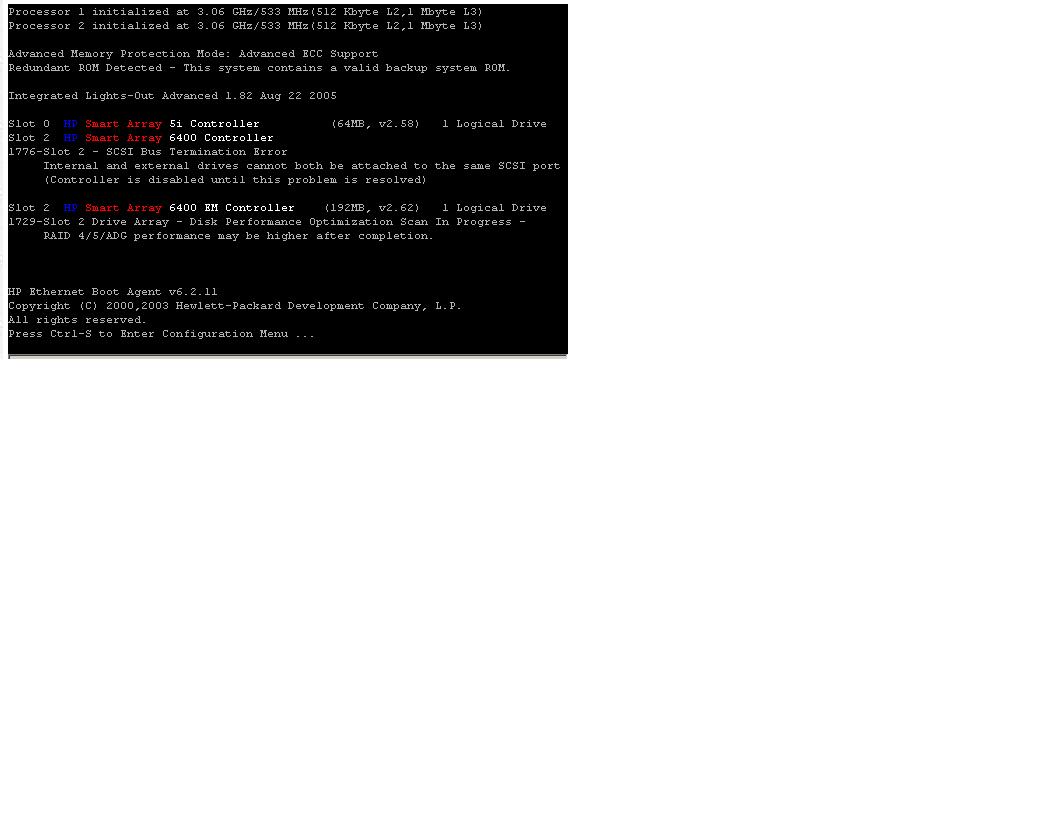
We just moved a Smart Array 6400 card and its StorageWorks array from one DL 380 to another. This new DL 380 is now giving some boot errors that I've attached to this thread for review. What suggestions on troubleshooting SCSI terminations can anyone provide me?
I intend to verify the SCSI cable(s) are terminated properly. I'll also be sure to confirm that the card that was moved is well seated in its slot.
What is the significance of the two SCSI cables running from the back of the 6400 card to the StorageWorks array? How do I determine which of the 4 ports on the 6400 those two SCSI cables should be plugged into?
Any help on this is greatly appreciated.
We just moved a Smart Array 6400 card and its StorageWorks array from one DL 380 to another. This new DL 380 is now giving some boot errors that I've attached to this thread for review. What suggestions on troubleshooting SCSI terminations can anyone provide me?
I intend to verify the SCSI cable(s) are terminated properly. I'll also be sure to confirm that the card that was moved is well seated in its slot.
What is the significance of the two SCSI cables running from the back of the 6400 card to the StorageWorks array? How do I determine which of the 4 ports on the 6400 those two SCSI cables should be plugged into?
Solved! Go to Solution.
2 REPLIES 2

- Mark as New
- Bookmark
- Subscribe
- Mute
- Subscribe to RSS Feed
- Permalink
- Report Inappropriate Content
09-03-2009 02:30 PM
09-03-2009 02:30 PM
Solution
Do you have internal disk drives connected to the internal connector of the 6400? As the error says you can NOT have internal and external drives connected on the same bus.
If you are using internal drives, you can NOT use the two external ports that are on the top of the slot cover. (top of the slot cover is where the screw is located)
If you are using internal drives, you can NOT use the two external ports that are on the top of the slot cover. (top of the slot cover is where the screw is located)
- Mark as New
- Bookmark
- Subscribe
- Mute
- Subscribe to RSS Feed
- Permalink
- Report Inappropriate Content
09-09-2009 07:22 AM
09-09-2009 07:22 AM
Re: DL 380 G3 SCSI bus termination error 1776
TTr,
Thank you for the help! It was just as you and the server said.
Port A1 of the 6400 was in use on both the external and internal side. The external port A1 was tied into a StorageWorks drive array cage B. The internal A1 port was hosting the server's internal SCSI hard disk drive array.
I moved the StorageWorks cage to external port B2, and the server booted without complaint!
Thank you again, TTr.
Thank you for the help! It was just as you and the server said.
Port A1 of the 6400 was in use on both the external and internal side. The external port A1 was tied into a StorageWorks drive array cage B. The internal A1 port was hosting the server's internal SCSI hard disk drive array.
I moved the StorageWorks cage to external port B2, and the server booted without complaint!
Thank you again, TTr.
The opinions expressed above are the personal opinions of the authors, not of Hewlett Packard Enterprise. By using this site, you accept the Terms of Use and Rules of Participation.
Company
Events and news
Customer resources
© Copyright 2026 Hewlett Packard Enterprise Development LP