- Community Home
- >
- Servers and Operating Systems
- >
- HPE ProLiant
- >
- ProLiant Servers (ML,DL,SL)
- >
- Upgrade iLO2 firmware on a DL380 G6 running ESXi 4...
Categories
Company
Local Language
Forums
Discussions
Knowledge Base
Forums
- Data Protection and Retention
- Entry Storage Systems
- Legacy
- Midrange and Enterprise Storage
- Storage Networking
- HPE Nimble Storage
Discussions
Forums
Discussions
Discussions
Forums
Discussions
Discussion Boards
Discussion Boards
Discussion Boards
Discussion Boards
Discussion Boards
Discussion Boards
Discussion Boards
Discussion Boards
Discussion Boards
Discussion Boards
Discussion Boards
Discussion Boards
Discussion Boards
Discussion Boards
Discussion Boards
Discussion Boards
Discussion Boards
Discussion Boards
Discussion Boards
Discussion Boards
Discussion Boards
Discussion Boards
Discussion Boards
Community
Resources
Forums
Blogs
- Subscribe to RSS Feed
- Mark Topic as New
- Mark Topic as Read
- Float this Topic for Current User
- Bookmark
- Subscribe
- Printer Friendly Page

- Mark as New
- Bookmark
- Subscribe
- Mute
- Subscribe to RSS Feed
- Permalink
- Report Inappropriate Content
03-01-2012 06:04 AM
03-01-2012 06:04 AM
Upgrade iLO2 firmware on a DL380 G6 running ESXi 4.1
I have downloaded the .scexe file but do not know how to extract the .bin file I need to update the iLO. I copied it down to the ESXi server and ran sh ./CP015685.scexe. I get an error - Make sure these programs are on the path: tar gzip tail sleep rm ln mkdir mktemp
I also tried this command sh CP015685.scexe --unpack=/vmfs/volumes/datastore1/ilo I get the error that sh can not open CP015685.scexe
Any help is greatly appreciated.
- Tags:
- firmware update
- iLO

- Mark as New
- Bookmark
- Subscribe
- Mute
- Subscribe to RSS Feed
- Permalink
- Report Inappropriate Content
03-01-2012 06:40 AM
03-01-2012 06:40 AM
Re: Upgrade iLO2 firmware on a DL380 G6 running ESXi 4.1
Hope this helps!
Regards
Torsten.
__________________________________________________
There are only 10 types of people in the world -
those who understand binary, and those who don't.
__________________________________________________
No support by private messages. Please ask the forum!
If you feel this was helpful please click the KUDOS! thumb below!

- Mark as New
- Bookmark
- Subscribe
- Mute
- Subscribe to RSS Feed
- Permalink
- Report Inappropriate Content
03-01-2012 06:56 AM
03-01-2012 06:56 AM
Re: Upgrade iLO2 firmware on a DL380 G6 running ESXi 4.1
I have the file but how do you extract it?

- Mark as New
- Bookmark
- Subscribe
- Mute
- Subscribe to RSS Feed
- Permalink
- Report Inappropriate Content
03-01-2012 07:05 AM
03-01-2012 07:05 AM
Re: Upgrade iLO2 firmware on a DL380 G6 running ESXi 4.1
It is a .exe file, use a windows system and double click the file, you would get two options extract and install, click on extract and to a folder, you would find a .bin file, login to ILO and go to admininstration and browse to choose the .bin file
Goutham Sabala
- Mark as New
- Bookmark
- Subscribe
- Mute
- Subscribe to RSS Feed
- Permalink
- Report Inappropriate Content
03-01-2012 07:07 AM
03-01-2012 07:07 AM
Re: Upgrade iLO2 firmware on a DL380 G6 running ESXi 4.1
It is not an .exe file rather a .scexe file. Windows does not have the software to open it.
- Mark as New
- Bookmark
- Subscribe
- Mute
- Subscribe to RSS Feed
- Permalink
- Report Inappropriate Content
03-01-2012 07:17 AM
03-01-2012 07:17 AM
Re: Upgrade iLO2 firmware on a DL380 G6 running ESXi 4.1
Hope this helps!
Regards
Torsten.
__________________________________________________
There are only 10 types of people in the world -
those who understand binary, and those who don't.
__________________________________________________
No support by private messages. Please ask the forum!
If you feel this was helpful please click the KUDOS! thumb below!
- Mark as New
- Bookmark
- Subscribe
- Mute
- Subscribe to RSS Feed
- Permalink
- Report Inappropriate Content
03-01-2012 07:30 AM
03-01-2012 07:30 AM
Re: Upgrade iLO2 firmware on a DL380 G6 running ESXi 4.1
Sorry, I kept clicking of the first link with out reading the whole description. I got the windows file and extracted the .bin. It took the file, but the log said firmware update via webpage failed.
- Mark as New
- Bookmark
- Subscribe
- Mute
- Subscribe to RSS Feed
- Permalink
- Report Inappropriate Content
03-01-2012 08:36 AM
03-01-2012 08:36 AM
Re: Upgrade iLO2 firmware on a DL380 G6 running ESXi 4.1
http://h20000.www2.hp.com/bizsupport/TechSupport/SoftwareDescription.jsp?lang=en&cc=us&swLang=8&mode=2&taskId=135&swItem=MTX-94560dcc34e845edbb13a26792
Goutham Sabala

- Mark as New
- Bookmark
- Subscribe
- Mute
- Subscribe to RSS Feed
- Permalink
- Report Inappropriate Content
03-02-2012 01:06 PM - edited 03-05-2012 01:37 PM
03-02-2012 01:06 PM - edited 03-05-2012 01:37 PM
Re: Upgrade iLO2 firmware on a DL380 G6 running ESXi 4.1
Did you use IE9 to upgrade the iLO2 firmware? I cannot use IE9 to upgrade my iLO2. It always fails.
I have been debugging this issue and it seems there is a bug with the Content-Length in IE9. It is telling iLO2 a wrong lenght value when uploading the bin file and iLO2 ends up declaring the image as invalid.
Edit: Ok, I found the root cause of why IE9 fails to flash iLO2 firmware. I'm getting it fixed in the next iLO2 firmware release.
__________________________________________________
If you feel this was helpful please click the KUDOS! thumb below!
- Tags:
- IE9
- Mark as New
- Bookmark
- Subscribe
- Mute
- Subscribe to RSS Feed
- Permalink
- Report Inappropriate Content
03-06-2012 08:20 AM
03-06-2012 08:20 AM
Re: Upgrade iLO2 firmware on a DL380 G6 running ESXi 4.1
I tried again with IE 8 this time and it still failed.
- Mark as New
- Bookmark
- Subscribe
- Mute
- Subscribe to RSS Feed
- Permalink
- Report Inappropriate Content
03-06-2012 09:13 AM
03-06-2012 09:13 AM
Re: Upgrade iLO2 firmware on a DL380 G6 running ESXi 4.1
Strange, what about offline ? Was the offline ILO firmware succesful ?
Goutham Sabala
- Mark as New
- Bookmark
- Subscribe
- Mute
- Subscribe to RSS Feed
- Permalink
- Report Inappropriate Content
03-06-2012 10:30 AM
03-06-2012 10:30 AM
Re: Upgrade iLO2 firmware on a DL380 G6 running ESXi 4.1
Your .bin file could be corrupted or incomplete. The binary for all the iLO2 versions 2.0x are 3072K bytes long.
Please try downloading the iLO2 v2.07 Windows Online component again, execute it and then select "extract" to a folder.
__________________________________________________
If you feel this was helpful please click the KUDOS! thumb below!
- Mark as New
- Bookmark
- Subscribe
- Mute
- Subscribe to RSS Feed
- Permalink
- Report Inappropriate Content
03-06-2012 11:37 AM
03-06-2012 11:37 AM
Re: Upgrade iLO2 firmware on a DL380 G6 running ESXi 4.1
Get this file and extract it:
ftp://ftp.hp.com/pub/softlib2/software1/sc-windows-fw-ilo/p1443420321/v71020/cp015686.exe
you will get this file
17.08.2011 10:38 3.145.728 ilo2_207.bin
Now connect to the ILO web page and use this file for update.
Have a look into the README.TXT file too.
Hope this helps!
Regards
Torsten.
__________________________________________________
There are only 10 types of people in the world -
those who understand binary, and those who don't.
__________________________________________________
No support by private messages. Please ask the forum!
If you feel this was helpful please click the KUDOS! thumb below!
- Mark as New
- Bookmark
- Subscribe
- Mute
- Subscribe to RSS Feed
- Permalink
- Report Inappropriate Content
03-09-2012 08:33 AM - edited 03-09-2012 10:58 AM
03-09-2012 08:33 AM - edited 03-09-2012 10:58 AM
Re: Upgrade iLO2 firmware on a DL380 G6 running ESXi 4.1
I got the iLO firmware updated using the USB key. Thanks everyone!

- Mark as New
- Bookmark
- Subscribe
- Mute
- Subscribe to RSS Feed
- Permalink
- Report Inappropriate Content
06-20-2012 11:59 AM
06-20-2012 11:59 AM
Re: Upgrade iLO2 firmware on a DL380 G6 running ESXi 4.1
It is definitely a browser issue. Faced the same problem, found this thread when searching for a fix, and tried it on an XP machine running IE 8 and it flashed no problem on both servers. On IE9 both failed at the very last step.
- Mark as New
- Bookmark
- Subscribe
- Mute
- Subscribe to RSS Feed
- Permalink
- Report Inappropriate Content
06-20-2012 01:58 PM
06-20-2012 01:58 PM
Re: Upgrade iLO2 firmware on a DL380 G6 running ESXi 4.1
It was a bug in the iLO2 webserver code that somehow surfaced few months ago after IE9 got some updates. It is related to the content length value that IE9 gives iLO2 when uploading the firmware image. But, not everybody running IE9 sees this issue. Also, I know by fact that if you use a proxy, you're likely not going to see this issue.
Anyway, the bug is fixed in iLO2 version 2.09
__________________________________________________
If you feel this was helpful please click the KUDOS! thumb below!
- Mark as New
- Bookmark
- Subscribe
- Mute
- Subscribe to RSS Feed
- Permalink
- Report Inappropriate Content
06-21-2012 06:37 AM
06-21-2012 06:37 AM
Re: Upgrade iLO2 firmware on a DL380 G6 running ESXi 4.1
Same bug in 209... Upgrade with IE9 fails, but with firefox everything is OK
- Mark as New
- Bookmark
- Subscribe
- Mute
- Subscribe to RSS Feed
- Permalink
- Report Inappropriate Content
06-21-2012 05:02 PM - edited 06-21-2012 05:07 PM
06-21-2012 05:02 PM - edited 06-21-2012 05:07 PM
Re: Upgrade iLO2 firmware on a DL380 G6 running ESXi 4.1
Are you already running 2.09 and upgrading to what?
By the way, I was told today that IE8 is exhibiting the same issue now.
Apparently, MS recently patched IE8 and it is now behaving the same way as IE9. The workaround is to upgrade iLO2 firmware to 2.09 using Firefox. Once 2.09 is up and running, next time you need to upgrade iLO2 firmware, you can use IE8 or IE9.
__________________________________________________
If you feel this was helpful please click the KUDOS! thumb below!
- Mark as New
- Bookmark
- Subscribe
- Mute
- Subscribe to RSS Feed
- Permalink
- Report Inappropriate Content
07-24-2012 06:19 PM
07-24-2012 06:19 PM
Re: Upgrade iLO2 firmware on a DL380 G6 running ESXi 4.1
Just ran into this issue myself - both on IE7 and IE8.
Firefox workaround allowed me to upgrade allowed me to get from 1.78 to 2.09.
- Tags:
- firefox
- Mark as New
- Bookmark
- Subscribe
- Mute
- Subscribe to RSS Feed
- Permalink
- Report Inappropriate Content
07-25-2012 06:46 AM
07-25-2012 06:46 AM
Re: Upgrade iLO2 firmware on a DL380 G6 running ESXi 4.1
Please try upgrading from 2.09 to 2.12 using IE8 or IE9. It should work fine now.
__________________________________________________
If you feel this was helpful please click the KUDOS! thumb below!
- Mark as New
- Bookmark
- Subscribe
- Mute
- Subscribe to RSS Feed
- Permalink
- Report Inappropriate Content
07-31-2012 01:49 PM
07-31-2012 01:49 PM
Re: Upgrade iLO2 firmware on a DL380 G6 running ESXi 4.1
I used IE9 in compatibility mode.
I first encoutered problems using IE9 and uploading the bin file.
But after switching the ILO website to compatibility mode in IE 9 the firm update worked fine!
- Mark as New
- Bookmark
- Subscribe
- Mute
- Subscribe to RSS Feed
- Permalink
- Report Inappropriate Content
01-09-2013 03:07 PM
01-09-2013 03:07 PM
Re: Upgrade iLO2 firmware on a DL380 G6 running ESXi 4.1
Suprisingly my fix was as follows:
I installed using FireFox instead of IE
If you are on a DoD Network you'll need the add-on DoD Configuration 1.3.6
Server: HP Proliant G5
- Mark as New
- Bookmark
- Subscribe
- Mute
- Subscribe to RSS Feed
- Permalink
- Report Inappropriate Content
01-31-2013 07:57 AM
01-31-2013 07:57 AM
Re: Upgrade iLO2 firmware on a DL380 G6 running ESXi 4.1
Is this the latest update for the iLO firmware? I can't get a definitive answer. And my problem is, I need the firmware for servers that are on a development network and it has no internet connectivity. So, basically, I need to be able to download the full thing in one sweep.
Any ideas?
- Mark as New
- Bookmark
- Subscribe
- Mute
- Subscribe to RSS Feed
- Permalink
- Report Inappropriate Content
01-31-2013 08:22 AM
01-31-2013 08:22 AM
Re: Upgrade iLO2 firmware on a DL380 G6 running ESXi 4.1
We just released 2.15 to the FTP this morning. But, it is not going to hit the HP.com website until later next month.
Online ROM Flash Component for Windows 64-bit
ftp://ftp.hp.com/pub/softlib2/software1/sc-windows-fw-ilo/p2023401934/v82929
Online ROM Flash Component for Windows 32-bit
ftp://ftp.hp.com/pub/softlib2/software1/sc-windows-fw-ilo/p1443420321/v82928
Online ROM Flash Component for Linux
ftp://ftp.hp.com/pub/softlib2/software1/sc-linux-fw-ilo/p1285463034/v82920
__________________________________________________
If you feel this was helpful please click the KUDOS! thumb below!

- Mark as New
- Bookmark
- Subscribe
- Mute
- Subscribe to RSS Feed
- Permalink
- Report Inappropriate Content
09-30-2014 11:56 AM
09-30-2014 11:56 AM
Re: Upgrade iLO2 firmware on a DL380 G6 running ESXi 4.1
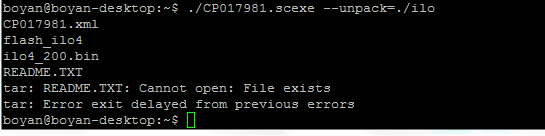
scexe files contain a hidden --unpack flag that will unpack the contents to the directory of your choosing.
For example:
# ./SOMEFILE.scexe --unpack=/tmp/test/
SOMEFILE.xml
SOMEFILE-PayLoad-version.version.version-1.zip
something.txt
installer
readme.txt
reference.xml
This is how you do it, upload your file to any Linux box and then: