
- Community Home
- >
- Networking
- >
- Software Defined Networking
- >
- Re: Authentication Failure
Categories
Company
Local Language
Forums
Discussions
- Integrity Servers
- Server Clustering
- HPE NonStop Compute
- HPE Apollo Systems
- High Performance Computing
Knowledge Base
Forums
- Data Protection and Retention
- Entry Storage Systems
- Legacy
- Midrange and Enterprise Storage
- Storage Networking
- HPE Nimble Storage
Discussions
Knowledge Base
Forums
Discussions
- Cloud Mentoring and Education
- Software - General
- HPE OneView
- HPE Ezmeral Software platform
- HPE OpsRamp Software
Knowledge Base
Discussions
Forums
Discussions
Discussion Boards
Discussion Boards
Discussion Boards
Discussion Boards
Discussion Boards
Discussion Boards
Discussion Boards
Discussion Boards
Discussion Boards
Discussion Boards
Discussion Boards
Discussion Boards
Discussion Boards
Discussion Boards
Discussion Boards
Discussion Boards
Discussion Boards
Discussion Boards
Discussion Boards
Discussion Boards
Discussion Boards
Discussion Boards
Discussion Boards
Community
Resources
Forums
Blogs
- Subscribe to RSS Feed
- Mark Topic as New
- Mark Topic as Read
- Float this Topic for Current User
- Bookmark
- Subscribe
- Printer Friendly Page

- Mark as New
- Bookmark
- Subscribe
- Mute
- Subscribe to RSS Feed
- Permalink
- Report Inappropriate Content
05-19-2014 12:33 AM
05-19-2014 12:33 AM
Authentication Failure
Hi,
When I try to login to SDN Controller Console using HTTPS, its not authenticating the username and password.
I tried resetting the password in Keystone, no luck.
When I run thru the sdn-adm-ui-2.2.5/log.log file, I see the messase as below:
[2014-05-19 18:38:37.577] ERROR http-bio-8443-exec-10 hp.keystone Failed to authenticate sdn domain user sdn due to java.lang.IllegalArgumentException: timeToIdle can't be negative
How do I fix this problem ? I am new to Linux and Keystone Identity. Any help is appreciated.
Thank you.

- Mark as New
- Bookmark
- Subscribe
- Mute
- Subscribe to RSS Feed
- Permalink
- Report Inappropriate Content
05-21-2014 10:44 AM
05-21-2014 10:44 AM
Re: Authentication Failure
Hello Rangasai,
Thanks for your query.
Please let us know the below details-
1. Are you not able to login using any user name (sdn , rsdoc ) with password(skyline)?
2. Did you try to change the password or this is the first time you are trying to login, after fresh installation?
3. What is the version no of controller ?
4. Did you get any warning/error while installing the controller ? You should install controller with all step executed successfully.
5. Could you share SDN Controller Console screen shot ? [ https://Controller _IP:8443/sdn/ui/ ]
Also in Controller Release notes for Controller 2.0 [page 5] you can see-
Keystone-related SDN user password changes are not restored properly (CR141586)—If the
default sdn password is changed from skyline using keystone and the backup operation is
done, you cannot login with the new password after restore operation. You must still use the
default password (skyline) for login.
Thanks,
HP SDN Team
- Mark as New
- Bookmark
- Subscribe
- Mute
- Subscribe to RSS Feed
- Permalink
- Report Inappropriate Content
05-21-2014 11:47 PM
05-21-2014 11:47 PM
Re: Authentication Failure
Hi Team,
Thank you for the response.
Please find my answers below in line with questions.
1. Are you not able to login using any user name (sdn , rsdoc ) with password(skyline)?
A. Yes, I am not able to login with either of the user names.
2. Did you try to change the password or this is the first time you are trying to login, after fresh installation?
A. Yes, I tried changing the password using keystone user-password-update. Even then its not working either with skyline or the new password.
3. What is the version no of controller ?
A. hp-sdn-ctl 2.2.5.0016 .
4. Did you get any warning/error while installing the controller ? You should install controller with all step executed successfully.
A. I dint encounter any errors during SDN installation. All the steps were successful.
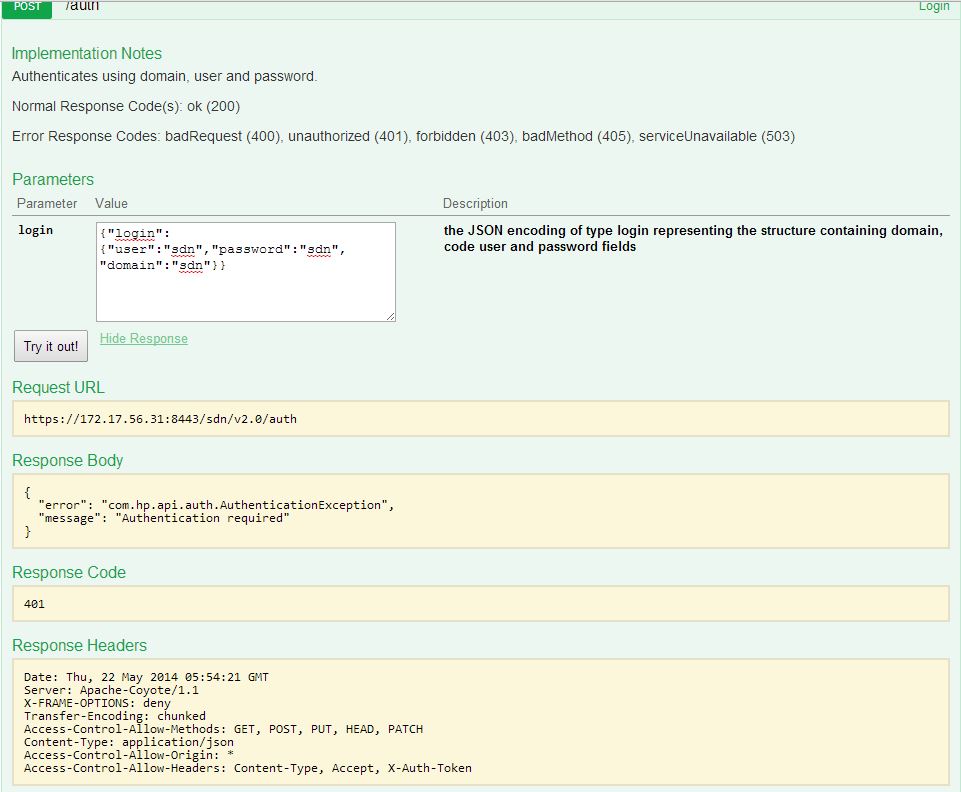
5. Could you share SDN Controller Console screen shot ? [ https://Controller _IP:8443/sdn/ui/ ]
A. Please find the attached logs and screenshots for reference.
Thank you.
- Mark as New
- Bookmark
- Subscribe
- Mute
- Subscribe to RSS Feed
- Permalink
- Report Inappropriate Content
05-27-2014 12:23 AM
05-27-2014 12:23 AM
Re: Authentication Failure
Hello Rangasai,
From the file auth.jpg it looks that you are trying to login with sdn as both the user and the password.
Please try to login with sdn as the user and skyline as the password and let us know if you still face the problem.
Thanks,
HP SDN Team
- Mark as New
- Bookmark
- Subscribe
- Mute
- Subscribe to RSS Feed
- Permalink
- Report Inappropriate Content
06-11-2014 03:29 AM
06-11-2014 03:29 AM
Re: Authentication Failure
Hello Rangasai,
Doing a follow up to check if you need any further assistance with respect to the query posted.
Please do let us know if your problem is solved.
If you have more questions on the same topic please do reply on the same thread or open a new post if new topic.
Thanks
HP SDN Team



- Mark as New
- Bookmark
- Subscribe
- Mute
- Subscribe to RSS Feed
- Permalink
- Report Inappropriate Content
10-13-2014 12:58 AM
10-13-2014 12:58 AM
Re: Authentication Failure
Hi SDN TEAM,
Good day,
I am not able to access the controller UI,
When I enter the https://controller_ip_address:8443/sdn/ui/ (where the IP address is the address of server, where I have installed controller), I am not able to access it.
I get the error as Unable to connect. Using Firefox browser in the server.
Regards,
Satish K
- Mark as New
- Bookmark
- Subscribe
- Mute
- Subscribe to RSS Feed
- Permalink
- Report Inappropriate Content
10-13-2014 02:18 AM
10-13-2014 02:18 AM
Re: Authentication Failure
Hello Satish,
Please provide/confirm the below details-
1. Did you install the version 2.3 a fresh or upgrade from older version?
2. What is the keystone version?
3. Command used to install keystone?
4. Are you able to see REST API page?
5. Did you try with Google chrome ? Chrome is recommended.
6.Please share the screen shot for SDN UI page as well as controller logs if possible.
Thanks,
HP SDN Team
- Mark as New
- Bookmark
- Subscribe
- Mute
- Subscribe to RSS Feed
- Permalink
- Report Inappropriate Content
12-02-2014 09:49 PM
12-02-2014 09:49 PM
Re: Authentication Failure
Hi SDN Team,
This got resolved,
can see further details at
Regards,
Satish K