- Community Home
- >
- Software
- >
- Software - General
- >
- How to find warranty expiration date for the serve...
Categories
Company
Local Language
Forums
Discussions
Knowledge Base
Forums
- Data Protection and Retention
- Entry Storage Systems
- Legacy
- Midrange and Enterprise Storage
- Storage Networking
- HPE Nimble Storage
Discussions
Knowledge Base
Forums
Discussions
- Cloud Mentoring and Education
- Software - General
- HPE OneView
- HPE Ezmeral Software platform
- HPE OpsRamp
Knowledge Base
Discussions
Forums
Discussions
Discussion Boards
Discussion Boards
Discussion Boards
Discussion Boards
Discussion Boards
Discussion Boards
Discussion Boards
Discussion Boards
Discussion Boards
Discussion Boards
Discussion Boards
Discussion Boards
Discussion Boards
Discussion Boards
Discussion Boards
Discussion Boards
Discussion Boards
Discussion Boards
Discussion Boards
Discussion Boards
Discussion Boards
Discussion Boards
Discussion Boards
Community
Resources
Forums
Blogs
- Subscribe to RSS Feed
- Mark Topic as New
- Mark Topic as Read
- Float this Topic for Current User
- Bookmark
- Subscribe
- Printer Friendly Page

- Mark as New
- Bookmark
- Subscribe
- Mute
- Subscribe to RSS Feed
- Permalink
- Report Inappropriate Content
01-24-2020 10:31 AM
01-24-2020 10:31 AM
How to find warranty expiration date for the servers we purchase?
I need to find purchase date of servers using the serial ID. I see a lot of information but which date should I pick?
- Tags:
- warranty

- Mark as New
- Bookmark
- Subscribe
- Mute
- Subscribe to RSS Feed
- Permalink
- Report Inappropriate Content
01-27-2020 04:44 AM
01-27-2020 04:44 AM
Re: How to find warranty expiration date for the servers we purchase?
Hello Meenakshivj,
Thank you for posting the query.
In order to find out the warranty, you can log on to - https://support.hpe.com/hpsc/wc/public/home..
Please enter the server serial number and press Submit.
For reference, Please find the attachment 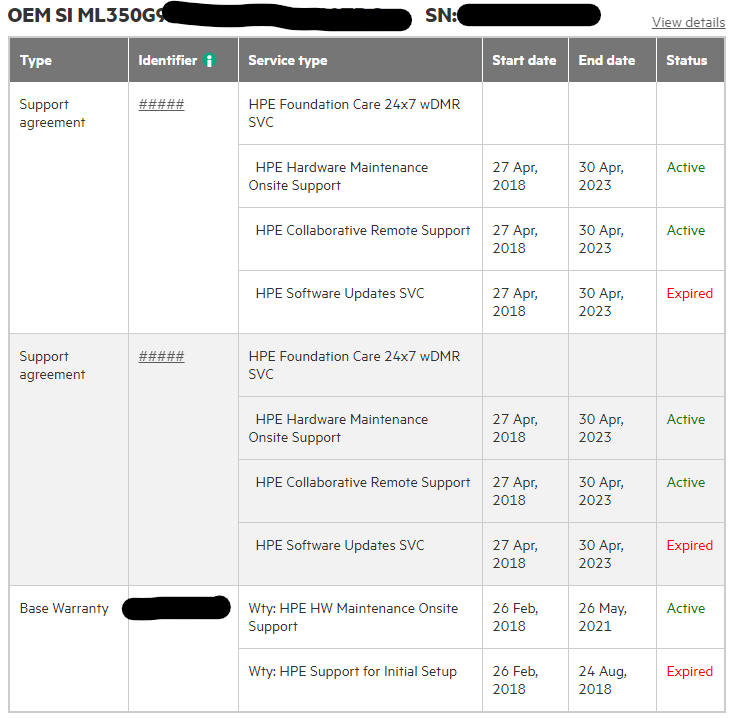
The end date indicates the Warranty/Contract Expiration date.
In case if you wish to find the server purchase date, you need to check POP (Proof of Purchase).
Alternatively, log a ticket with HPE Support for the same.
Thank you
Aniket Chauhan
