GreenLake Administration
- Community Home
- >
- Storage
- >
- Data Protection and Retention
- >
- StoreEver Tape Storage
- >
- Re: Error 1401- please insert compatible media
StoreEver Tape Storage
1851059
Members
2386
Online
104056
Solutions
Forums
Categories
Company
Local Language
back
Forums
Discussions
Knowledge Base
Forums
- Data Protection and Retention
- Entry Storage Systems
- Legacy
- Midrange and Enterprise Storage
- Storage Networking
- HPE Nimble Storage
Discussions
Forums
Discussions
Discussions
Forums
Discussions
back
Discussion Boards
Discussion Boards
Discussion Boards
Discussion Boards
Discussion Boards
Discussion Boards
Discussion Boards
Discussion Boards
Discussion Boards
Discussion Boards
Discussion Boards
Discussion Boards
Discussion Boards
Discussion Boards
Discussion Boards
Discussion Boards
Discussion Boards
Discussion Boards
Discussion Boards
Discussion Boards
Discussion Boards
Discussion Boards
Discussion Boards
Blogs
Information
Community
Resources
Community Language
Language
Forums
Blogs
Topic Options
- Subscribe to RSS Feed
- Mark Topic as New
- Mark Topic as Read
- Float this Topic for Current User
- Bookmark
- Subscribe
- Printer Friendly Page

- Mark as New
- Bookmark
- Subscribe
- Mute
- Subscribe to RSS Feed
- Permalink
- Report Inappropriate Content
06-04-2009 03:12 PM
06-04-2009 03:12 PM
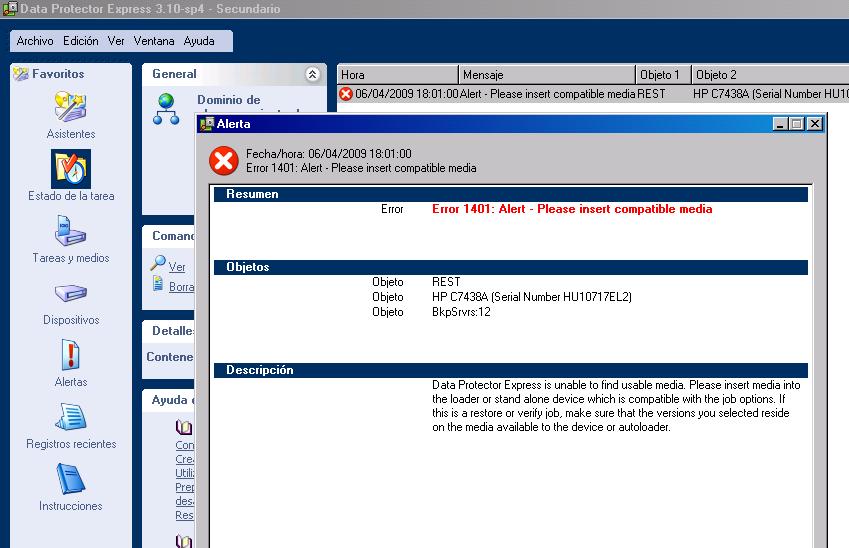
Error 1401- please insert compatible media
I have been backing in a different media every day from monday to friday.
I can only restore data from the last backup that i made.
When i try to restore a different backup, i receive this error after mounting the media: Error 1401
I don't have problems to backup and restore in a new media, just in previous medias.
I also checked the data protector registry, and the task received an error 1040: No devices specified or all devices are now offline.
I selected my device and it works fine for new tapes.
I checked on dataprotector tape errors for code 1401 and it seems that my library mechanism have a problem.
How can i solve it?
I can only restore data from the last backup that i made.
When i try to restore a different backup, i receive this error after mounting the media: Error 1401
I don't have problems to backup and restore in a new media, just in previous medias.
I also checked the data protector registry, and the task received an error 1040: No devices specified or all devices are now offline.
I selected my device and it works fine for new tapes.
I checked on dataprotector tape errors for code 1401 and it seems that my library mechanism have a problem.
How can i solve it?
3 REPLIES 3

- Mark as New
- Bookmark
- Subscribe
- Mute
- Subscribe to RSS Feed
- Permalink
- Report Inappropriate Content
06-08-2009 08:54 AM
06-08-2009 08:54 AM
Re: Error 1401- please insert compatible media
Goergina DPE will restore the latest version of a files by default. If you want to restore a previous version just select the file or folder and press "versions" then choose the media that has the version that you will like.
see the attach
I recomend you to upgrade to 3.5sp2
http://h20000.www2.hp.com/bizsupport/TechSupport/SoftwareDescription.jsp?lang=en&cc=us&prodTypeId=12169&prodSeriesId=1144272&prodNameId=1144275&swEnvOID=1005&swLang=13&mode=2&taskId=135&swItem=co-70596-1
Pablo Alvarado Siles
see the attach
I recomend you to upgrade to 3.5sp2
http://h20000.www2.hp.com/bizsupport/TechSupport/SoftwareDescription.jsp?lang=en&cc=us&prodTypeId=12169&prodSeriesId=1144272&prodNameId=1144275&swEnvOID=1005&swLang=13&mode=2&taskId=135&swItem=co-70596-1
Pablo Alvarado Siles
Pablo Alv Siles

- Mark as New
- Bookmark
- Subscribe
- Mute
- Subscribe to RSS Feed
- Permalink
- Report Inappropriate Content
06-08-2009 08:56 AM
06-08-2009 08:56 AM
Re: Error 1401- please insert compatible media
forgot to highligh versions botton
Pablo Alv Siles

- Mark as New
- Bookmark
- Subscribe
- Mute
- Subscribe to RSS Feed
- Permalink
- Report Inappropriate Content
06-08-2009 09:00 AM
06-08-2009 09:00 AM
Re: Error 1401- please insert compatible media
Thanks very much for your response, i already tried it last week and it worked as you mentioned.
The opinions expressed above are the personal opinions of the authors, not of Hewlett Packard Enterprise. By using this site, you accept the Terms of Use and Rules of Participation.
Company
Events and news
Customer resources
© Copyright 2026 Hewlett Packard Enterprise Development LP