- Community Home
- >
- Storage
- >
- Midrange and Enterprise Storage
- >
- StoreVirtual Storage
- >
- Re: 3 Node VSA - Gen 10 ESX Host patching question
Categories
Company
Local Language
Forums
Discussions
- Integrity Servers
- Server Clustering
- HPE NonStop Compute
- HPE Apollo Systems
- High Performance Computing
Knowledge Base
Forums
- Data Protection and Retention
- Entry Storage Systems
- Legacy
- Midrange and Enterprise Storage
- Storage Networking
- HPE Nimble Storage
Discussions
Knowledge Base
Forums
Discussions
- Cloud Mentoring and Education
- Software - General
- HPE OneView
- HPE Ezmeral Software platform
- HPE OpsRamp Software
Knowledge Base
Discussions
Forums
Discussions
Discussion Boards
Discussion Boards
Discussion Boards
Discussion Boards
Discussion Boards
Discussion Boards
Discussion Boards
Discussion Boards
Discussion Boards
Discussion Boards
Discussion Boards
Discussion Boards
Discussion Boards
Discussion Boards
Discussion Boards
Discussion Boards
Discussion Boards
Discussion Boards
Discussion Boards
Discussion Boards
Discussion Boards
Discussion Boards
Discussion Boards
Community
Resources
Forums
Blogs
- Subscribe to RSS Feed
- Mark Topic as New
- Mark Topic as Read
- Float this Topic for Current User
- Bookmark
- Subscribe
- Printer Friendly Page

- Mark as New
- Bookmark
- Subscribe
- Mute
- Subscribe to RSS Feed
- Permalink
- Report Inappropriate Content
01-11-2018 07:23 AM
01-11-2018 07:23 AM
Hi
I have the above & like to patch the Gen 10 host to System ROM Version 1.28 from 1.20 on my Gen 10 ESX host
https://support.hpe.com/hpsc/doc/public/display?docId=emr_na-a00039267en_us
And patch VMW 6.5 as well. Is this below steps correct ?
1) VMotion all VM's to ahother host & Shutdown VSA from CMC
2) Update BIOS reboot >> Patch VMW 6.5 >> After reboot power on VSA
3) After some time thei VSA will show in CMC
4) LUNS's will resync & You can do ths same for the remaining ESX hosts
Before shutting down VSA from CMC do I have to stop any running manager(s) ? I'm on latest 12.7 OS
Please advise
Solved! Go to Solution.

- Mark as New
- Bookmark
- Subscribe
- Mute
- Subscribe to RSS Feed
- Permalink
- Report Inappropriate Content
01-11-2018 07:48 AM
01-11-2018 07:48 AM
SolutionHi,
The easiest is to put the ESXi host in maintenance mode. Normally all VM's will be moved to other ESXi hosts in the cluster (depending of HA and DRS settings). Only the VSA needs to be shut down manually... No need to stop the manager manually.
At that moment patch the firmware and OS and reboot the ESXi host... Start the VSA manually (even better put it in autostart mode as first VM) and let it sync the changes from the other VSA's in the cluster.
Once the VSA cluster is normal, repeat this procedure on the other hosts...
FYI on my blog I have an article about how I obtained 7 years of 100% uptime (should update the article is 8 years meanwhile) with my VSA cluster
http://www.bitcon.be/100-uptime-for-7-years-with-storevirtual-vsa-check/
Kr,
Bart
If my post was useful, clik on my KUDOS! "White Star" !
- Mark as New
- Bookmark
- Subscribe
- Mute
- Subscribe to RSS Feed
- Permalink
- Report Inappropriate Content
01-11-2018 11:08 AM
01-11-2018 11:08 AM
Re: 3 Node VSA - Gen 10 ESX Host patching question
Thanks Bart point taken
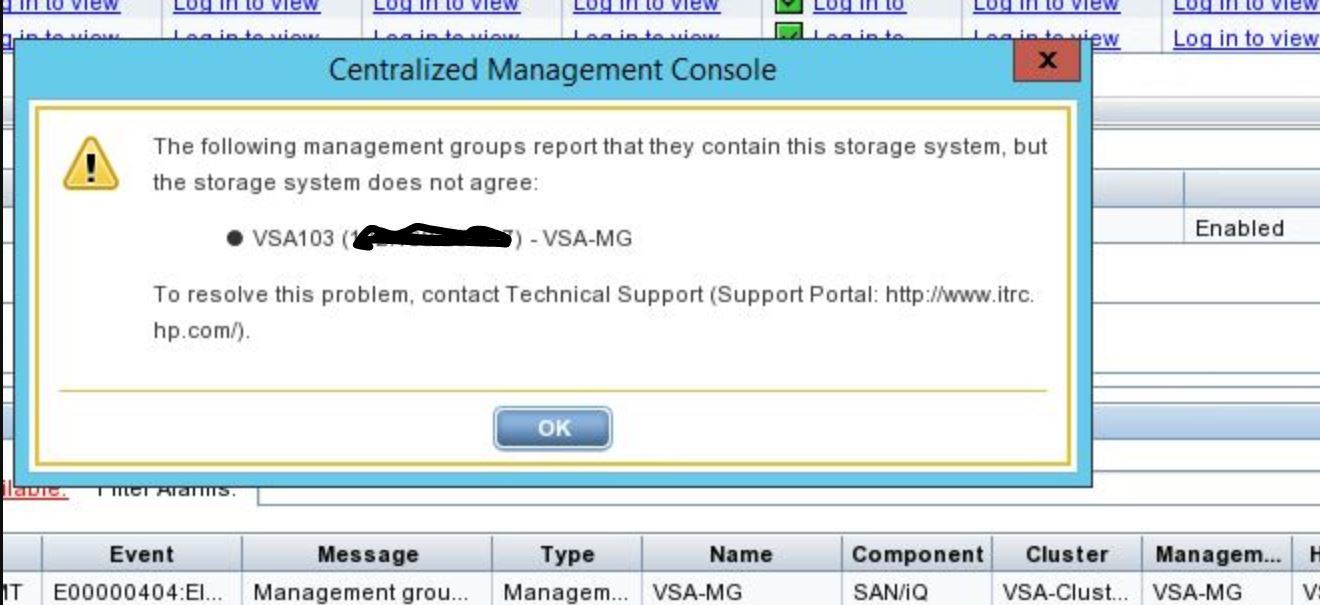
I stopped the running manager by accident before shutting dowin the VSA and when it came back it said the below
Phoned support & they sorted it
- Mark as New
- Bookmark
- Subscribe
- Mute
- Subscribe to RSS Feed
- Permalink
- Report Inappropriate Content
01-11-2018 11:17 AM
01-11-2018 11:17 AM
Re: 3 Node VSA - Gen 10 ESX Host patching question
Hi,
This is indeed possible allthough I never saw this error in real life before... Just do a clean shutdown of the VSA and you should be OK...
Good that everything is (re)solved...
Kr,
Bart
If my post was useful, clik on my KUDOS! "White Star" !