- Community Home
- >
- Storage
- >
- Midrange and Enterprise Storage
- >
- StoreVirtual Storage
- >
- Remote snap shot ( copy )
Categories
Company
Local Language
Forums
Discussions
- Integrity Servers
- Server Clustering
- HPE NonStop Compute
- HPE Apollo Systems
- High Performance Computing
Knowledge Base
Forums
- Data Protection and Retention
- Entry Storage Systems
- Legacy
- Midrange and Enterprise Storage
- Storage Networking
- HPE Nimble Storage
Discussions
Knowledge Base
Forums
Discussions
- Cloud Mentoring and Education
- Software - General
- HPE OneView
- HPE Ezmeral Software platform
- HPE OpsRamp Software
Knowledge Base
Discussions
Forums
Discussions
Discussion Boards
Discussion Boards
Discussion Boards
Discussion Boards
Discussion Boards
Discussion Boards
Discussion Boards
Discussion Boards
Discussion Boards
Discussion Boards
Discussion Boards
Discussion Boards
Discussion Boards
Discussion Boards
Discussion Boards
Discussion Boards
Discussion Boards
Discussion Boards
Discussion Boards
Discussion Boards
Discussion Boards
Discussion Boards
Discussion Boards
Community
Resources
Forums
Blogs
- Subscribe to RSS Feed
- Mark Topic as New
- Mark Topic as Read
- Float this Topic for Current User
- Bookmark
- Subscribe
- Printer Friendly Page

- Mark as New
- Bookmark
- Subscribe
- Mute
- Subscribe to RSS Feed
- Permalink
- Report Inappropriate Content
04-12-2010 05:47 AM
04-12-2010 05:47 AM
Solved! Go to Solution.

- Mark as New
- Bookmark
- Subscribe
- Mute
- Subscribe to RSS Feed
- Permalink
- Report Inappropriate Content
04-14-2010 04:20 AM
04-14-2010 04:20 AM
Re: Remote snap shot ( copy )
The issue you'll have is when you move the local bandwidth up, you can starve access to your volumes as management tasks can take more priority than data access which could cause disk errors on your servers (if you have volumes connected).
I'm not aware of any method that can be used to switch the local bandwidth at night automatically. Perhaps you could have a scheduled task on one of your server that uses CLIQ to change it?
I'd highly recommend against 40 though. I'd suggest inching it up a little at a time to see what the impact is first.
- Mark as New
- Bookmark
- Subscribe
- Mute
- Subscribe to RSS Feed
- Permalink
- Report Inappropriate Content
04-14-2010 05:31 AM
04-14-2010 05:31 AM
Re: Remote snap shot ( copy )
http://forums11.itrc.hp.com/service/forums/questionanswer.do?threadId=1415381
- Mark as New
- Bookmark
- Subscribe
- Mute
- Subscribe to RSS Feed
- Permalink
- Report Inappropriate Content
04-19-2010 05:29 AM
04-19-2010 05:29 AM
Re: Remote snap shot ( copy )
- Mark as New
- Bookmark
- Subscribe
- Mute
- Subscribe to RSS Feed
- Permalink
- Report Inappropriate Content
04-20-2010 04:32 AM
04-20-2010 04:32 AM
Re: Remote snap shot ( copy )
- Mark as New
- Bookmark
- Subscribe
- Mute
- Subscribe to RSS Feed
- Permalink
- Report Inappropriate Content
04-21-2010 04:08 AM
04-21-2010 04:08 AM
Re: Remote snap shot ( copy )
- Mark as New
- Bookmark
- Subscribe
- Mute
- Subscribe to RSS Feed
- Permalink
- Report Inappropriate Content
04-21-2010 05:28 AM
04-21-2010 05:28 AM
Re: Remote snap shot ( copy )
Are you running all of these snapshots concurrently? Are you staggering them throughout the day? Meaning, do you start them all at the same time?
- Mark as New
- Bookmark
- Subscribe
- Mute
- Subscribe to RSS Feed
- Permalink
- Report Inappropriate Content
04-21-2010 06:01 AM
04-21-2010 06:01 AM
Re: Remote snap shot ( copy )
- Mark as New
- Bookmark
- Subscribe
- Mute
- Subscribe to RSS Feed
- Permalink
- Report Inappropriate Content
04-21-2010 09:03 AM
04-21-2010 09:03 AM
Re: Remote snap shot ( copy )
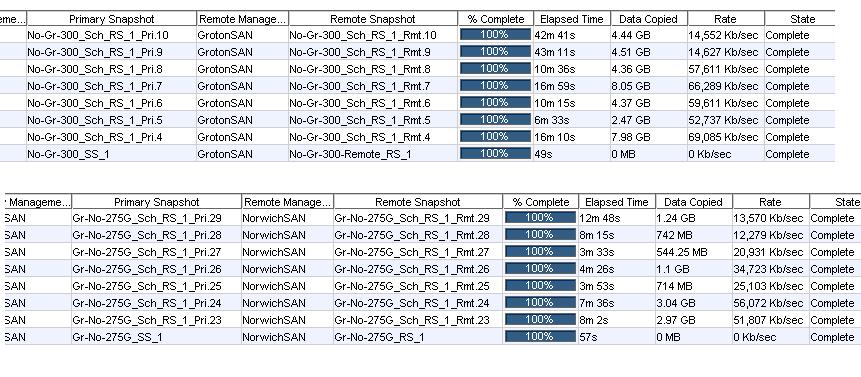
I have a 50Mb pipe between sites and can usually only pull about 20-25Mb with the slider on 6. Which is still well above the 4-8k. I know you gave an example of your results in the file you attached, but are you still seeing the actual 4-8k transfers? What I saw wasn't maxing out your line, but it was still healthy compared to what you were seeing before.
I've got to talk to my HP contacts about the slider's relationship to remote snapshot speed. If I hear back before you contact support, I'll let you know what I find.
- Mark as New
- Bookmark
- Subscribe
- Mute
- Subscribe to RSS Feed
- Permalink
- Report Inappropriate Content
04-21-2010 09:26 AM
04-21-2010 09:26 AM
Re: Remote snap shot ( copy )
- Mark as New
- Bookmark
- Subscribe
- Mute
- Subscribe to RSS Feed
- Permalink
- Report Inappropriate Content
04-21-2010 10:48 AM
04-21-2010 10:48 AM
Re: Remote snap shot ( copy )
If so, then you are probably correct in that your admin tasks are impacting performance. I've never seen it cause a problem here, but I'm running 50 nodes, so it may be different if you only have a couple.
- Mark as New
- Bookmark
- Subscribe
- Mute
- Subscribe to RSS Feed
- Permalink
- Report Inappropriate Content
04-28-2010 12:37 PM
04-28-2010 12:37 PM
Re: Remote snap shot ( copy )

- Mark as New
- Bookmark
- Subscribe
- Mute
- Subscribe to RSS Feed
- Permalink
- Report Inappropriate Content
04-30-2010 04:03 AM
04-30-2010 04:03 AM
Re: Remote snap shot ( copy )
I'm still waiting on a response from my SE on this as remote copy speed used to be controled by remote bandwidth, local bandwidth only controlled resync/restripe/rebuild speed. The horror that would come from the mouths of LHN support when it came to talking about the local bandwidth setting made it sound quite taboo to change the default (though we still did when needed).
- Mark as New
- Bookmark
- Subscribe
- Mute
- Subscribe to RSS Feed
- Permalink
- Report Inappropriate Content
05-03-2010 05:00 AM
05-03-2010 05:00 AM
SolutionCutting and pasting the response*
Local Bandwidth of the target group will limit the remote copies between the two groups if Remote_Bandwidth > Local_Bandwidth. We do have plans to de-couple this behavior in a future release, however, for 8.5 this behavior remains. In 8.5 we did increase default Local Bandwidth to 16MB/sec. Key info is local bandwidth of the target group is the key so they could throttle up their DR siteâ s local bandwidth and not hurt anything.
End cut and paste*
So it looks like the speed can be adjusted by setting only the remote side local bandwidth rather than needing it on both sides. (Not sure if you had set only the remote side, or both sides.) I can confirm in testing it does work with remote side only.
This must have been snuck into the 8.x releases.
- Mark as New
- Bookmark
- Subscribe
- Mute
- Subscribe to RSS Feed
- Permalink
- Report Inappropriate Content
05-03-2010 05:17 AM
05-03-2010 05:17 AM