- Community Home
- >
- Networking
- >
- Legacy
- >
- Switches, Hubs, Modems
- >
- Re: IGMP config - how to?
Categories
Company
Local Language
Forums
Discussions
Forums
- Data Protection and Retention
- Entry Storage Systems
- Legacy
- Midrange and Enterprise Storage
- Storage Networking
- HPE Nimble Storage
Discussions
Forums
Discussions
Discussions
Forums
Discussions
Discussion Boards
Discussion Boards
Discussion Boards
Discussion Boards
- BladeSystem Infrastructure and Application Solutions
- Appliance Servers
- Alpha Servers
- BackOffice Products
- Internet Products
- HPE 9000 and HPE e3000 Servers
- Networking
- Netservers
- Secure OS Software for Linux
- Server Management (Insight Manager 7)
- Windows Server 2003
- Operating System - Tru64 Unix
- ProLiant Deployment and Provisioning
- Linux-Based Community / Regional
- Microsoft System Center Integration
Discussion Boards
Discussion Boards
Discussion Boards
Discussion Boards
Discussion Boards
Discussion Boards
Discussion Boards
Discussion Boards
Discussion Boards
Discussion Boards
Discussion Boards
Discussion Boards
Discussion Boards
Discussion Boards
Discussion Boards
Discussion Boards
Discussion Boards
Discussion Boards
Discussion Boards
Discussion Boards
Community
Resources
Forums
Blogs
- Subscribe to RSS Feed
- Mark Topic as New
- Mark Topic as Read
- Float this Topic for Current User
- Bookmark
- Subscribe
- Printer Friendly Page

- Mark as New
- Bookmark
- Subscribe
- Mute
- Subscribe to RSS Feed
- Permalink
- Report Inappropriate Content
10-11-2010 04:56 AM
10-11-2010 04:56 AM
Can anyone explain how to configure my switches correctly to get IGMP working correctly in VLAN1? See attached picture.
Used equipment are two 2910al and two 2610al switches.
When I turn on IGMP in the webinterface for VLAN1 on every switch multicast traffic doesn't go through.
Do I have to configure the switches with the CLI? If yes can anyone show me how.
Thanks in advance Harald
Solved! Go to Solution.
- Mark as New
- Bookmark
- Subscribe
- Mute
- Subscribe to RSS Feed
- Permalink
- Report Inappropriate Content
10-11-2010 08:53 AM
10-11-2010 08:53 AM
Re: IGMP config - how to?
In CLI you need to enable IGMP in VLAN 1 on every switch:
switch(config)# vlan 1 ip igmp
You can check if IGMP is enabled after you configured it in the webinterface or CLI:
show ip igmp config
show ip igmp
The source and client in common subnet, so you don't need any aditional steps.

- Mark as New
- Bookmark
- Subscribe
- Mute
- Subscribe to RSS Feed
- Permalink
- Report Inappropriate Content
10-11-2010 08:56 AM
10-11-2010 08:56 AM
Re: IGMP config - how to?
It's easier to confirm that things are working as expected via the CLI, so what you can do is this:
on each switch -
switch# show ip igmp 1
That should tell you if IGMP is enabled on VLAN 1. If it isn't you need to run (on each switch)
switch# conf t
switch(config)# vlan 1 ip igmp
Then to determine whether your switches are seeing any multicast traffic run the first command again
switch# sh ip igmp 1
which should give you an output similar to:
VLAN ID : 1
VLAN Name : VLAN1
Querier Address : No Querier detected yet
Active Group Addresses Reports Queries Querier Access Port
---------------------- ------- ------- -------------------
224.0.1.60 280 0
224.0.1.127 12 0
- Mark as New
- Bookmark
- Subscribe
- Mute
- Subscribe to RSS Feed
- Permalink
- Report Inappropriate Content
10-11-2010 09:19 AM
10-11-2010 09:19 AM
Re: IGMP config - how to?
Which switch should be the querier? Is there any rule?
And how do I set up an IP for that Switch in VLAN1.
Thanks for your Help!
- Mark as New
- Bookmark
- Subscribe
- Mute
- Subscribe to RSS Feed
- Permalink
- Report Inappropriate Content
10-11-2010 09:24 AM
- Mark as New
- Bookmark
- Subscribe
- Mute
- Subscribe to RSS Feed
- Permalink
- Report Inappropriate Content
10-11-2010 09:28 AM
10-11-2010 09:28 AM
Re: IGMP config - how to?
- Mark as New
- Bookmark
- Subscribe
- Mute
- Subscribe to RSS Feed
- Permalink
- Report Inappropriate Content
10-11-2010 09:34 AM
10-11-2010 09:34 AM
Re: IGMP config - how to?
Unicast traffic is no problem! Ping and everthing else like http work without problems. Only multicast makes problems in this configuration.
Just for Info: See attachemt -> Config of the first 2910 (where the streaming server is connected)
moreover: default_Vlan has id 1 and the VLAN1 of my schematic diagram is called Tripleplay and has id 3.
- Mark as New
- Bookmark
- Subscribe
- Mute
- Subscribe to RSS Feed
- Permalink
- Report Inappropriate Content
10-11-2010 09:50 AM
10-11-2010 09:50 AM
Re: IGMP config - how to?
You have all devices in VLAN 3?
They all in general subnet? Is the streaming server and clients in general subnet?
If all devices in VLAN 3, then you need to configure IGMP in this VLAN.
From show command its looks like clients send IGMP report to server.
- Mark as New
- Bookmark
- Subscribe
- Mute
- Subscribe to RSS Feed
- Permalink
- Report Inappropriate Content
10-11-2010 10:24 AM
10-11-2010 10:24 AM
Re: IGMP config - how to?
Yes I have my multicast Clients and the streaming Server in VLAN 3 (Tripleplay).
This devices are only in VLAN 3!
Here I have made a flickr set where I post my screenshots: http://www.flickr.com/photos/weillechner/sets/72157625017882781/with/5071547898/
- Mark as New
- Bookmark
- Subscribe
- Mute
- Subscribe to RSS Feed
- Permalink
- Report Inappropriate Content
10-11-2010 11:22 AM
10-11-2010 11:22 AM
Re: IGMP config - how to?
May be this port also tagged in VLAN 3?
How streaming server and clients see each other?
You can also try to connect streaming client and server to the same switch. In this way you can test is this a switch to switch issue or may be some multicast streaming software issue.
- Mark as New
- Bookmark
- Subscribe
- Mute
- Subscribe to RSS Feed
- Permalink
- Report Inappropriate Content
10-11-2010 11:36 AM
10-11-2010 11:36 AM
Re: IGMP config - how to?
When I switch the client back to the first switch SA004HP00_1 then suddenly the stream works on this switch too, but not on SA004HP00_2.
But when I power off all switches and restart them then streaming on SA004HP00_1 doesn't work again.
It seems that the switches have to learn something but after a restart they have lost this information and need to learn again.
By the way why does the switch loose the ip I set for VLAN 3 everytime I power off the switches?
- Mark as New
- Bookmark
- Subscribe
- Mute
- Subscribe to RSS Feed
- Permalink
- Report Inappropriate Content
10-11-2010 11:49 AM
10-11-2010 11:49 AM
Re: IGMP config - how to?
After restart they once again must receive IGMP report from host.
Can you copy configurations of all your switches, at least part of config for VLANs 1 and 3?
"By the way why does the switch loose the ip I set for VLAN 3 everytime I power off the switches?"
You need to save your running configuration:
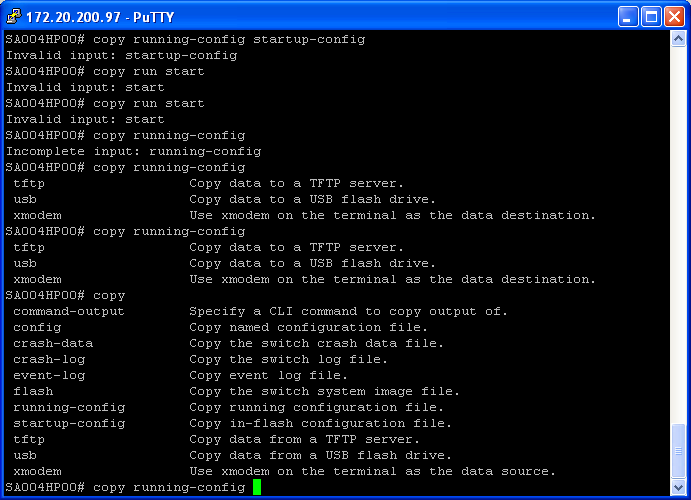
copy run start
- Mark as New
- Bookmark
- Subscribe
- Mute
- Subscribe to RSS Feed
- Permalink
- Report Inappropriate Content
10-11-2010 12:27 PM
10-11-2010 12:27 PM
Re: IGMP config - how to?
I will do that!
copy run start -> doesn't work!
Maybe there is another command, do you have any idea?
- Mark as New
- Bookmark
- Subscribe
- Mute
- Subscribe to RSS Feed
- Permalink
- Report Inappropriate Content
10-11-2010 09:10 PM
10-11-2010 09:10 PM
Re: IGMP config - how to?
Instead of copy run start, use:
wr mem
- Mark as New
- Bookmark
- Subscribe
- Mute
- Subscribe to RSS Feed
- Permalink
- Report Inappropriate Content
10-12-2010 07:50 AM
10-12-2010 07:50 AM
Re: IGMP config - how to?
write memory which is the long version of wr mem.
Moreover the problem is solved:
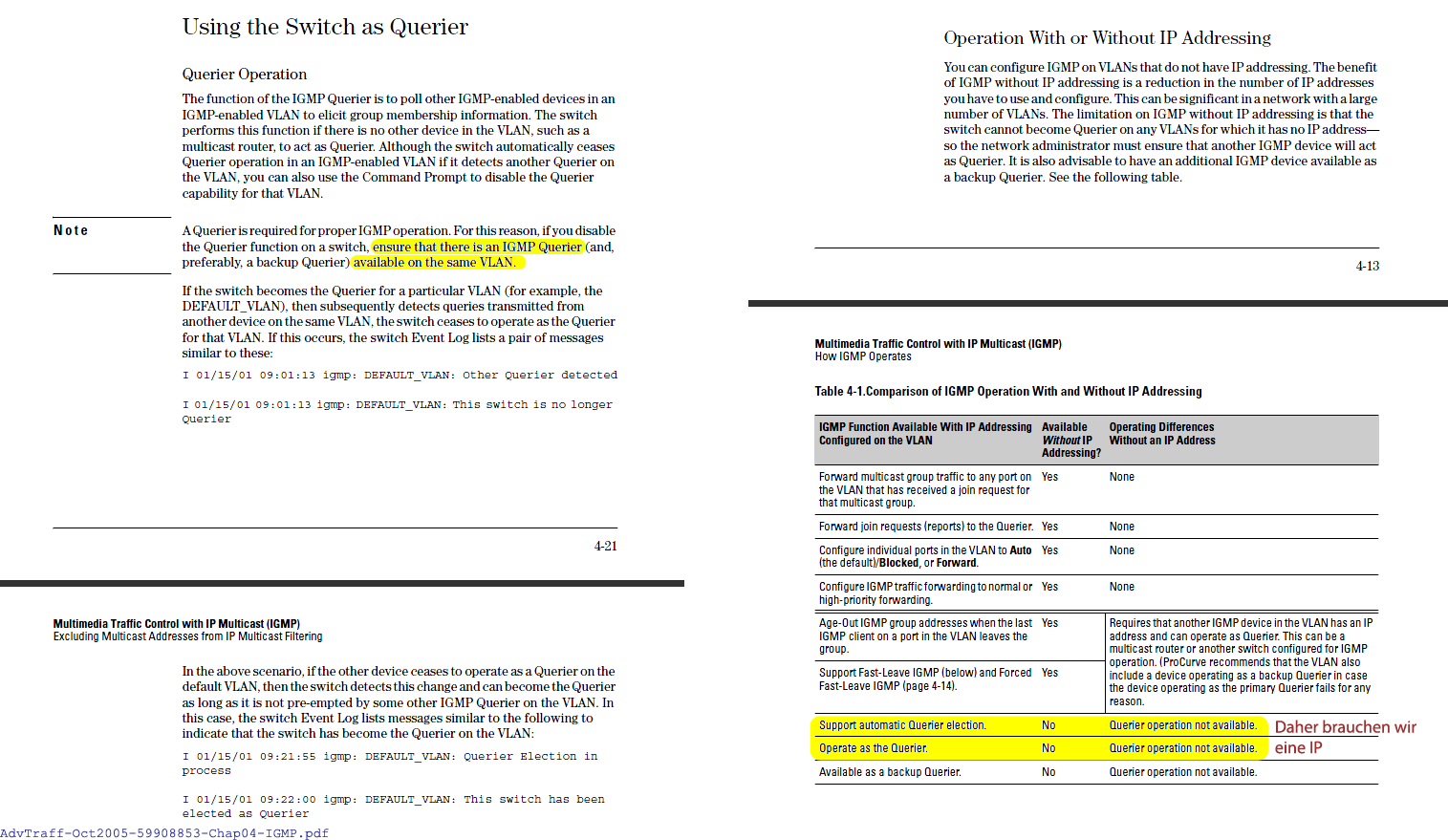
A querier was need in my topology. Therefore one Switch needs an IP address. -> see attachment.
After I have configured an IP address for one switch, the other switches register the configured switch as querier.
Thank you very much for your help!
Regards Mutex
- Mark as New
- Bookmark
- Subscribe
- Mute
- Subscribe to RSS Feed
- Permalink
- Report Inappropriate Content
10-12-2010 12:46 PM
10-12-2010 12:46 PM
Re: IGMP config - how to?
I also read the docs and copy in my first answer information about querier. :)
But I also remember that in real life I did not face such a problem (I think this is because at least one switch always had an IP). So I was not quite sure about the querier.
For me it also good to recall that querier is always needed.


- Mark as New
- Bookmark
- Subscribe
- Mute
- Subscribe to RSS Feed
- Permalink
- Report Inappropriate Content
10-12-2010 11:34 PM
10-12-2010 11:34 PM
Re: IGMP config - how to?
This is to forward multicasts only to the subbscribed ports an NOT "flood" multicasts to all ports on the switch (all switches).
But there needs to be a DR (designated )router for the multicasts in the network for correct operation of IGMP(snooping).
It's not the switch that specificly need an ip-adress.
Without DR the switch that is NOT directly connected to the multicast source cannot determine what (uplink) port to subscribe to the multicasts.
By giving some switch an ip-address in the network, this takes the DR function and IGMP can forward the multicasts to the subscribed ports.
As such the switch closest to the multicast source seems the best candidate for the ip-adress.
A section from this document may clarify things: http://www.h3c.com/portal/Products___Solutions/Products/Switches/H3C_S5810_Series_Switches/White_Paper/200912/656291_57_0.htm
PIM-DM assumes that at least one multicast group member exists on each subnet of a network, and therefore multicast data is flooded to all nodes on the network. Then, branches without receivers downstream are pruned from the forwarding tree, leaving only those branches with receivers. This â flood and pruneâ process takes place periodically, that is, pruned branches resume multicast forwarding when the pruned state times out and then data is re-flooded down these branches, and then are pruned again.