GreenLake Administration

- Community Home
- >
- Networking
- >
- Legacy
- >
- Switches, Hubs, Modems
- >
- Re: PCM update wizard problem
Switches, Hubs, and Modems
1855738
Members
5163
Online
104103
Solutions
Forums
Categories
Company
Local Language
back
Forums
Discussions
Knowledge Base
Forums
- Data Protection and Retention
- Entry Storage Systems
- Legacy
- Midrange and Enterprise Storage
- Storage Networking
- HPE Nimble Storage
Discussions
Knowledge Base
Forums
Discussions
- Cloud Mentoring and Education
- Software - General
- HPE OneView
- HPE Ezmeral Software platform
- HPE OpsRamp
Knowledge Base
Discussions
Forums
Discussions
back
Discussion Boards
Discussion Boards
Discussion Boards
Discussion Boards
Discussion Boards
Discussion Boards
Discussion Boards
Discussion Boards
Discussion Boards
Discussion Boards
Discussion Boards
Discussion Boards
Discussion Boards
Discussion Boards
Discussion Boards
Discussion Boards
Discussion Boards
Discussion Boards
Discussion Boards
Discussion Boards
Discussion Boards
Discussion Boards
Discussion Boards
Blogs
Information
Community
Resources
Community Language
Language
Forums
Blogs
Topic Options
- Subscribe to RSS Feed
- Mark Topic as New
- Mark Topic as Read
- Float this Topic for Current User
- Bookmark
- Subscribe
- Printer Friendly Page

- Mark as New
- Bookmark
- Subscribe
- Mute
- Subscribe to RSS Feed
- Permalink
- Report Inappropriate Content
10-22-2007 11:20 PM
10-22-2007 11:20 PM
PCM update wizard problem
I have encountered some problems:
1.when i configued the "globel:configuration management",and clicked the "download now" button.
After i downloaded the update version list (i made sure i had downloaded),but in the "configuration management switch software" ,it did not show any preferred vision from the list. Can someone help me with this problem?
2.
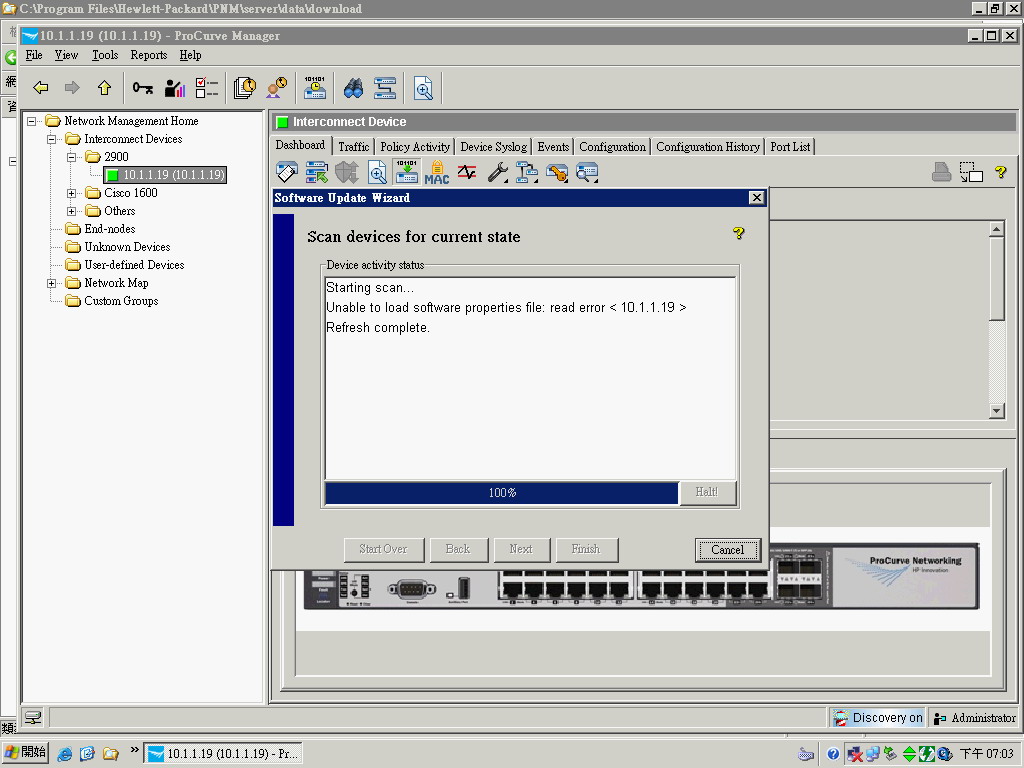
When I configured under the "software update wizard--scaning for the devices current state",the devices activity status showing the following messages:
--------------------------------------
Starting scan...
Unable to load software properties file: read error < 10.1.1.19 >
Refresh complete.
--------------------------------------
Can anyone help me with this, see what i configured wrong?
I have attached the screenshot about the problem.
1.when i configued the "globel:configuration management",and clicked the "download now" button.
After i downloaded the update version list (i made sure i had downloaded),but in the "configuration management switch software" ,it did not show any preferred vision from the list. Can someone help me with this problem?
2.
When I configured under the "software update wizard--scaning for the devices current state",the devices activity status showing the following messages:
--------------------------------------
Starting scan...
Unable to load software properties file: read error < 10.1.1.19 >
Refresh complete.
--------------------------------------
Can anyone help me with this, see what i configured wrong?
I have attached the screenshot about the problem.
2 REPLIES 2
- Mark as New
- Bookmark
- Subscribe
- Mute
- Subscribe to RSS Feed
- Permalink
- Report Inappropriate Content
10-23-2007 04:30 AM
10-23-2007 04:30 AM
Re: PCM update wizard problem
I suggest you verify that this file exists:
Program Files\Hewlett-Packard\PNM\server\data\download\procurve_firmware.prp
and that you can open it and read it. It is an ASCII file. Even though it may not make a lot of sense to you, you should be able to read it.
What OS are you running?
Program Files\Hewlett-Packard\PNM\server\data\download\procurve_firmware.prp
and that you can open it and read it. It is an ASCII file. Even though it may not make a lot of sense to you, you should be able to read it.
What OS are you running?
- Mark as New
- Bookmark
- Subscribe
- Mute
- Subscribe to RSS Feed
- Permalink
- Report Inappropriate Content
10-23-2007 12:29 PM
10-23-2007 12:29 PM
Re: PCM update wizard problem
At first, I did not notice the original poster's attachment.
It appears that this is not English Windows running.
PCM is not supported on non-English Windows.
The list of Windows versions supported is on the data sheet at:
www.hp.com/rnd/pdfs/datasheets/ProCurve_Manager_Plus_2.2.pdf
Ralph
It appears that this is not English Windows running.
PCM is not supported on non-English Windows.
The list of Windows versions supported is on the data sheet at:
www.hp.com/rnd/pdfs/datasheets/ProCurve_Manager_Plus_2.2.pdf
Ralph
The opinions expressed above are the personal opinions of the authors, not of Hewlett Packard Enterprise. By using this site, you accept the Terms of Use and Rules of Participation.
Company
Events and news
Customer resources
© Copyright 2026 Hewlett Packard Enterprise Development LP