- Community Home
- >
- Storage
- >
- Midrange and Enterprise Storage
- >
- HPE EVA Storage
- >
- Re: IE showing white page while loading HP P6000 C...
Categories
Company
Local Language
Forums
Discussions
Forums
- Data Protection and Retention
- Entry Storage Systems
- Legacy
- Midrange and Enterprise Storage
- Storage Networking
- HPE Nimble Storage
Discussions
Forums
Discussions
Discussions
Discussions
Forums
Discussions
Discussion Boards
Discussion Boards
Discussion Boards
Discussion Boards
- BladeSystem Infrastructure and Application Solutions
- Appliance Servers
- Alpha Servers
- BackOffice Products
- Internet Products
- HPE 9000 and HPE e3000 Servers
- Networking
- Netservers
- Secure OS Software for Linux
- Server Management (Insight Manager 7)
- Windows Server 2003
- Operating System - Tru64 Unix
- ProLiant Deployment and Provisioning
- Linux-Based Community / Regional
- Microsoft System Center Integration
Discussion Boards
Discussion Boards
Discussion Boards
Discussion Boards
Discussion Boards
Discussion Boards
Discussion Boards
Discussion Boards
Discussion Boards
Discussion Boards
Discussion Boards
Discussion Boards
Discussion Boards
Discussion Boards
Discussion Boards
Discussion Boards
Discussion Boards
Discussion Boards
Discussion Boards
Discussion Boards
Community
Resources
Forums
Blogs
- Subscribe to RSS Feed
- Mark Topic as New
- Mark Topic as Read
- Float this Topic for Current User
- Bookmark
- Subscribe
- Printer Friendly Page

- Mark as New
- Bookmark
- Subscribe
- Mute
- Subscribe to RSS Feed
- Permalink
- Report Inappropriate Content
09-14-2021 08:57 PM - last edited on 09-16-2021 01:45 AM by support_s
09-14-2021 08:57 PM - last edited on 09-16-2021 01:45 AM by support_s
IE showing white page while loading HP P6000 Command View
Hi All,
I am getting a white screen while trying to load HP P6000 Command View using the IE browser.
I am able to log in and able to view the details under Storage Network but when I click on the Enclosure or Vdisks or hosts nothing is displayed on the right-hand side.
I tried with the possible troubleshooting by changing IE settings and nothing really worked
Can someone help me with this?
Thank you

- Mark as New
- Bookmark
- Subscribe
- Mute
- Subscribe to RSS Feed
- Permalink
- Report Inappropriate Content
09-15-2021 12:41 PM
09-15-2021 12:41 PM
Re: IE showing white page while loading HP P6000 Command View
have you tried "Compatibility View" ?
- Mark as New
- Bookmark
- Subscribe
- Mute
- Subscribe to RSS Feed
- Permalink
- Report Inappropriate Content
09-15-2021 09:00 PM
09-15-2021 09:00 PM
Re: IE showing white page while loading HP P6000 Command View
Hi Support,
Without compatibility view, we are not able to log in.
With compatibility view, we can log in but shows everything blank.
After logging in, we are able to see everything on the left pane.
But if we select anything there, the right pane shows blank.
Browser : IE 10.0.9200.17609
Java : Version 8 Update 181 (build 1.8.0_181-b13)
Thank you,
System Support

- Mark as New
- Bookmark
- Subscribe
- Mute
- Subscribe to RSS Feed
- Permalink
- Report Inappropriate Content
09-16-2021 12:11 AM
09-16-2021 12:11 AM
Re: IE showing white page while loading HP P6000 Command View
Hello @Systems_ET,
That looks like an issue with the browser. Can you please try an alternate browser or another version of IE?
Regards,
Srinivas Bhat
If you feel this was helpful please click the KUDOS! thumb below!
Note: All of my comments are my own and are not any official representation of HPE.
I work at HPE
HPE Support Center offers support for your HPE services and products when and how you need it. Get started with HPE Support Center today.
[Any personal opinions expressed are mine, and not official statements on behalf of Hewlett Packard Enterprise]

- Mark as New
- Bookmark
- Subscribe
- Mute
- Subscribe to RSS Feed
- Permalink
- Report Inappropriate Content
09-16-2021 04:32 AM
09-16-2021 04:32 AM
Re: IE showing white page while loading HP P6000 Command View
Hello
Srinivas Bhat,
We are getting an error like the below while clicking on the options on the left-hand side,
""""
Webpage error details
User Agent: Mozilla/4.0 (compatible; MSIE 8.0; Windows NT 6.1; WOW64; Trident/4.0; SLCC2; .NET CLR 2.0.50727; .NET CLR 3.5.30729; .NET CLR 3.0.30729; .NET4.0C; .NET4.0E)
Timestamp: Thu, 16 Sep 2021 11:12:38 UTC
Message: Permission denied
Line: 6
Char: 3
Code: 0
URI: https://localhost:2372/RootPropArrays?guid=wnHfAUce%2BT4%2BskllQnhy0nJahIsQr6HIxZ40%2FJm71oc%3D&sessionId=6BAFDA9C-7C44-702B-5346-EE4E5AC37453&xfws=https%3A%2F%2Flocalhost%3A2374%2F
"""""
Thank you,
- Mark as New
- Bookmark
- Subscribe
- Mute
- Subscribe to RSS Feed
- Permalink
- Report Inappropriate Content
09-16-2021 09:23 AM
09-16-2021 09:23 AM
Re: IE showing white page while loading HP P6000 Command View
Hello @Systems_ET,
Can you please post the complete screenshot (mask if there is any confidential info)?
Regards,
Srinivas Bhat
If you feel this was helpful please click the KUDOS! thumb below!
I work at HPE
HPE Support Center offers support for your HPE services and products when and how you need it. Get started with HPE Support Center today.
[Any personal opinions expressed are mine, and not official statements on behalf of Hewlett Packard Enterprise]
- Mark as New
- Bookmark
- Subscribe
- Mute
- Subscribe to RSS Feed
- Permalink
- Report Inappropriate Content
09-16-2021 10:00 AM - edited 09-16-2021 10:01 AM
09-16-2021 10:00 AM - edited 09-16-2021 10:01 AM
Re: IE showing white page while loading HP P6000 Command View
Hi Srinivas Bhat,
How can we paste/upload images inside this?
Thank you,
- Mark as New
- Bookmark
- Subscribe
- Mute
- Subscribe to RSS Feed
- Permalink
- Report Inappropriate Content
09-16-2021 08:43 PM
09-16-2021 08:43 PM
Re: IE showing white page while loading HP P6000 Command View
Hello @Systems_ET,
Save the image locally on your system.
While you are drafting a post, click on the camera icon.
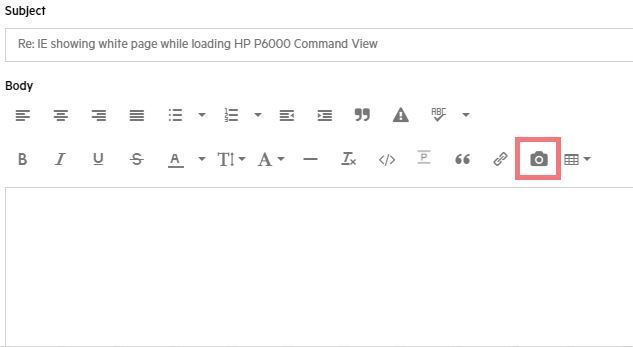
Click on choose file

Browse to the location where saved the file on your system.
Select the file and click on open.
On the next page, click on 'DONE'.
You will the image as a part of your post.
Regards,
Srinivas Bhat
If you feel this was helpful please click the KUDOS! thumb below!
Note: All of my comments are my own and are not any official representation of HPE.
I work at HPE
HPE Support Center offers support for your HPE services and products when and how you need it. Get started with HPE Support Center today.
[Any personal opinions expressed are mine, and not official statements on behalf of Hewlett Packard Enterprise]
- Mark as New
- Bookmark
- Subscribe
- Mute
- Subscribe to RSS Feed
- Permalink
- Report Inappropriate Content
09-16-2021 08:51 PM - edited 09-16-2021 08:54 PM
09-16-2021 08:51 PM - edited 09-16-2021 08:54 PM
Re: IE showing white page while loading HP P6000 Command View
Hi Srinivas Bhat,
Thank you for the update.
Please find the screenshot below,

Thank you,
- Mark as New
- Bookmark
- Subscribe
- Mute
- Subscribe to RSS Feed
- Permalink
- Report Inappropriate Content
09-17-2021 07:48 AM
09-17-2021 07:48 AM
Re: IE showing white page while loading HP P6000 Command View
Hello @Systems_ET,
What is the user id you logged in with (only tell me user group)? does it have admin rights? when was the last time it worked fine?
Regards,
Srinivas Bhat
If you feel this was helpful please click the KUDOS! thumb below!
Note: All of my comments are my own and are not any official representation of HPE.
I work at HPE
HPE Support Center offers support for your HPE services and products when and how you need it. Get started with HPE Support Center today.
[Any personal opinions expressed are mine, and not official statements on behalf of Hewlett Packard Enterprise]
- Mark as New
- Bookmark
- Subscribe
- Mute
- Subscribe to RSS Feed
- Permalink
- Report Inappropriate Content
09-17-2021 08:38 AM
09-17-2021 08:38 AM
Re: IE showing white page while loading HP P6000 Command View
Hi Srinivas Bhat,
We are using with domain administrator and also with another admin user.
Both the users are members of Administrators, HP Storage Admins, and HP Storage Users.
Should we add these users to any other groups?
Last time we were able to login successfully was one month back.
Thank you,
System Support
- Mark as New
- Bookmark
- Subscribe
- Mute
- Subscribe to RSS Feed
- Permalink
- Report Inappropriate Content
09-22-2021 12:25 PM - last edited on 09-24-2021 04:38 AM by Parvez_Admin
09-22-2021 12:25 PM - last edited on 09-24-2021 04:38 AM by Parvez_Admin
Re: IE showing white page while loading HP P6000 Command View
- Mark as New
- Bookmark
- Subscribe
- Mute
- Subscribe to RSS Feed
- Permalink
- Report Inappropriate Content
09-24-2021 05:32 AM
09-24-2021 05:32 AM
Re: IE showing white page while loading HP P6000 Command View
Hello @Systems_ET,
Sorry for the delayed response. I had received your response outside my working hours followed by weekend.
If you were able to login successfully with the same user before with the exact same settings, but it is not working now, is strange. To address this, it requires log analysis and deep insight into the problem. So I recommand you to contact HPE support.
The important point what I can tell is, 'Domain users will not have access outside the domain'. So, the system resource you are accessing must be part of the same domain the user id belongs to. Hope the domain settings were not changes after you had successfully logged in before.
Regards,
Srinivas Bhat
If you feel this was helpful please click the KUDOS! thumb below!
Note: All of my comments are my own and are not any official representation of HPE.
I work at HPE
HPE Support Center offers support for your HPE services and products when and how you need it. Get started with HPE Support Center today.
[Any personal opinions expressed are mine, and not official statements on behalf of Hewlett Packard Enterprise]
- Mark as New
- Bookmark
- Subscribe
- Mute
- Subscribe to RSS Feed
- Permalink
- Report Inappropriate Content
09-24-2021 10:22 PM
09-24-2021 10:22 PM
Re: IE showing white page while loading HP P6000 Command View
Hello Srinivas,
Thank you for the update.
Recently we have changed the domain admin password but we are able to login to the EVA Command view using the new password but facing this issue.
Should we have to change or modify any of the EVA configurations with the new domain password?
Thank you,
- Mark as New
- Bookmark
- Subscribe
- Mute
- Subscribe to RSS Feed
- Permalink
- Report Inappropriate Content
09-26-2021 10:31 PM
09-26-2021 10:31 PM
Re: IE showing white page while loading HP P6000 Command View
Hello @Systems_ET,
There seems to be something wrong with the user rights. To investigate further, it requires deeper insight into the problem and logs analysis. So I recommend you to contact HPE support.
Regards,
Srinivas Bhat
If you feel this was helpful please click the KUDOS! thumb below!
Note: All of my comments are my own and are not any official representation of HPE.
I work at HPE
HPE Support Center offers support for your HPE services and products when and how you need it. Get started with HPE Support Center today.
[Any personal opinions expressed are mine, and not official statements on behalf of Hewlett Packard Enterprise]