- Community Home
- >
- Software
- >
- HPE OneView
- >
- Re: Disable specific alerts
Categories
Company
Local Language
Forums
Discussions
Forums
- Data Protection and Retention
- Entry Storage Systems
- Legacy
- Midrange and Enterprise Storage
- Storage Networking
- HPE Nimble Storage
Discussions
Forums
Discussions
Discussions
Discussions
Forums
Discussions
Discussion Boards
Discussion Boards
Discussion Boards
Discussion Boards
- BladeSystem Infrastructure and Application Solutions
- Appliance Servers
- Alpha Servers
- BackOffice Products
- Internet Products
- HPE 9000 and HPE e3000 Servers
- Networking
- Netservers
- Secure OS Software for Linux
- Server Management (Insight Manager 7)
- Windows Server 2003
- Operating System - Tru64 Unix
- ProLiant Deployment and Provisioning
- Linux-Based Community / Regional
- Microsoft System Center Integration
Discussion Boards
Discussion Boards
Discussion Boards
Discussion Boards
Discussion Boards
Discussion Boards
Discussion Boards
Discussion Boards
Discussion Boards
Discussion Boards
Discussion Boards
Discussion Boards
Discussion Boards
Discussion Boards
Discussion Boards
Discussion Boards
Discussion Boards
Discussion Boards
Discussion Boards
Discussion Boards
Community
Resources
Forums
Blogs
- Subscribe to RSS Feed
- Mark Topic as New
- Mark Topic as Read
- Float this Topic for Current User
- Bookmark
- Subscribe
- Printer Friendly Page

- Mark as New
- Bookmark
- Subscribe
- Mute
- Subscribe to RSS Feed
- Permalink
- Report Inappropriate Content
08-31-2020 10:15 AM
08-31-2020 10:15 AM
Is it possible to disable a specific alert for a blade chassis?
For examle. We'd like to temporarily disable this alet Critical The stacking health has changed to disconnected. bladechassisA interconnect group for a specific chassis. is this possible to achieve?
Solved! Go to Solution.

- Mark as New
- Bookmark
- Subscribe
- Mute
- Subscribe to RSS Feed
- Permalink
- Report Inappropriate Content
09-01-2020 10:09 AM
09-01-2020 10:09 AM
Re: Disable specific alerts
Are you asking if an administrator can disable an alert within the UI? Today that is not possible. If you are using the EMail alerting feature, then you can look at the alert details, and use the alertTypeID property to exclude the value in your email filter rule. Here is an example on an email rule that will capture critical and warning alerts, but not when the alert type is a specific value:
status:critical status:warning
NOT alertTypeID:REPLACEME
[Any personal opinions expressed are mine, and not official statements on behalf of Hewlett Packard Enterprise]

- Mark as New
- Bookmark
- Subscribe
- Mute
- Subscribe to RSS Feed
- Permalink
- Report Inappropriate Content
10-15-2020 11:54 AM
10-15-2020 11:54 AM
Re: Disable specific alerts
I want to suppress the new "Overall Security Status" alerts. Is there away to do that? For context the alert says, "Overall security status of the system is at risk" The resolution is, "Navigate to the 'Security Dashboard' tab under the 'Information' section on the iLO Web UI in order to evaluate your configuration for potential risks and view advice on improving system security. "
- Mark as New
- Bookmark
- Subscribe
- Mute
- Subscribe to RSS Feed
- Permalink
- Report Inappropriate Content
10-16-2020 09:29 AM
10-16-2020 09:29 AM
Re: Disable specific alerts
Unfortunately, we do not have the ability to suppress alerts within the appliance. If you are asking about email alerting, then you can add an exclusion rule by looking at the alert details for the trap ID and add a NOT alertId:{IDVALUE}.
[Any personal opinions expressed are mine, and not official statements on behalf of Hewlett Packard Enterprise]
- Mark as New
- Bookmark
- Subscribe
- Mute
- Subscribe to RSS Feed
- Permalink
- Report Inappropriate Content
10-16-2020 09:46 AM
10-16-2020 09:46 AM
Re: Disable specific alerts
Yes I am looking for a way to filter the email alerting. I have tried adding an exclusion rule but it's not working. The alert we receive says, "Overall security status of the system is at risk." The alert ID for this is 9030 so the exclucsion would look like this: status:warning NOT alertId:9030. Is that correct? And if I wanted to a a second one for 9029 would it look like this: status:warning NOT alertId:9030 NOT alertId:9029
- Mark as New
- Bookmark
- Subscribe
- Mute
- Subscribe to RSS Feed
- Permalink
- Report Inappropriate Content
10-16-2020 10:00 AM
10-16-2020 10:00 AM
Re: Disable specific alerts
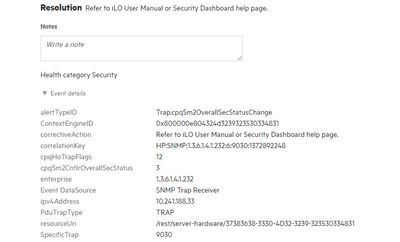
Do you have a full screenshot of the event details? There should be an snmpTrapID table property name. You want it plus the value of that property to add to your filter.
[Any personal opinions expressed are mine, and not official statements on behalf of Hewlett Packard Enterprise]
- Mark as New
- Bookmark
- Subscribe
- Mute
- Subscribe to RSS Feed
- Permalink
- Report Inappropriate Content
10-16-2020 11:29 AM
10-16-2020 11:29 AM
Re: Disable specific alerts
Chris this is from the iLO event log:
Initial Update 10/16/2020 01:53:53
Event Class 0x23
Event Code 0x491
Recommended Action Refer to iLO user manual or Security Dashboard help page.
- Mark as New
- Bookmark
- Subscribe
- Mute
- Subscribe to RSS Feed
- Permalink
- Report Inappropriate Content
10-19-2020 12:51 PM
10-19-2020 12:51 PM
Re: Disable specific alerts
- Mark as New
- Bookmark
- Subscribe
- Mute
- Subscribe to RSS Feed
- Permalink
- Report Inappropriate Content
10-19-2020 01:22 PM
10-19-2020 01:22 PM
Re: Disable specific alerts
You want to use NOT alertTypeID:Trap.cpqSm2OVeralSecStatusChange as part of the filter. That should exclude the alert from propogating via email to the recipients.
[Any personal opinions expressed are mine, and not official statements on behalf of Hewlett Packard Enterprise]
- Mark as New
- Bookmark
- Subscribe
- Mute
- Subscribe to RSS Feed
- Permalink
- Report Inappropriate Content
10-19-2020 01:33 PM
10-19-2020 01:33 PM
Re: Disable specific alerts
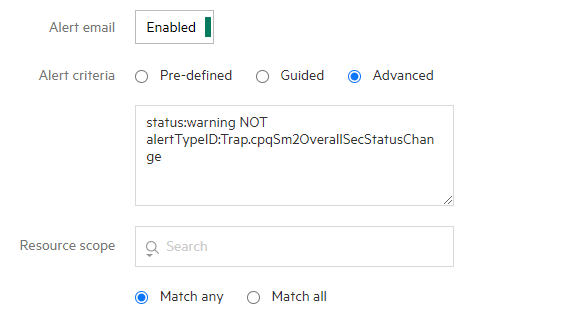
Still receiving the messages. This is what my filter looks like.:
- Mark as New
- Bookmark
- Subscribe
- Mute
- Subscribe to RSS Feed
- Permalink
- Report Inappropriate Content
10-19-2020 01:37 PM
10-19-2020 01:37 PM
SolutionA few things:
- Make sure I didn't fat finger the alertTypeID value.
- Make sure the alert severity is Warning, and not Informational.
- Do you have any other email alert filters configured on the appliance? Just because you are trying to filter it out for one email destination doesn't mean it is applied to all.
[Any personal opinions expressed are mine, and not official statements on behalf of Hewlett Packard Enterprise]
- Mark as New
- Bookmark
- Subscribe
- Mute
- Subscribe to RSS Feed
- Permalink
- Report Inappropriate Content
10-20-2020 07:09 AM
10-20-2020 07:09 AM
Re: Disable specific alerts
#3! I believe it was hitting a filter before that and never processing this new one. Problem resolved. Thank you!!!