- Community Home
- >
- Networking
- >
- Wireless
- >
- M and MSM Series
- >
- MSM720 Controller Team with authenticating 802.1x+...
Categories
Company
Local Language
Forums
Discussions
Forums
- Data Protection and Retention
- Entry Storage Systems
- Legacy
- Midrange and Enterprise Storage
- Storage Networking
- HPE Nimble Storage
Discussions
Forums
Discussions
Discussions
Discussions
Forums
Discussions
Discussion Boards
Discussion Boards
Discussion Boards
Discussion Boards
- BladeSystem Infrastructure and Application Solutions
- Appliance Servers
- Alpha Servers
- BackOffice Products
- Internet Products
- HPE 9000 and HPE e3000 Servers
- Networking
- Netservers
- Secure OS Software for Linux
- Server Management (Insight Manager 7)
- Windows Server 2003
- Operating System - Tru64 Unix
- ProLiant Deployment and Provisioning
- Linux-Based Community / Regional
- Microsoft System Center Integration
Discussion Boards
Discussion Boards
Discussion Boards
Discussion Boards
Discussion Boards
Discussion Boards
Discussion Boards
Discussion Boards
Discussion Boards
Discussion Boards
Discussion Boards
Discussion Boards
Discussion Boards
Discussion Boards
Discussion Boards
Discussion Boards
Discussion Boards
Discussion Boards
Discussion Boards
Discussion Boards
Community
Resources
Forums
Blogs
- Subscribe to RSS Feed
- Mark Topic as New
- Mark Topic as Read
- Float this Topic for Current User
- Bookmark
- Subscribe
- Printer Friendly Page

- Mark as New
- Bookmark
- Subscribe
- Mute
- Subscribe to RSS Feed
- Permalink
- Report Inappropriate Content
10-02-2015 05:53 AM
10-02-2015 05:53 AM
Hello all !
I'm having some authentication problems in Active Directory. Here's how this setup at that time:
- Was performed successfully join the AD. Created a group to authenticate in the Controller and AD.
- It created the XYZ SSID with WPA2 protection (AES / CCMP) with Dynamic Key Source + 802.1x with AD.
- On the client (Win7) I manually configured the network to use PEAP.
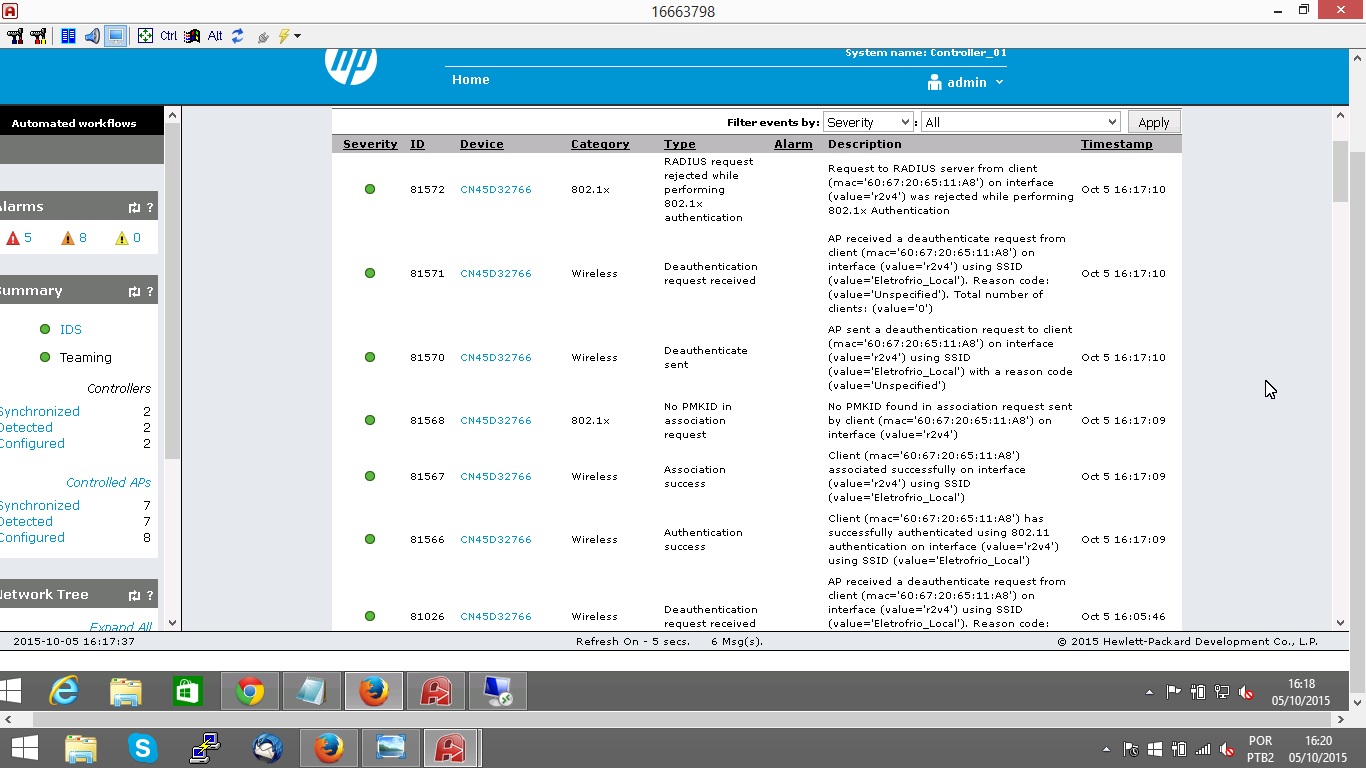
- When you connect the network appears to enter the User / Password, however access is not established and I have error messages attached.
I have this same setup on another client, the only difference is that on the client with problem we are in the environment with Team Controller MSM720 and MSM430 AP. And on the client where works have MSM760 + MSM460.
Is there any way to debug the Controller to communicate it to the AD is working or something else that can help me in this analysis ??
Tk.
ATP FLEXNETWORK V3 | ACSA
Solved! Go to Solution.

- Mark as New
- Bookmark
- Subscribe
- Mute
- Subscribe to RSS Feed
- Permalink
- Report Inappropriate Content
10-02-2015 09:13 AM
10-02-2015 09:13 AM
SolutionFew things to verify:
check the Authentication section --> Active directory and ensure at least one Active Directory group is activated. By default AC and Non-AC Active Directory group is disabled.
If you have configured any specific/custom group attributes, make sure the same "group name" is configured on the Active Directory as well. Because when the controller searches for the name, its going to look for the group attribute match. If the retrieved user group attribute didnt match what you have configured in the custom group attribute, then the authentication would fail.
I dont think its a certificate issue because the radius reject is seen on the logs. But just for testing, can you test the manual profile on the Windows client without "validate server certificate" option?
Ram
- Mark as New
- Bookmark
- Subscribe
- Mute
- Subscribe to RSS Feed
- Permalink
- Report Inappropriate Content
10-02-2015 10:28 AM
10-02-2015 10:28 AM
Re: MSM720 Controller Team with authenticating 802.1x+AD
Thank you for RamKrish help.
I will check the issue of the default group. I believe the two are disabled.
ATP FLEXNETWORK V3 | ACSA
- Mark as New
- Bookmark
- Subscribe
- Mute
- Subscribe to RSS Feed
- Permalink
- Report Inappropriate Content
10-05-2015 01:49 PM
10-05-2015 01:49 PM
Re: MSM720 Controller Team with authenticating 802.1x+AD
Hello.
Groups "default" were disabled.
- I enable the group "Default non AC Active Directory Group". It is necessary to link the VSC in this group ?
- Error logs are the same.
- The VSC this as egress VLAN. And we are using Mobility traffic manager in VSC.
I honestly have no idea of where this problem. Already read documentation and how to.
I accept new ideas for this case ..
ATP FLEXNETWORK V3 | ACSA
- Mark as New
- Bookmark
- Subscribe
- Mute
- Subscribe to RSS Feed
- Permalink
- Report Inappropriate Content
10-05-2015 05:47 PM
10-05-2015 05:47 PM
Re: MSM720 Controller Team with authenticating 802.1x+AD
Check if both the controller in the team shows as JOINED state.
Initially just enable both the Default Group and test. Disable any custom specific groups.
Once you have successfully tested with Default Groups, then you can enable the custom AD groups on the authentication profile.
Ram
- Mark as New
- Bookmark
- Subscribe
- Mute
- Subscribe to RSS Feed
- Permalink
- Report Inappropriate Content
10-05-2015 06:09 PM
10-05-2015 06:09 PM
Re: MSM720 Controller Team with authenticating 802.1x+AD
Any idea how to debug communication?
ATP FLEXNETWORK V3 | ACSA
- Mark as New
- Bookmark
- Subscribe
- Mute
- Subscribe to RSS Feed
- Permalink
- Report Inappropriate Content
10-05-2015 06:16 PM
10-05-2015 06:16 PM
Re: MSM720 Controller Team with authenticating 802.1x+AD
Under the controller --> Tools --> system tools --> select "Extra AD/Radius debug" and select run.
Then if you perform the tests again, in the log files you should see additional logs getting captured.
Ram


- Mark as New
- Bookmark
- Subscribe
- Mute
- Subscribe to RSS Feed
- Permalink
- Report Inappropriate Content
10-07-2015 08:07 AM
10-07-2015 08:07 AM
Re: MSM720 Controller Team with authenticating 802.1x+AD
I will have just short notice. Sorry for that I know that you are solving AD vs MSM. But my experience with MSM and AD integration is not so good. (but last time I used this was in older firmwares 5.x.x).
So all setups where I need to use 802.1X and WPA2-AES dynamic keys I am solving using traditional RADIUS server. In Windows world simply with Microsoft Network policy server. This will use AD and all policies are based on standard. Results are great. Functional on first touch.
Just add Radius clients (each AP for non-access controlled VSC), add some policies based on groups.
Especially this is great for computer-based authentication.
From my view this is more transparent and better logged.
But I am very interested about AD integration if you will be successful.
System engineer
AVE BOHEMIA, s.r.o.
- Mark as New
- Bookmark
- Subscribe
- Mute
- Subscribe to RSS Feed
- Permalink
- Report Inappropriate Content
10-07-2015 08:43 AM
10-07-2015 08:43 AM
Re: MSM720 Controller Team with authenticating 802.1x+AD
Hello Michal !!!
Thanks for the tip. If you have any procedure or documentation on how to perform this configuration please send me.
I will take the tests today and tomorrow. If you have no success I will think of another form of authentication.
ATP FLEXNETWORK V3 | ACSA
- Mark as New
- Bookmark
- Subscribe
- Mute
- Subscribe to RSS Feed
- Permalink
- Report Inappropriate Content
10-07-2015 10:02 AM
10-07-2015 10:02 AM
Re: MSM720 Controller Team with authenticating 802.1x+AD
Hello,
easy to do.
First you must install the role on some Windows Server (I recommend 2008 R2 and later)
This role is Windows Network policy server (NPS). You need just policy server, nothing more.
Second you need to setup communication between MSM controller, APs and NPS. This is common RADIUS.
So on MSM you need:
Go to Authentication - go to RADIUS profiles, click Add New profile and fill the details.
IP address is the IP of your Windows NPS and preshared key is your own secret key for communication between controller and NPS (same must be filled in NPS).
Untick Use Message authenticator. Check authentication method which must be set to MSCHAPv2. For HA setup you need two NPS servers, so you can fill both, but for test you can use just one (primary).
On NPS server:
Go to RADIUS Clients and Servers - Radius clients - New and fill the details.
Here you are working with two common scenarios. First one is authentication box checked on your VSC in MSM. In this case you need add here just controller IP address. But if you would like to be completely independent on controller (so unticked Access controller/Authentication) you must add here all APs. (just note: In linux and freeradius it is possible to add range of IPs, in Windows not).
you need add the name, IP address and preshared key which you fill in MSM setup.
At this time you passed the all the basics. Now it is the time for policies.
You can use RADIUS for Guest access and also for 802.1X. So in first case you will use just MSCHAPv2 protocol, in second case you need to use EAP protocol (TLS for certificates or PEAP for passwords).
If you need to use both methods you must in conditions divide those two access methods.
In Policies - Network policies just add a new one. On first tab you fill the name, next, on second tab you need to set conditions of access. Just click add, choose Windows Groups and choose group of users you would like to give the access. and OK. You can specify here the condition for authentication protocol, add second condition and choose Authentication method and choose appropriate (Windows use EAP as EAP-TLS, PEAP and MSCHAP derivates). Next. Then Leave access granted and next. In EAP types you must add correct method you want to use.
Here you must have certificate in system you will use for encryption (can be used internal or self-signed).
On the last page you are specifying other details like VLANs, access lists etc. But this is very complex.
If you have this policy:
you must check on MSM your VSC. You must go to 802.1X config and choose (check) previously created RADIUS profile.
If you would like to have total independence untick access control/authentication. So all traffic including authentication will go thru AP (not controller).
Try the access. It is written directly from my head so it can be small mistakes.
How to check the result if something fails. Easily - check first system log on your NPS server where are reported problem with NPS itself, mainly problem with client communication. (like bad passwords etc).
And the most important: Security log, where you will see RADIUS packets and result of policies.
Some problems connected to this:
If you need to have dynamic VLANs - my experience is that APs must be provisioned to be on tagged VLAN (with management interface) - best is to manually force the AP to do this. And then create virtual interface for APs VLAN to connect all APs by L2 discovery (discovery on this interface must be allowed). But this is good question to discussion. I only write my experience and working setup.
System engineer
AVE BOHEMIA, s.r.o.
- Mark as New
- Bookmark
- Subscribe
- Mute
- Subscribe to RSS Feed
- Permalink
- Report Inappropriate Content
10-08-2015 01:31 PM
10-08-2015 01:31 PM
Re: MSM720 Controller Team with authenticating 802.1x+AD
I have good news in this case. The configuration performed in the Controller was correct, the problem is in the DNS configured in the Controller. It was set up two local DNS, and Join the AD functioned perfectly. After reverse DNS authentication worked perfectly.
Now, as I did not have problems with the Join the previously configured DNS ...
ATP FLEXNETWORK V3 | ACSA