- Community Home
- >
- Servers and Operating Systems
- >
- HPE ProLiant
- >
- ProLiant Servers (ML,DL,SL)
- >
- Re: Query: HPE Smart Storage Administrator GUI in ...
Categories
Company
Local Language
Forums
Discussions
Forums
- Data Protection and Retention
- Entry Storage Systems
- Legacy
- Midrange and Enterprise Storage
- Storage Networking
- HPE Nimble Storage
Discussions
Forums
Discussions
Discussions
Forums
Discussions
Discussion Boards
Discussion Boards
Discussion Boards
Discussion Boards
- BladeSystem Infrastructure and Application Solutions
- Appliance Servers
- Alpha Servers
- BackOffice Products
- Internet Products
- HPE 9000 and HPE e3000 Servers
- Networking
- Netservers
- Secure OS Software for Linux
- Server Management (Insight Manager 7)
- Windows Server 2003
- Operating System - Tru64 Unix
- ProLiant Deployment and Provisioning
- Linux-Based Community / Regional
- Microsoft System Center Integration
Discussion Boards
Discussion Boards
Discussion Boards
Discussion Boards
Discussion Boards
Discussion Boards
Discussion Boards
Discussion Boards
Discussion Boards
Discussion Boards
Discussion Boards
Discussion Boards
Discussion Boards
Discussion Boards
Discussion Boards
Discussion Boards
Discussion Boards
Discussion Boards
Discussion Boards
Discussion Boards
Community
Resources
Forums
Blogs
- Subscribe to RSS Feed
- Mark Topic as New
- Mark Topic as Read
- Float this Topic for Current User
- Bookmark
- Subscribe
- Printer Friendly Page

- Mark as New
- Bookmark
- Subscribe
- Mute
- Subscribe to RSS Feed
- Permalink
- Report Inappropriate Content
06-13-2022 10:09 AM - last edited on 06-21-2022 06:37 PM by support_s
06-13-2022 10:09 AM - last edited on 06-21-2022 06:37 PM by support_s
HPE Smart Storage Administrator GUI in Server 2019 Core
Hello,
I have a server 2019 core installed on HPE Proliant d360 Gen10. I have not been able to get HPE Smart Storage Administrator GUI to work on the OS regardless of whatever I have tried to resolve it. I have copied oledlg.dll into both the installation path and SYSTEM32 folder, installed Chrome and Egde incase it needed a browser, installed the latest version of HPE SSA (5+). Nothing works. I need to expand an array (RAID 5)online with two extra disks, and I cannot achieve this vi a the always on option in ILO. i cannot do this offline either as this is a production server.
Your help will be highly appreciated

- Mark as New
- Bookmark
- Subscribe
- Mute
- Subscribe to RSS Feed
- Permalink
- Report Inappropriate Content
06-13-2022 11:09 AM
06-13-2022 11:09 AM
Query: HPE Smart Storage Administrator GUI in Server 2019 Core
System recommended content:
1. HPE Smart Array SR Gen10 User Guide | Smart Storage Administrator
2. HPE Smart Storage Administrator User Guide
Please click on "Thumbs Up/Kudo" icon to give a "Kudo".
Thank you for being a HPE valuable community member.

- Mark as New
- Bookmark
- Subscribe
- Mute
- Subscribe to RSS Feed
- Permalink
- Report Inappropriate Content
06-14-2022 01:12 AM
06-14-2022 01:12 AM
Re: Query: HPE Smart Storage Administrator GUI in Server 2019 Core
Wow! How helpful! You must be the life of the party in the support community! It is like asking someone for directions to a location and they hand you the highway code. Honestly, if you cannot help with the question, no need to respond. This was highly unhelpful and just plain condescending.
I have read the SSA guide enough before posting my question here. Also, I know I can use the CLI if all avenues to the GUI fail, but that is not the question.
I will appreciate responses from people who ACTUALLY can help in resolving this issue.
Thanks

- Mark as New
- Bookmark
- Subscribe
- Mute
- Subscribe to RSS Feed
- Permalink
- Report Inappropriate Content
06-19-2022 09:44 PM
06-19-2022 09:44 PM
Re: Query: HPE Smart Storage Administrator GUI in Server 2019 Core
Hi,
Thank you for the Post. We understand that you are unable to use the SSA GUI, but could you please let us know what exactly happens - if you are getting any error while running / GUI Screen is blank / if the GUI crashes.
Also let us know what is the current version of SSA that you are using and let us know if you have tried different versions.
And yes, if the GUI doesnt work - we may have to either re-install the SSA / use the latest SSA version and if nothing helps we can use the CLI.
And as last resort - the Offline SSA.
However try to explain the behaviour once the SSA is launched, we shall check and share suggestions if any.
Thank you
RamKS
I work for HPE.
[Any personal opinions expressed are mine, and not official statements on behalf of Hewlett Packard Enterprise]
- Mark as New
- Bookmark
- Subscribe
- Mute
- Subscribe to RSS Feed
- Permalink
- Report Inappropriate Content
06-22-2022 01:10 AM - last edited on 06-22-2022 11:21 PM by Sunitha_Mod
06-22-2022 01:10 AM - last edited on 06-22-2022 11:21 PM by Sunitha_Mod
Re: Query: HPE Smart Storage Administrator GUI in Server 2019 Core
I know I can use SSACLI, but that is not the query here. Its whether I can get SSA GUI to work in Server 2019 core or not
- SSA version is 5.30.6.0 (from the latest SPP)
- I have installed both edge and chrome browsers in the server
- I copied into C:\Program Files\Smart Storage Administrator\ssa\bin oledlg.dll from the recommendation I got from all the online research
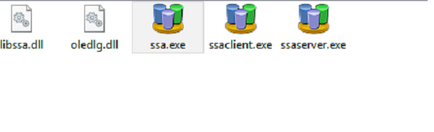
- When I run ssa.exe, nothing happens
- When I run ssa.htm from C:\Program Files\Smart Storage Administrator\ssa\HTML\SSA1, it launches in the browser, runs ssainit.hm in a pop-up window, but it is blank
- This is as far as I get.
- I cannot launch it from a remote computer either as that option seems to have gone since HP SMH is no longer supported
PS: Offline operation is not on the table here as I cannot bring the server down to carry out this expansion
SSACLI is a last resort if all else fails
Thanks
- Mark as New
- Bookmark
- Subscribe
- Mute
- Subscribe to RSS Feed
- Permalink
- Report Inappropriate Content
06-23-2022 12:57 AM
06-23-2022 12:57 AM
Re: Query: HPE Smart Storage Administrator GUI in Server 2019 Core
Hi @femiodulaja
Good day!
Not sure about the 5.30.6.0, this looks like its for VMWare SSA CLI.
"HPE Smart Storage Administrator (HPE SSA) CLI for VMware 7.0 hpessacli 5.30.6.0"
However, can you please try downloading and installing from : https://internal.support.hpe.com/hpesc/public/swd/detail?swItemId=MTX_891c6d6803044e5db3e0c2a5ab#tab-history and check.
It should ideally work. Also confirm if you have any other Server with different 2019 version and if you can check if SSA is working.
Thank you
RamKS
I work for HPE.
[Any personal opinions expressed are mine, and not official statements on behalf of Hewlett Packard Enterprise]
- Mark as New
- Bookmark
- Subscribe
- Mute
- Subscribe to RSS Feed
- Permalink
- Report Inappropriate Content
06-25-2022 12:38 PM - last edited on 06-26-2022 10:20 PM by Sunitha_Mod
06-25-2022 12:38 PM - last edited on 06-26-2022 10:20 PM by Sunitha_Mod
Re: Query: HPE Smart Storage Administrator GUI in Server 2019 Core
The 5.30.6.0 was installed as part of the latest SPP for gen10. Tryring to install the downloaded version tries to downgrade to 4.21.7.0
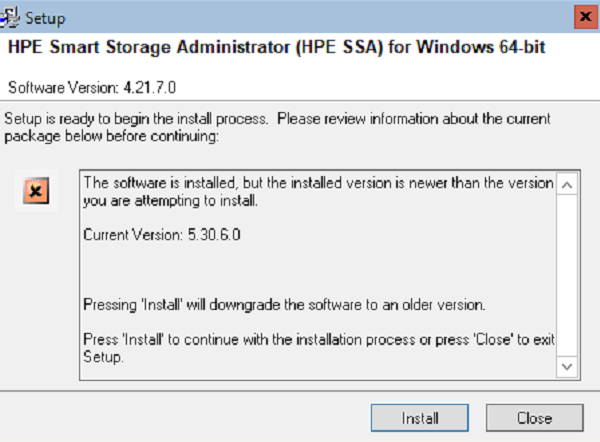
Downgrading did not make any difference. Still not working. I do not have any other server core 2019 to test with
- Mark as New
- Bookmark
- Subscribe
- Mute
- Subscribe to RSS Feed
- Permalink
- Report Inappropriate Content
06-28-2022 01:06 AM
06-28-2022 01:06 AM
Re: Query: HPE Smart Storage Administrator GUI in Server 2019 Core
Hi @femiodulaja
Thanks for trying the steps and sharing the update,
Would request you to log Case with HPE.
This may need some additional information and Lab replication (if required)
Of if you can share the details, I can help you in logging Case.
Thank you
RamKS
I work for HPE.
[Any personal opinions expressed are mine, and not official statements on behalf of Hewlett Packard Enterprise]