- Community Home
- >
- Servers and Operating Systems
- >
- HPE ProLiant
- >
- ProLiant Servers (ML,DL,SL)
- >
- Problem to upgrade driver on DL308G5 with NC373i
Categories
Company
Local Language
Forums
Discussions
Forums
- Data Protection and Retention
- Entry Storage Systems
- Legacy
- Midrange and Enterprise Storage
- Storage Networking
- HPE Nimble Storage
Discussions
Forums
Discussions
Discussions
Forums
Discussions
Discussion Boards
Discussion Boards
Discussion Boards
Discussion Boards
Discussion Boards
Discussion Boards
Discussion Boards
Discussion Boards
Discussion Boards
Discussion Boards
Discussion Boards
Discussion Boards
Discussion Boards
Discussion Boards
Discussion Boards
Discussion Boards
Discussion Boards
Discussion Boards
Discussion Boards
Discussion Boards
Discussion Boards
Discussion Boards
Discussion Boards
Community
Resources
Forums
Blogs
- Subscribe to RSS Feed
- Mark Topic as New
- Mark Topic as Read
- Float this Topic for Current User
- Bookmark
- Subscribe
- Printer Friendly Page

- Mark as New
- Bookmark
- Subscribe
- Mute
- Subscribe to RSS Feed
- Permalink
- Report Inappropriate Content
03-09-2008 01:11 PM
03-09-2008 01:11 PM
Problem to upgrade driver on DL308G5 with NC373i
I have a DL380G5 with 2 NC373i (Windows Server 2003 R2 SP2).
I can install NIC Driver until 3.0.7.0.
If I try to upgrade to new version, I receive several error in Device Manager.
I try the new version 4.1.5.0, but I have the same problem.
I have no ideas...
Thank you in advance for your support.
Best regards.
Alessandro

- Mark as New
- Bookmark
- Subscribe
- Mute
- Subscribe to RSS Feed
- Permalink
- Report Inappropriate Content
03-09-2008 01:42 PM
03-09-2008 01:42 PM
Re: Problem to upgrade driver on DL308G5 with NC373i
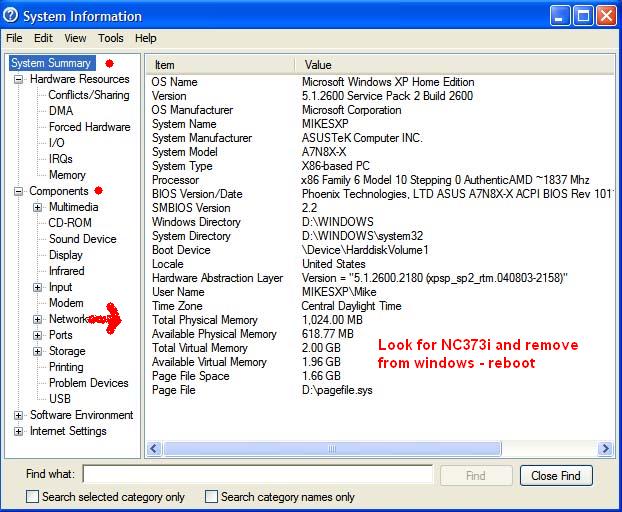
check this thread and follow juan quesada's workaround
which is basically
- uninstall actual driver
- remove it physically from windows
- reboot server
- avoid windows driver installation
- install driver manually
- regards
http://forums11.itrc.hp.com/service/forums/questionanswer.do?threadId=1208480
regards
- Mark as New
- Bookmark
- Subscribe
- Mute
- Subscribe to RSS Feed
- Permalink
- Report Inappropriate Content
03-09-2008 01:52 PM
03-09-2008 01:52 PM
Re: Problem to upgrade driver on DL308G5 with NC373i
details about steps 2 - 3 where to get driver's location, check attached file
regards

- Mark as New
- Bookmark
- Subscribe
- Mute
- Subscribe to RSS Feed
- Permalink
- Report Inappropriate Content
03-09-2008 11:15 PM
03-09-2008 11:15 PM
Re: Problem to upgrade driver on DL308G5 with NC373i
Phil
http://forums12.itrc.hp.com/service/forums/questionanswer.do?threadId=1200618
- Mark as New
- Bookmark
- Subscribe
- Mute
- Subscribe to RSS Feed
- Permalink
- Report Inappropriate Content
03-15-2008 01:13 PM
03-15-2008 01:13 PM
Re: Problem to upgrade driver on DL308G5 with NC373i
I have tried all your tips, but without success.
I have the same problem:
-if I install the driver 3.0.7.0, I haven't problems;
-if I install a driver after 3.0.7.0, the result is that I have, in the Device Manager, two "NC373i Virtual Device Bus" with the yellow exclamation mark.
I have already tried to delete CatRoot2 folder (with edb.log), without success (I have read this tip in another thread on this forum).
Thank you.
Best regards.
Alessandro
- Mark as New
- Bookmark
- Subscribe
- Mute
- Subscribe to RSS Feed
- Permalink
- Report Inappropriate Content
03-15-2008 04:18 PM
03-15-2008 04:18 PM
Re: Problem to upgrade driver on DL308G5 with NC373i
now that I see this:
"I have a DL380G5 with 2 NC373i (Windows Server 2003 R2 SP2)."
just 2 days ago I had same exact issue none workaround worked
and until my customer tried a non R2 W2003 drivers worked
I still don't know if R2 has any known issue with those drivers
it would be good to know.
he used W2003 R2 and SmartStart 7.91
so he used SS 7.91 again and non R2 W2003 and it worked.
sorry this is not a workaround but I was thinking what if my customer had tried SS 7.92 or 7.90
http://h20000.www2.hp.com/bizsupport/TechSupport/SoftwareIndex.jsp?lang=en&cc=us&prodNameId=344318&prodTypeId=18964&prodSeriesId=345557&swLang=8&taskId=135&swEnvOID=1113
by the way which SS did you used? version?
regards
- Mark as New
- Bookmark
- Subscribe
- Mute
- Subscribe to RSS Feed
- Permalink
- Report Inappropriate Content
03-16-2008 12:05 AM
03-16-2008 12:05 AM
Re: Problem to upgrade driver on DL308G5 with NC373i
thank you for your quick reply.
I use the Proliant Support Pack 8.00(A) for Win2003 x64 (the version of the NIC driver is 4.1.5.0).
Best regards.
Alessandro
- Mark as New
- Bookmark
- Subscribe
- Mute
- Subscribe to RSS Feed
- Permalink
- Report Inappropriate Content
03-16-2008 12:12 AM
03-16-2008 12:12 AM
Re: Problem to upgrade driver on DL308G5 with NC373i
I want to know something
1. is it W2003 x32 or x64 bits?
2. when you install only the driver for NIC cards
do you an error? like driver can not be installed?
3. I Suppose you dont see NIC cards in Network connections right?
regards
- Mark as New
- Bookmark
- Subscribe
- Mute
- Subscribe to RSS Feed
- Permalink
- Report Inappropriate Content
03-16-2008 01:42 AM
03-16-2008 01:42 AM
Re: Problem to upgrade driver on DL308G5 with NC373i
I use Win2003 Server Standard R2 SP2 x64.
When I install the NIC driver 4.1.5.0, I only see two "NC373i Virtual Device Bus" with yellow exclamation mark.
I don't see any nics in Network Connections.
Best regards.
Alessandro
- Mark as New
- Bookmark
- Subscribe
- Mute
- Subscribe to RSS Feed
- Permalink
- Report Inappropriate Content
03-16-2008 08:41 AM
03-16-2008 08:41 AM
Re: Problem to upgrade driver on DL308G5 with NC373i
I know about another driver
but I'm going to give a workaround to try.
go Windows Run -> msconfig -> startup tab ->
disable cpqteam.exe to avid that software to load -> reboot machine -> try this driver
http://broadcom.com/support/ethernet_nic/netxtremeii.php
also you can try the driver from HP too (but don't try both at the same reboot again)
after installation
enable cqpteam.exe again and reboot
let us know result
regards
- Mark as New
- Bookmark
- Subscribe
- Mute
- Subscribe to RSS Feed
- Permalink
- Report Inappropriate Content
03-16-2008 12:46 PM
03-16-2008 12:46 PM
Re: Problem to upgrade driver on DL308G5 with NC373i
Karlo, I have already tried this tip, without success.
This is a very difficult case!
I have no ideas...
Thank you.
Best regards.
Alessandro
- Mark as New
- Bookmark
- Subscribe
- Mute
- Subscribe to RSS Feed
- Permalink
- Report Inappropriate Content
03-16-2008 01:24 PM
03-16-2008 01:24 PM
Re: Problem to upgrade driver on DL308G5 with NC373i
what if you try rebuild the machine again with a previous smartstart 7.8 - 7.9
http://h20000.www2.hp.com/bizsupport/TechSupport/SoftwareDescription.jsp?lang=en&cc=us&prodTypeId=18964&prodSeriesId=345557&prodNameId=344318&swEnvOID=1113&swLang=8&mode=2&taskId=135&swItem=MTX-5f7f4719deaf4e6cba9b83cea1
regards
- Mark as New
- Bookmark
- Subscribe
- Mute
- Subscribe to RSS Feed
- Permalink
- Report Inappropriate Content
03-16-2008 01:25 PM
03-16-2008 01:25 PM
Re: Problem to upgrade driver on DL308G5 with NC373i
I forgot or another windows not R version
regards

- Mark as New
- Bookmark
- Subscribe
- Mute
- Subscribe to RSS Feed
- Permalink
- Report Inappropriate Content
03-16-2008 01:28 PM
03-16-2008 01:28 PM
Re: Problem to upgrade driver on DL308G5 with NC373i
did you try a firmware update of the NICs?
http://h20000.www2.hp.com/bizsupport/TechSupport/SoftwareDescription.jsp?lang=en&cc=us&prodTypeId=15351&prodSeriesId=1121516&prodNameId=3288134&swEnvOID=1005&swLang=8&mode=2&taskId=135&swItem=MTX-86a7c2b4e0ab4d6c8f6d6b86fb
Sometimes this causes the driver to can't be installed.
Since you tried all workarounds and the problem persists, this can be your issue...
Pac
- Mark as New
- Bookmark
- Subscribe
- Mute
- Subscribe to RSS Feed
- Permalink
- Report Inappropriate Content
03-16-2008 02:48 PM
03-16-2008 02:48 PM
Re: Problem to upgrade driver on DL308G5 with NC373i
I have already tried to upgrade the firmware, without success.
What is the difference between version 3.0.7.0 and the latest version (for example 4.1.5.0)?
Tha files inside the compressed file are different: the version 4.1.5.0 has more files and "wdf01005" file.
Thank you.
Best regards.
Alessandro
- Mark as New
- Bookmark
- Subscribe
- Mute
- Subscribe to RSS Feed
- Permalink
- Report Inappropriate Content
03-16-2008 03:36 PM
03-16-2008 03:36 PM
Re: Problem to upgrade driver on DL308G5 with NC373i
with every new driver there are new fixes and enhancement but I think since 3.0.7.0 version has been a lot of issues so don't worry stay in that version until new release or until broadcom releases a new drivers
regards
- Mark as New
- Bookmark
- Subscribe
- Mute
- Subscribe to RSS Feed
- Permalink
- Report Inappropriate Content
03-18-2008 04:40 PM
03-18-2008 04:40 PM
Re: Problem to upgrade driver on DL308G5 with NC373i
any update about this issue?
I'm doing a research let me ask you
I supposed you already try manual installation?
regards
- Mark as New
- Bookmark
- Subscribe
- Mute
- Subscribe to RSS Feed
- Permalink
- Report Inappropriate Content
03-18-2008 05:44 PM
03-18-2008 05:44 PM
Re: Problem to upgrade driver on DL308G5 with NC373i
just to be sure can you upload a screenshot (pic) from your device manager? just to double check
regards
- Mark as New
- Bookmark
- Subscribe
- Mute
- Subscribe to RSS Feed
- Permalink
- Report Inappropriate Content
03-18-2008 11:14 PM
03-18-2008 11:14 PM
Re: Problem to upgrade driver on DL308G5 with NC373i
this is another workaround you can try
it is updating virtual bus devices (which are in system devices) instead of nic cards
I attached an PDF file
check that and let us know
regards
- Mark as New
- Bookmark
- Subscribe
- Mute
- Subscribe to RSS Feed
- Permalink
- Report Inappropriate Content
04-16-2008 10:57 PM
04-16-2008 10:57 PM
Re: Problem to upgrade driver on DL308G5 with NC373i
I have this issue on one BL460c (and similar on ML370G5) for almost half a year, I tried several drivers including the latest one from SmartStart 8.00 and still no success, I have 373i in Device manager with yellow exclamation mark and no network interfaces.
Procedure that works is updating driver to very old one (2.8.18.0), unfortunately this works only until restart and also teaming utility does not work with this old driver.
Radek
- Mark as New
- Bookmark
- Subscribe
- Mute
- Subscribe to RSS Feed
- Permalink
- Report Inappropriate Content
04-16-2008 11:27 PM
04-16-2008 11:27 PM
Re: Problem to upgrade driver on DL308G5 with NC373i
have you tried drivers from Broadcom - Chipset or those NIC is broadcom and this is the driver
http://www.broadcom.com/support/ethernet_nic/netxtremeii.php
check that and let us know the results
regards
- Mark as New
- Bookmark
- Subscribe
- Mute
- Subscribe to RSS Feed
- Permalink
- Report Inappropriate Content
07-02-2008 02:04 AM
07-02-2008 02:04 AM
Re: Problem to upgrade driver on DL308G5 with NC373i
I think that PSP8.00 has a bug.