- Community Home
- >
- Servers and Operating Systems
- >
- HPE ProLiant
- >
- Server Management - Remote Server Management
- >
- Re: iLO2 Remote Console not working - com.hp.ilo2....
Categories
Company
Local Language
Forums
Discussions
Forums
- Data Protection and Retention
- Entry Storage Systems
- Legacy
- Midrange and Enterprise Storage
- Storage Networking
- HPE Nimble Storage
Discussions
Forums
Discussions
Discussions
Discussions
Forums
Discussions
Discussion Boards
Discussion Boards
Discussion Boards
Discussion Boards
- BladeSystem Infrastructure and Application Solutions
- Appliance Servers
- Alpha Servers
- BackOffice Products
- Internet Products
- HPE 9000 and HPE e3000 Servers
- Networking
- Netservers
- Secure OS Software for Linux
- Server Management (Insight Manager 7)
- Windows Server 2003
- Operating System - Tru64 Unix
- ProLiant Deployment and Provisioning
- Linux-Based Community / Regional
- Microsoft System Center Integration
Discussion Boards
Discussion Boards
Discussion Boards
Discussion Boards
Discussion Boards
Discussion Boards
Discussion Boards
Discussion Boards
Discussion Boards
Discussion Boards
Discussion Boards
Discussion Boards
Discussion Boards
Discussion Boards
Discussion Boards
Discussion Boards
Discussion Boards
Discussion Boards
Discussion Boards
Discussion Boards
Community
Resources
Forums
Blogs
- Subscribe to RSS Feed
- Mark Topic as New
- Mark Topic as Read
- Float this Topic for Current User
- Bookmark
- Subscribe
- Printer Friendly Page

- Mark as New
- Bookmark
- Subscribe
- Mute
- Subscribe to RSS Feed
- Permalink
- Report Inappropriate Content
03-19-2014 03:25 PM
03-19-2014 03:25 PM
iLO2 Remote Console not working - com.hp.ilo2.remcons.remocons.class
I was able to use Remote Console without a problem, but suddenly I cannot get it working on any HP servers. Other people can access it just fine. When I connect I get the error:
com.hp.ilo2.remcons.remocons.class
I used to be able to reload the plugin and it would work, but not anymore. I am running Java build 1.7.0_51-b13 and FireFox 28. I also tried in IE. System is Windows 7 64-bit. It seems the underlying problem is with Java itself, because it doesn't work in IE either. I have uninstalled Java using Revo Uninstaller Pro (also did a tracked install, and another uninstall) but still no love.
I've found some other posts about clearing cache, accepting 3rd party cookies but that didn't help either.
Does anyone have any suggestions to this problem, or know when HP will release an update to iLO that plays nice with later versions of Java?
- Tags:
- Java

- Mark as New
- Bookmark
- Subscribe
- Mute
- Subscribe to RSS Feed
- Permalink
- Report Inappropriate Content
03-19-2014 05:01 PM - last edited on 09-04-2024 09:43 PM by Sunitha_Mod
03-19-2014 05:01 PM - last edited on 09-04-2024 09:43 PM by Sunitha_Mod
Re: iLO2 Remote Console not working - com.hp.ilo2.remcons.remocons.class
Look at the last post from Oscar in this thread, v2.23 may fix your issue
[Moderator edit: Removed the broken link. Please refer to https://support.hpe.com/hpesc/public/home]
- Mark as New
- Bookmark
- Subscribe
- Mute
- Subscribe to RSS Feed
- Permalink
- Report Inappropriate Content
03-19-2014 06:23 PM
03-19-2014 06:23 PM
Re: iLO2 Remote Console not working - com.hp.ilo2.remcons.remocons.class
I should've mentioned, I am running 2.23.
- Mark as New
- Bookmark
- Subscribe
- Mute
- Subscribe to RSS Feed
- Permalink
- Report Inappropriate Content
03-20-2014 05:01 AM
03-20-2014 05:01 AM
Re: iLO2 Remote Console not working - com.hp.ilo2.remcons.remocons.class
Whats the differences between the client that doesn't work and the ones that work?

- Mark as New
- Bookmark
- Subscribe
- Mute
- Subscribe to RSS Feed
- Permalink
- Report Inappropriate Content
03-20-2014 01:59 PM - edited 03-20-2014 02:00 PM
03-20-2014 01:59 PM - edited 03-20-2014 02:00 PM
Re: iLO2 Remote Console not working - com.hp.ilo2.remcons.remocons.class
We did everything Java required us to do with our JAR files and iLO users are still running into problems. There is nothing else we can do here other than waiting for Oracle to get their act together and fix their JRE.
Some people who get this error have successully opened the Remote Console App after closing the window, pressing F5 on the browser and then trying opening the App again.
__________________________________________________
If you feel this was helpful please click the KUDOS! thumb below!
- Mark as New
- Bookmark
- Subscribe
- Mute
- Subscribe to RSS Feed
- Permalink
- Report Inappropriate Content
06-18-2014 05:49 PM
06-18-2014 05:49 PM
Re: iLO2 Remote Console not working - com.hp.ilo2.remcons.remocons.class
Sorry for the long delay. A month or so ago I did a total rebuild of my laptop (Windows 7 64-bit Pro) using Java 1.7u55 and iLO is working fine now.
So somewhere along the way, something to do with Java got hosed on my machine. One error that kept standing out to me was something to do with a Java certificate store. Really wish they provided an option to do a total default of local Java settings.

- Mark as New
- Bookmark
- Subscribe
- Mute
- Subscribe to RSS Feed
- Permalink
- Report Inappropriate Content
11-29-2014 12:54 AM
11-29-2014 12:54 AM
Re: iLO2 Remote Console not working - com.hp.ilo2.remcons.remocons.class
I was just having the same problem. I went into Administration > Settings > Security > SSL and changed the SSL Key length to 2048 and customized the CSR to change the Common Name (CN) to the IP address as that was how I was referencing the ILO. When I tried to use the remote console it asked me to confirm the usage of the Remote Console class.
This is the first time I've been able to post something like this after years of getting out of trouble from other peoples posts so I really help this returns a favour or two.
- Mark as New
- Bookmark
- Subscribe
- Mute
- Subscribe to RSS Feed
- Permalink
- Report Inappropriate Content
12-20-2014 10:53 PM
12-20-2014 10:53 PM
Re: iLO2 Remote Console not working - com.hp.ilo2.remcons.remocons.class
Does anyone know how to solve this problem? I still have this problem with every single iLO2 with different FW version (from 2.15 to 2.25). I tried to use "Remote Console > Remote Console" on different PCs using different Browsers - the same error:
Application Error
ClassNotFoundException
com.hp.ilo2.remcons.remcons.class
I tried to use workaround mentioned above "Administration > Settings > Security > SSL and changed the SSL Key length to 2048 and customized the CSR to change the Common Name (CN) to the IP address as that was how I was referencing the ILO" .
It does NOT work for me.
I'm using the latest JRE version 1.8.0_25-b18 and of course I know about "Java Control Panel > Security > Edit site list > Add > https://_iLO2_IP/".
Need help...
- Mark as New
- Bookmark
- Subscribe
- Mute
- Subscribe to RSS Feed
- Permalink
- Report Inappropriate Content
02-26-2015 09:00 PM - edited 02-27-2015 01:45 AM
02-26-2015 09:00 PM - edited 02-27-2015 01:45 AM
Re: iLO2 Remote Console not working - com.hp.ilo2.remcons.remocons.class
this has been killing me, and now the IE ActiveX client won't let me enter arrow keys or TAB key so I had to do something.
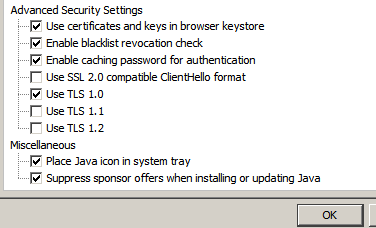
I think all of us have the broswer issues worked out and the issue is soley Java based. I tried java 1.6, 1.7, various releases, old firefox from 2013, etc. I finally narrowed things down some and went back to latest firefox(36.0), latest java (1.8u31 )
I have 2 things that make it work for me in firefox (also IE 10, but there may be some IE settings that assist, like adding to compatibilty sites, I havne't verified)
- In Control Panel, Java, Advanced Tab, down at the bottom, uncheck "Use TLS 1.1" and "Use TLS1.2".
- The 2nd thing is that I have confirmed the "run twice and it works 2nd time" behavior. The first "Class Not Found" error seems to be due to the fact that it is not in the Java Cache (viewable on Java Control Panel applet), BUT the jar file is downloaded and cached. Think of it as: if it cant' run the jar/class from cache, it errors, even though it just downloaded it. You dont need to restart browser after the first class not found, I just close the pop up window with console and click remote console tab in main browser window, then click "Remote Console" again to re-launch the pop up console window.
Edit: I am working on a DL360 G6 with advanced ILO2 lic., latest ILO firmware (2.27)
Edit2: I wrote up all the info I gathered here . Hopefully it helps get this resolved.

- Mark as New
- Bookmark
- Subscribe
- Mute
- Subscribe to RSS Feed
- Permalink
- Report Inappropriate Content
06-15-2015 11:35 PM
06-15-2015 11:35 PM
Re: iLO2 Remote Console not working - com.hp.ilo2.remcons.remocons.class
Hi,
its working with Windows 8.1 32 bit version , but Windows 8.1 64 bit its not working
WIN 8.1 64 bit
IE 11,
JAVA 8 - JRE 1.8
Thanks
Gowrisankar
- Mark as New
- Bookmark
- Subscribe
- Mute
- Subscribe to RSS Feed
- Permalink
- Report Inappropriate Content
06-24-2015 07:17 AM
06-24-2015 07:17 AM
Re: iLO2 Remote Console not working - com.hp.ilo2.remcons.remocons.class
Quick update:
I found that the RSA SSL library used by iLO2 wasn't handling Client Hello properly, when Client Hello messages sent by SSL clients came in a TLS 1.1 or TLS 1.2 record. Both Java and IE11 send their Client Hello messages in TLS 1.2 records. Chrome on the other hand, always sends Client Hello messages in a TLS 1.0 record for backward compatability.
I'm testing a fix for this issue.
Oscar
__________________________________________________
If you feel this was helpful please click the KUDOS! thumb below!
- Mark as New
- Bookmark
- Subscribe
- Mute
- Subscribe to RSS Feed
- Permalink
- Report Inappropriate Content
07-14-2015 05:30 PM
07-14-2015 05:30 PM
Re: iLO2 Remote Console not working - com.hp.ilo2.remcons.remocons.class
Did you find a solution? I have the same issue. Bunch of Gen5 servers are not allowing remote console and get the same errors. I know these servers are old but still useful.
Thanks,
Chris
- Mark as New
- Bookmark
- Subscribe
- Mute
- Subscribe to RSS Feed
- Permalink
- Report Inappropriate Content
07-22-2015 07:07 AM - edited 07-22-2015 07:08 AM
07-22-2015 07:07 AM - edited 07-22-2015 07:08 AM
Re: iLO2 Remote Console not working - com.hp.ilo2.remcons.remocons.class
I've uploaded a BETA version 2.29 to a temp FTP site. Please give it a try and let me know the results. I tested it with the latest Java 8u51 and it works fine. However, you may still get the class not found error the very first time you launch the Applet. Doing a reload takes care of the problem.
FTP Access : ftp://ilo2beta:G!v3t2me@h2.usa.hp.com
Drop Box Host: h2.usa.hp.com (15.201.164.55, Failover: 15.240.92.59)
Login: ilo2beta
Password: G!v3t2me (NOTE: CASE-sensitive)
Account Expires: 8/21/2015 1:51:24 PM
__________________________________________________
If you feel this was helpful please click the KUDOS! thumb below!
- Mark as New
- Bookmark
- Subscribe
- Mute
- Subscribe to RSS Feed
- Permalink
- Report Inappropriate Content
07-24-2015 09:16 AM - edited 07-24-2015 09:16 AM
07-24-2015 09:16 AM - edited 07-24-2015 09:16 AM
Re: iLO2 Remote Console not working - com.hp.ilo2.remcons.remocons.class
Thank you Oscar. This version works with IE 11, Firefox 39, and Chrome 44 (for now, come on Oracle give us a fix). Still got the pop-up about not being found the first time but I clicked reload and it came up.
Matthew
- Mark as New
- Bookmark
- Subscribe
- Mute
- Subscribe to RSS Feed
- Permalink
- Report Inappropriate Content
08-16-2015 03:01 AM
08-16-2015 03:01 AM
Re: iLO2 Remote Console not working - com.hp.ilo2.remcons.remocons.class
The fix workes for me to a point where the console looks like it should be loading showing the Refresh and Ctr+Alt+del buttons and I can now add a virtual media which I couldn't before. However, in the java console window I get "java.net.ConnectException: Connection timed out: connect " at the bottom of the window causing the console window to be blank.
- Mark as New
- Bookmark
- Subscribe
- Mute
- Subscribe to RSS Feed
- Permalink
- Report Inappropriate Content
08-16-2015 07:48 AM
08-16-2015 07:48 AM
Re: iLO2 Remote Console not working - com.hp.ilo2.remcons.remocons.class
Hi yaro137,
I'm going to need to see the entire Java debug console output when the issue is reproduced. Could you please PM me one? Also, what OS is your client running?
Oscar
__________________________________________________
If you feel this was helpful please click the KUDOS! thumb below!
- Mark as New
- Bookmark
- Subscribe
- Mute
- Subscribe to RSS Feed
- Permalink
- Report Inappropriate Content
08-17-2015 06:00 AM
08-17-2015 06:00 AM
Re: iLO2 Remote Console not working - com.hp.ilo2.remcons.remocons.class
Log posted. The OS is Server 2008 x64

- Mark as New
- Bookmark
- Subscribe
- Mute
- Subscribe to RSS Feed
- Permalink
- Report Inappropriate Content
08-21-2015 12:06 AM
08-21-2015 12:06 AM
Re: iLO2 Remote Console not working - com.hp.ilo2.remcons.remocons.class
Just to confirm that after trying every combo of Windows OS, IE and Java I could find - nothing worked.
Your beta ilo firmware however worked. As others have said, still got the class not found error the first time, but clicking 'reload' and it worked straight away.
- Mark as New
- Bookmark
- Subscribe
- Mute
- Subscribe to RSS Feed
- Permalink
- Report Inappropriate Content
08-22-2015 12:55 AM
08-22-2015 12:55 AM
Re: iLO2 Remote Console not working - com.hp.ilo2.remcons.remocons.class
Any chance this BETA can be made publicly available?
I am currently facing the same issue, and both mentioned download options seems unavailable.
Regards
Martin
- Mark as New
- Bookmark
- Subscribe
- Mute
- Subscribe to RSS Feed
- Permalink
- Report Inappropriate Content
08-26-2015 02:46 AM
08-26-2015 02:46 AM
Re: iLO2 Remote Console not working - com.hp.ilo2.remcons.remocons.class
same issue here
please upload the firmware somewhere else :)
Thanks a Lot!
- Mark as New
- Bookmark
- Subscribe
- Mute
- Subscribe to RSS Feed
- Permalink
- Report Inappropriate Content
08-26-2015 10:23 PM
08-26-2015 10:23 PM
Re: iLO2 Remote Console not working - com.hp.ilo2.remcons.remocons.class
Hi.
I need to the firmware too, can someone else please post it. thanks
Grant.
- Mark as New
- Bookmark
- Subscribe
- Mute
- Subscribe to RSS Feed
- Permalink
- Report Inappropriate Content
09-03-2015 11:07 AM
09-03-2015 11:07 AM
Re: iLO2 Remote Console not working - com.hp.ilo2.remcons.remocons.class
Can't believe I missed this firmware getting posted, any chance of a link from anyone, this would be massively helpful for our clients older servers to help things along till they replace them.
- Mark as New
- Bookmark
- Subscribe
- Mute
- Subscribe to RSS Feed
- Permalink
- Report Inappropriate Content
09-07-2015 12:11 AM
09-07-2015 12:11 AM
Re: iLO2 Remote Console not working - com.hp.ilo2.remcons.remocons.class
Hi
I am facing this issue too and need the beta firmware.
- Mark as New
- Bookmark
- Subscribe
- Mute
- Subscribe to RSS Feed
- Permalink
- Report Inappropriate Content
09-07-2015 02:13 AM
09-07-2015 02:13 AM
Re: iLO2 Remote Console not working - com.hp.ilo2.remcons.remocons.class
I would also appreciate a link to download the beta version, please make it available again.
Best regards,
.costin
- Mark as New
- Bookmark
- Subscribe
- Mute
- Subscribe to RSS Feed
- Permalink
- Report Inappropriate Content
09-08-2015 06:01 AM
09-08-2015 06:01 AM
Re: iLO2 Remote Console not working - com.hp.ilo2.remcons.remocons.class
Hi, I really could use this one also ;-)
Link no longer active and beta not yet final and in the downloads on the HP site ;-)