- Community Home
- >
- Servers and Operating Systems
- >
- HPE ProLiant
- >
- Servers - General
- >
- Re: HPE Generic USB-EEM Networkadapter
Categories
Company
Local Language
Forums
Discussions
Forums
- Data Protection and Retention
- Entry Storage Systems
- Legacy
- Midrange and Enterprise Storage
- Storage Networking
- HPE Nimble Storage
Discussions
Forums
Discussions
Discussions
Discussions
Forums
Discussions
Discussion Boards
Discussion Boards
Discussion Boards
Discussion Boards
- BladeSystem Infrastructure and Application Solutions
- Appliance Servers
- Alpha Servers
- BackOffice Products
- Internet Products
- HPE 9000 and HPE e3000 Servers
- Networking
- Netservers
- Secure OS Software for Linux
- Server Management (Insight Manager 7)
- Windows Server 2003
- Operating System - Tru64 Unix
- ProLiant Deployment and Provisioning
- Linux-Based Community / Regional
- Microsoft System Center Integration
Discussion Boards
Discussion Boards
Discussion Boards
Discussion Boards
Discussion Boards
Discussion Boards
Discussion Boards
Discussion Boards
Discussion Boards
Discussion Boards
Discussion Boards
Discussion Boards
Discussion Boards
Discussion Boards
Discussion Boards
Discussion Boards
Discussion Boards
Discussion Boards
Discussion Boards
Discussion Boards
Community
Resources
Forums
Blogs
- Subscribe to RSS Feed
- Mark Topic as New
- Mark Topic as Read
- Float this Topic for Current User
- Bookmark
- Subscribe
- Printer Friendly Page

- Mark as New
- Bookmark
- Subscribe
- Mute
- Subscribe to RSS Feed
- Permalink
- Report Inappropriate Content
08-19-2020 11:59 PM
08-19-2020 11:59 PM
HPE Generic USB-EEM Networkadapter
Hi,
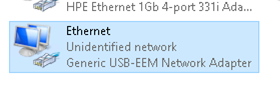
what does this network adapter do ( Generic USB-EEM ) it appeared in the last month and why is it only installed on two servers (Winows 2016).
Has this something to do with a HPE firmware update?
Server: ProLiant DL360 Gen10

- Mark as New
- Bookmark
- Subscribe
- Mute
- Subscribe to RSS Feed
- Permalink
- Report Inappropriate Content
08-21-2020 03:05 AM - last edited on 05-08-2024 08:05 AM by Sunitha_Mod
08-21-2020 03:05 AM - last edited on 05-08-2024 08:05 AM by Sunitha_Mod
Re: HPE Generic USB-EEM Networkadapter
Hello,
Thats is the virtual nic shows up on supported OS.
Please refer to the page 170 onwards from the below mentioned link.
http://itdoc.hitachi.co.jp/manuals/ha8000v/hard/Gen10/iLO/880740-006_en.pdf
[Moderator edit: Removed the broken link. Please refer to https://support.hpe.com/]
I am a HPE Employee


- Mark as New
- Bookmark
- Subscribe
- Mute
- Subscribe to RSS Feed
- Permalink
- Report Inappropriate Content
11-10-2020 02:26 PM
11-10-2020 02:26 PM
Re: HPE Generic USB-EEM Networkadapter
Servers with this adapter are failling to udpate DNS. It appears to try and register it with the wrong suffix (uses the hostname).

- Mark as New
- Bookmark
- Subscribe
- Mute
- Subscribe to RSS Feed
- Permalink
- Report Inappropriate Content
11-12-2025 04:01 PM
11-12-2025 04:01 PM
Re: HPE Generic USB-EEM Networkadapter
Hey All
This caused me issues with WIndows / Failover Cluster
It is the Virtual NIC inside ILO - It allows you to look at ILO from the Server, say if you didnt have the ability to connect the ILO port or something.
Turn it Off, Disappears after ILO resets.


- Mark as New
- Bookmark
- Subscribe
- Mute
- Subscribe to RSS Feed
- Permalink
- Report Inappropriate Content
11-13-2025 09:17 PM
11-13-2025 09:17 PM
Re: HPE Generic USB-EEM Networkadapter
Hi @SHW0FF ,
The "iLO Virtual NIC" (sometimes called the iLO Management Device or HP iLO NIC) is a virtual network adapter presented by the iLO firmware to the server's operating system. Its main use is to let you access the iLO interface from within the OS, useful if the dedicated iLO port isn't cabled or available.
The iLO Virtual NIC appears in Windows and can cause issues with networking or failover clusters.
If you do not need to manage iLO from the OS, disable the iLO Virtual NIC in the iLO settings:
- This can usually be done from the iLO web interface:
iLO → Administration → Access Settings → Virtual NIC → Disable - After disabling, reboot or reset iLO if needed.
- The virtual NIC will disappear from Windows, resolving network/cluster issues.
Thank you!
Hope this information has helped you, Please click on the "Thumbs Up/Kudo" icon as a token of appreciation. Also, if this post has helped to solve your issue, consider marking this as an "Accepted Solution".
I work at HPE
HPE Support Center offers support for your HPE services and products when and how you need it. Get started with HPE Support Center today.
[Any personal opinions expressed are mine, and not official statements on behalf of Hewlett Packard Enterprise]