- Community Home
- >
- Partner Solutions and Certifications
- >
- Alliances
- >
- Windows Server 2019 Licensing Refresher Course
Categories
Company
Local Language
Forums
Discussions
Knowledge Base
Forums
- Data Protection and Retention
- Entry Storage Systems
- Legacy
- Midrange and Enterprise Storage
- Storage Networking
- HPE Nimble Storage
Discussions
Knowledge Base
Forums
Discussions
- Cloud Mentoring and Education
- Software - General
- HPE OneView
- HPE Ezmeral Software platform
- HPE OpsRamp
Knowledge Base
Discussions
Forums
Discussions
Discussion Boards
Discussion Boards
Discussion Boards
Discussion Boards
Discussion Boards
Discussion Boards
Discussion Boards
Discussion Boards
Discussion Boards
Discussion Boards
Discussion Boards
Discussion Boards
Discussion Boards
Discussion Boards
Discussion Boards
Discussion Boards
Discussion Boards
Discussion Boards
Discussion Boards
Discussion Boards
Discussion Boards
Discussion Boards
Discussion Boards
Community
Resources
Forums
Blogs
- Subscribe to RSS Feed
- Mark as New
- Mark as Read
- Bookmark
- Receive email notifications
- Printer Friendly Page
- Report Inappropriate Content

Windows Server 2019 Licensing Refresher Course

Windows Server 2019 Core-Based Licensing
Windows Server 2019 Standard and Windows Server 2019 Datacenter follow a core-based licensing model which means that licensing requirements for Windows Server 2019 Standard and Windows Server 2019 Datacenter are determined based on the number of server cores.
NOTE: This is a different licensing-model than Windows Server 2019 Essentials, which follows a processor-based model
Core-Based Licensing Rules
There are some important rules that must be followed for Windows Server 2019 Standard and Datacenter core-based licensing.
1) Every server requires a minimum of one Base License
2) All physical cores in the server must be licensed
3) A minimum of 8 core licenses are required for each physical processor in the server
4) A minimum of 16 core licenses are required for each server
Not so hard, right?
When you are setting up a new server with Windows Server 2019 Standard or Datacenter just ask yourself these questions: Does this server have Windows Server 2019 Base License? Are all the physical cores licensed? Does each physical processor have at least 8 core licenses? Does the server have at least 16 core licenses total?
If you can answer yes to all these questions, then you are doing great!
Base Licenses vs. Additional Licenses
How to license all server cores
Remember rule #1 from above, “every server requires a minimum of one Base License”?. It is important to take note of the kind of license specified here, a Base License. There are different kinds of licenses used to provide rights for server cores: Base Licenses and Additional Licenses.
Base Licenses
Each Base License provides rights for up to 16 cores (remember, that is the minimum number of cores that must be licensed per server in rule #4). Windows Server 2019 Standard Base Licenses also provide rights for two virtual OSEs or Hyper-V containers, when all physical cores on a server are licensed. Alternatively, Windows Server 2019 Datacenter Base Licenses provide rights for unlimited OSEs or Hyper-V containers, when all physical cores on a server are licensed.
Base Licenses include the Certificate of Authenticity, or COA which is affixed to the server by HPE or HPE Reseller, product key, product software, and Microsoft Software License Terms (previously known as End User License Agreement or EULA)... These are all needed when licensing a server.
But, what if the server has more than 16 cores? How do you ensure that rule #2 (all physical cores in the server must be licensed) is followed? This is where Additional Licenses come into play!
Additional Licenses
Additional Licenses may be added to a server to support more cores and/or more concurrent virtual machines (VMs) for Windows Server 2019 Standard (for every 2 VMs, all the cores in the server must be licensed again).
HPE offers Additional Licenses for two, four, and sixteen cores for both Windows Server 2019 Standard and Windows Server 2019 Datacenter.
Additional licenses are delivered as a paper license card with a COA sticker permanently affixed to the license card or packaging. You may have noticed that Additional Licenses do not include everything that Base Licenses do, this is why it is a rule that every server has a minimum of one Base License (and then Additional Licenses can be added on to license more cores of VMs).
It is important to note that Windows Server 2019 Datacenter Additional Licenses must be purchased at the same time as the Base License and HPE Server. However, Windows Server 2019 Standard Additional Licenses can be sold After Point of Sale (APOS) and can be reassigned to another server that already has a Windows Server 2019 Standard Base License. And Base Licenses and Additional Licenses must be for the same edition and generation of the product.
Want to put your new understanding of Windows Server 2019 Standard and Windows Server 2019 Datacenter Core-Based Licensing to practice? See if you can figure out how to license the instances below following Core-Based Licensing (not a test, just practice).
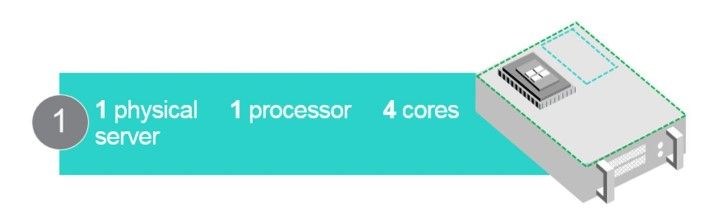
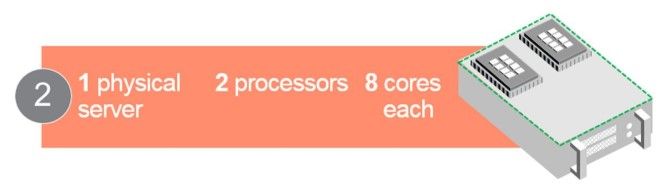
Let’s try a harder one…

Want additional help determining licensing requirements for Windows Server 2019 Standard and Windows Server 2019 Datacenter? You’re in luck! We’ve got a helpful Windows Server Core Licensing Calculator to help you determine licensing requirements for specific systems. You simple select Windows Server 2019 Standard or Windows Server 2019 Datacenter, input the number of processors and cores that need to be licensed, and it will calculate the number and type of licenses that are required!
Willa Anderson
Hewlett Packard Enterprise
twitter.com/CoffeeCoaching
linkedin.com/groups/3413248/
hpe.com/info/CoffeeCoaching

Willa
Willa manages the HPE | Microsoft Coffee Coaching program. Follow along to learn more about the latest HPE OEM Microsoft product releases and how the HPE Microsoft partnership can benefit partners and customers.
- Back to Blog
- Newer Article
- Older Article
- mhardi01 on: The time is now for Microsoft Exchange SE on HPE h...
- JoeV_The_CT on: Streamline AI Workloads with HPE & NVIDIA
- iVAN LINARES on: Curious about Windows Server 2022 downgrade rights...
- HPEML350_22 on: Windows Server 2022 is here: how to implement it o...
- testingis on: How are you going to license that new server? A st...
- wowu on: Pick up the pace
- nice345 on: Don’t let the time slip away
- vmigliacc on: Frequently asked questions about HPE solutions for...
- MassimilianoG on: What are downgrade and Down-edition rights for Win...
- harithachinni on: Coffee Coaching's "Must See" Discover Virtual Expe...
-
Accenture
1 -
Citrix
13 -
Coffee Coaching
345 -
Event
71 -
Microsoft
212 -
Red Hat
7 -
SAP
40 -
Strategic Alliances
106 -
Veeam
8 -
VMware
34
