- Community Home
- >
- Servers and Operating Systems
- >
- HPE ProLiant
- >
- ProLiant Servers (ML,DL,SL)
- >
- Re: Query: Firmware update – User token USB key re...
Categories
Company
Local Language
Forums
Discussions
Forums
- Data Protection and Retention
- Entry Storage Systems
- Legacy
- Midrange and Enterprise Storage
- Storage Networking
- HPE Nimble Storage
Discussions
Forums
Discussions
Discussions
Discussions
Forums
Discussions
Discussion Boards
Discussion Boards
Discussion Boards
Discussion Boards
- BladeSystem Infrastructure and Application Solutions
- Appliance Servers
- Alpha Servers
- BackOffice Products
- Internet Products
- HPE 9000 and HPE e3000 Servers
- Networking
- Netservers
- Secure OS Software for Linux
- Server Management (Insight Manager 7)
- Windows Server 2003
- Operating System - Tru64 Unix
- ProLiant Deployment and Provisioning
- Linux-Based Community / Regional
- Microsoft System Center Integration
Discussion Boards
Discussion Boards
Discussion Boards
Discussion Boards
Discussion Boards
Discussion Boards
Discussion Boards
Discussion Boards
Discussion Boards
Discussion Boards
Discussion Boards
Discussion Boards
Discussion Boards
Discussion Boards
Discussion Boards
Discussion Boards
Discussion Boards
Discussion Boards
Discussion Boards
Discussion Boards
Community
Resources
Forums
Blogs
- Subscribe to RSS Feed
- Mark Topic as New
- Mark Topic as Read
- Float this Topic for Current User
- Bookmark
- Subscribe
- Printer Friendly Page

- Mark as New
- Bookmark
- Subscribe
- Mute
- Subscribe to RSS Feed
- Permalink
- Report Inappropriate Content
01-26-2022 04:36 AM - last edited on 01-26-2022 06:56 AM by support_s
01-26-2022 04:36 AM - last edited on 01-26-2022 06:56 AM by support_s
Hello everyone,
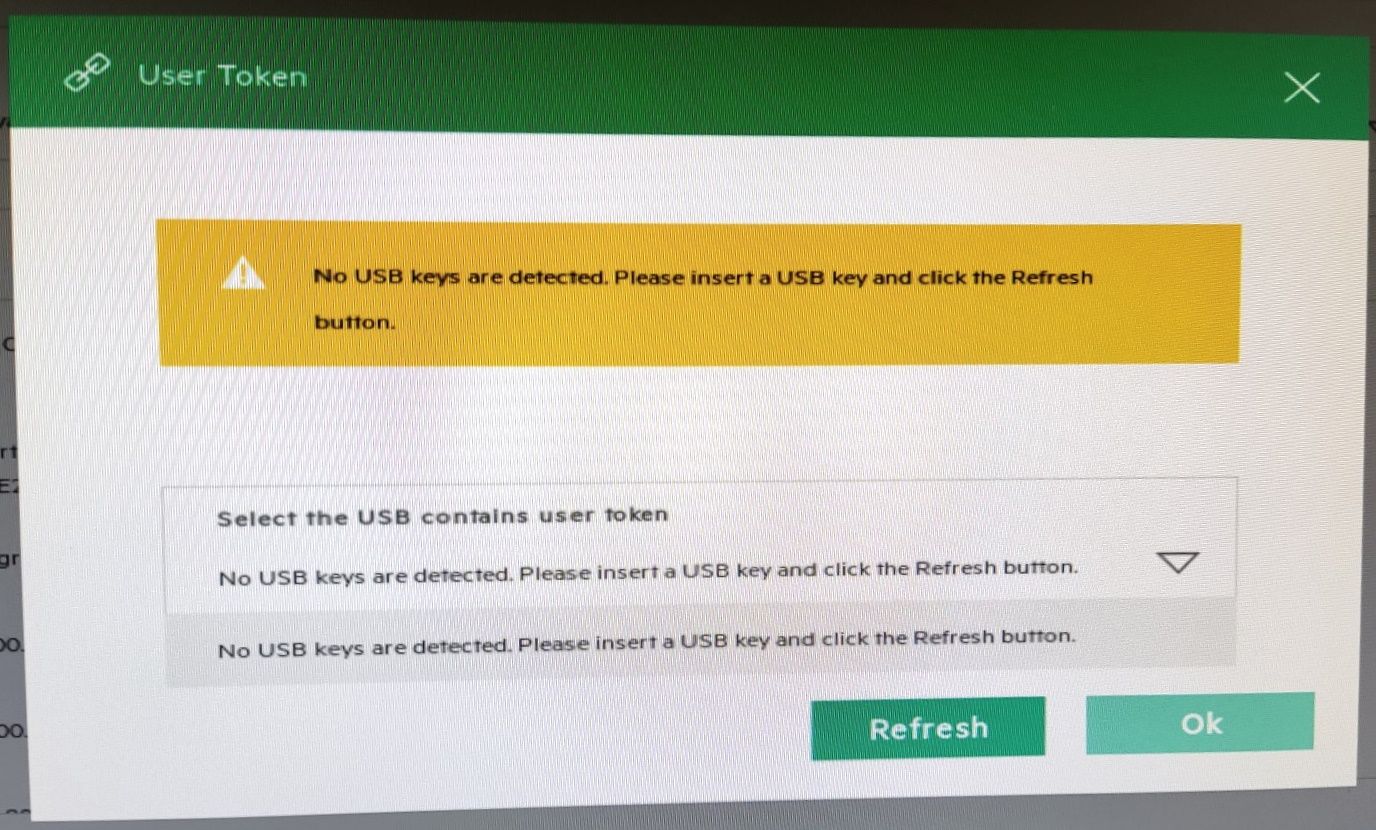
we got some new "ProLiant DL380 Gen10"-Servers for our company. When trying to apply the suggested firmware updates for hard drives etc. we are prompted for a USB key user token (see picture below). What is this? Are we not able to just apply the firmware updates without any further authorisation?
Thank you in advance,
rznr
Solved! Go to Solution.

- Mark as New
- Bookmark
- Subscribe
- Mute
- Subscribe to RSS Feed
- Permalink
- Report Inappropriate Content
01-26-2022 05:36 AM
01-26-2022 05:36 AM
Query: Firmware update – User token USB key required?
System recommended content:
If the above information is helpful, then please click on "Thumbs Up/Kudo" icon.
Thank you for being a HPE community member.


- Mark as New
- Bookmark
- Subscribe
- Mute
- Subscribe to RSS Feed
- Permalink
- Report Inappropriate Content
01-26-2022 05:48 AM
01-26-2022 05:48 AM
Re: Query: Firmware update – User token USB key required?
What firmware and update method do we talk about?
Hope this helps!
Regards
Torsten.
__________________________________________________
There are only 10 types of people in the world -
those who understand binary, and those who don't.
__________________________________________________
No support by private messages. Please ask the forum!
If you feel this was helpful please click the KUDOS! thumb below!

- Mark as New
- Bookmark
- Subscribe
- Mute
- Subscribe to RSS Feed
- Permalink
- Report Inappropriate Content
01-26-2022 11:04 PM
01-26-2022 11:04 PM
Re: Query: Firmware update – User token USB key required?
Thanks for the replies.
I thought there was only one update method. Unfortunatly I cannot access the server to look up the update method at the moment. I get back to you when i can.
Regards,
rznr
- Mark as New
- Bookmark
- Subscribe
- Mute
- Subscribe to RSS Feed
- Permalink
- Report Inappropriate Content
01-27-2022 05:30 AM
01-27-2022 05:30 AM
Re: Query: Firmware update – User token USB key required?
There are dozens of upgrade methods ... please tell the details.
Hope this helps!
Regards
Torsten.
__________________________________________________
There are only 10 types of people in the world -
those who understand binary, and those who don't.
__________________________________________________
No support by private messages. Please ask the forum!
If you feel this was helpful please click the KUDOS! thumb below!
- Mark as New
- Bookmark
- Subscribe
- Mute
- Subscribe to RSS Feed
- Permalink
- Report Inappropriate Content
02-04-2022 12:38 AM
02-04-2022 12:38 AM
SolutionNow i got it. The update method i use is via intelligent provisioning after booting up the server ("Server maintenance" -> "Firmware update"). I inserted an empty usb flash drive and got an additional popup which told me exactly what to do:
- Go to the website https://support.hpe.com/hpesc/swd/entitlement-token-service/generate and generate a user token
- Save the token in a file named "user_token.txt" to an usb flash drive
- Insert the flash drive into the server before the firmware update
-> Now you can start the updates.
Regards
rznr
- Mark as New
- Bookmark
- Subscribe
- Mute
- Subscribe to RSS Feed
- Permalink
- Report Inappropriate Content
01-10-2023 05:45 AM
01-10-2023 05:45 AM
Re: Query: Firmware update – User token USB key required?
OH MY GOD, what is this stupid piece of *****!?
Can't we just update firmware without being tortured with useless stuff like that?
Now the deployment of a server gets delayed because I have to wait for someone to connect the stupid USB stick to the server.
This is just utterly, utterly stupid and ridiculous. We are burning our time, installing fixes for bugs which were introduced by HPE themselves in the first place and as a bonus they just torture us all the way through the process.
- Mark as New
- Bookmark
- Subscribe
- Mute
- Subscribe to RSS Feed
- Permalink
- Report Inappropriate Content
01-10-2023 06:20 AM
01-10-2023 06:20 AM
Re: Query: Firmware update – User token USB key required?
Why not just booting the current SPP?
Any reason to struggle with IP?
Hope this helps!
Regards
Torsten.
__________________________________________________
There are only 10 types of people in the world -
those who understand binary, and those who don't.
__________________________________________________
No support by private messages. Please ask the forum!
If you feel this was helpful please click the KUDOS! thumb below!
- Mark as New
- Bookmark
- Subscribe
- Mute
- Subscribe to RSS Feed
- Permalink
- Report Inappropriate Content
01-10-2023 06:22 AM
01-10-2023 06:22 AM
Re: Query: Firmware update – User token USB key required?
why not use a (supposedly) convenient feature if it is there?
also, the server is located thousands of km away and has a bad internet connection to my location. the remote iso boot process would most likely take ages and/or abort.
i've managed to get another machine on-site running however, from where I'll do the iso boot. still unbelievably annoying.
- Mark as New
- Bookmark
- Subscribe
- Mute
- Subscribe to RSS Feed
- Permalink
- Report Inappropriate Content
02-08-2023 07:13 PM
02-08-2023 07:13 PM
Re: Query: Firmware update – User token USB key required?
Sound like illegal user token key to pass for access.... FUNNY HPE.... HPE should put user token in their own website to generate. we can enter private and copy user token.
is it all for people to use user_token.txt that you give us so easy?
- Mark as New
- Bookmark
- Subscribe
- Mute
- Subscribe to RSS Feed
- Permalink
- Report Inappropriate Content
02-14-2023 01:26 AM - last edited on 02-14-2023 10:07 PM by Sunitha_Mod
02-14-2023 01:26 AM - last edited on 02-14-2023 10:07 PM by Sunitha_Mod
Re: Query: Firmware update – User token USB key required?
Leider ist die Webseite um den User Token zu generieren nicht verfügbar...
Der angeforderte Service oder die angeforderten Informationen sind derzeit nicht verfügbar. Wir entschuldigen uns für diese Unannehmlichkeit und arbeiten daran, dieses Problem so rasch wie möglich zu lösen. Bitte versuchen Sie es später erneut.
(Fehler: 503)
Google Translated:
Unfortunately the website to generate the user token is not available...
The requested service or information is currently unavailable. We apologize for the inconvenience and are working to resolve this issue as soon as possible. Please try again later.
(Error: 503)

- Mark as New
- Bookmark
- Subscribe
- Mute
- Subscribe to RSS Feed
- Permalink
- Report Inappropriate Content
02-14-2023 10:10 PM - edited 02-14-2023 10:10 PM
02-14-2023 10:10 PM - edited 02-14-2023 10:10 PM
Re: Query: Firmware update – User token USB key required?
Hello @MZe_CH,
Thank you for posting! Sorry for the inconvenience caused. If you are still facing the same issue, we would recommend using the following link to report it so that the concerned team can quickly look into it:
- Mark as New
- Bookmark
- Subscribe
- Mute
- Subscribe to RSS Feed
- Permalink
- Report Inappropriate Content
03-31-2023 05:26 AM
03-31-2023 05:26 AM
Re: Query: Firmware update – User token USB key required?
Still the same issue. No service error 500
- Mark as New
- Bookmark
- Subscribe
- Mute
- Subscribe to RSS Feed
- Permalink
- Report Inappropriate Content
04-01-2023 01:03 AM
04-01-2023 01:03 AM
Re: Query: Firmware update – User token USB key required?
When server site was up again it worked fine
https://support.hpe.com/hpesc/swd/entitlement-token-service/generate
- Mark as New
- Bookmark
- Subscribe
- Mute
- Subscribe to RSS Feed
- Permalink
- Report Inappropriate Content
04-19-2023 11:35 PM
04-19-2023 11:35 PM
Re: Query: Firmware update – User token USB key required?
Does anyone know if these tokens expire?
I created one a few weeks back but it didn't seem to work today so I created a new one, not that the new one works either but just wondering if anyone has used one for a few weeks/months?
- Mark as New
- Bookmark
- Subscribe
- Mute
- Subscribe to RSS Feed
- Permalink
- Report Inappropriate Content
04-21-2023 12:32 PM - edited 04-21-2023 12:34 PM
04-21-2023 12:32 PM - edited 04-21-2023 12:34 PM
Re: Query: Firmware update – User token USB key required?
Incredibly annoying - does not even work with fresh generated key. I wonder when they can create a utility that is able to detect their own products, serial number, and automatically update if required (or if end-user agrees) instead of going through this ridiculous process.

- Mark as New
- Bookmark
- Subscribe
- Mute
- Subscribe to RSS Feed
- Permalink
- Report Inappropriate Content
06-09-2023 06:59 PM
06-09-2023 06:59 PM
Re: Query: Firmware update – User token USB key required?
Is there any way to emulate a USB? This is so stupid that I would need a local person to put in a USB.
- Mark as New
- Bookmark
- Subscribe
- Mute
- Subscribe to RSS Feed
- Permalink
- Report Inappropriate Content
06-10-2023 08:27 PM - last edited on 06-11-2023 11:15 PM by Sunitha_Mod
06-10-2023 08:27 PM - last edited on 06-11-2023 11:15 PM by Sunitha_Mod
Re: Query: Firmware update – User token USB key required?
I haven't tried, but I guess ilo does usb emulation. You may need to create an iso of the usb drive as I think it needs an iso to mount.
I'll try to give it a go soon myself.
Get Outlook for Android<>
Artur Rzasa
IT Manager**personal info erased**
STORE.EMPRGROUP.COM.AU
South Pacific’s most experienced and trusted supplier of genuine replacement parts and upgrades
Supporting your Right to Repair and the Circular Economy, one part at a time
IMPORTANT: please
note EMPR Australia Pty Ltd only sells products on its own Terms and Conditions
(“the Terms”) which can be found at https://goo.gl/VDJ0K4
and the company shall not be bound by any other terms and conditions provided
by a buyer at any time, irrespective of when these are provided or what they
provide for. Further, please note that it is a condition precedent of any
sale of products made by EMPR Australia that such sales shall be under its own
Terms which shall be subject to the laws of Australia and subject to the
exclusive jurisdiction of the courts of Australia.
This message (and any associated files) is intended only for the use of the
individual or entity to which it is addressed and may contain information that
is confidential, subject to copyright or constitutes a trade secret. If you are
not the intended recipient you are hereby notified that any dissemination,
copying or distribution of this message, or files associated with this message,
is strictly prohibited. If you have received this message in error, please
notify us immediately by replying to the message and deleting it from your
computer. Messages sent to and from us may be monitored.

- Mark as New
- Bookmark
- Subscribe
- Mute
- Subscribe to RSS Feed
- Permalink
- Report Inappropriate Content
06-13-2023 03:04 AM - edited 06-13-2023 06:46 AM
06-13-2023 03:04 AM - edited 06-13-2023 06:46 AM
Re: Query: Firmware update – User token USB key required?
Just run into this issue here too, our Datacentre is miles away and this now needs me to drive over to put a USB stick in, MADNESS! I'm going to try to do this with iLO Virtual Media and will report back if I manage to do it just like others have commented, wish me luck.
UPDATE: I failed to make use of the Virtual Media options in iLO as it never saw them as a USB stick, so just booted to the latest SPP iso instead,. As it happens all the firmware versions were newer on the SPP anyway so not sure what IP is doing for us here. It's a shame that this whole experience has been truly painful and it really doesn't need to be.
- Mark as New
- Bookmark
- Subscribe
- Mute
- Subscribe to RSS Feed
- Permalink
- Report Inappropriate Content
07-05-2023 06:04 AM
07-05-2023 06:04 AM
Re: Query: Firmware update – User token USB key required?
Quick question to add to this Thread. Is a new token required per Server? I have 3 units!
- Mark as New
- Bookmark
- Subscribe
- Mute
- Subscribe to RSS Feed
- Permalink
- Report Inappropriate Content
07-10-2023 12:38 AM
07-10-2023 12:38 AM
Re: Query: Firmware update – User token USB key required?
Thank you for posting! Since you have posted in an old topic and there is no response yet, I would recommend you to create a new topic using the create "New Discussion" button, so the experts can check and assist you further.
- Mark as New
- Bookmark
- Subscribe
- Mute
- Subscribe to RSS Feed
- Permalink
- Report Inappropriate Content
07-10-2023 12:42 AM
07-10-2023 12:42 AM
Re: Query: Firmware update – User token USB key required?
A year ago I used the same token for 3 servers. If they did not change anything it should work...
- Mark as New
- Bookmark
- Subscribe
- Mute
- Subscribe to RSS Feed
- Permalink
- Report Inappropriate Content
09-20-2023 04:26 PM
09-20-2023 04:26 PM
Re: Query: Firmware update – User token USB key required?
Thanks a lot for this hint. However, I did it so, but the USB Key can't be detected, even I can see it at System Information.
Can you please tell me which USB Port you used? Any form factor requirements for the USB key?
- Mark as New
- Bookmark
- Subscribe
- Mute
- Subscribe to RSS Feed
- Permalink
- Report Inappropriate Content
09-20-2023 10:42 PM
09-20-2023 10:42 PM
Re: Query: Firmware update – User token USB key required?
I used a USB 2.0 and a 3.0 key in the port on the front (not the ILO one, that one doesn't work). I am unaware of any form factor requirements.
- Mark as New
- Bookmark
- Subscribe
- Mute
- Subscribe to RSS Feed
- Permalink
- Report Inappropriate Content
09-21-2023 02:09 AM
09-21-2023 02:09 AM
Re: Query: Firmware update – User token USB key required?
I'm a little bit confused. My server hasn't any ILO Port at the front, just only 2 USB ports. In general (I went through the manual right now), there aren't any USB ports dedicated for ILO. But there could be a RJ-45 NIC port.
However, my model is P54649-421, means Gen10 plus V2. This could be the difference.