- Community Home
- >
- Servers and Operating Systems
- >
- HPE ProLiant
- >
- ProLiant Servers (ML,DL,SL)
- >
- Re: Smart Storage Administrator Stuck at "Loading"
Categories
Company
Local Language
Forums
Discussions
Knowledge Base
Forums
- Data Protection and Retention
- Entry Storage Systems
- Legacy
- Midrange and Enterprise Storage
- Storage Networking
- HPE Nimble Storage
Discussions
Knowledge Base
Forums
Discussions
- Cloud Mentoring and Education
- Software - General
- HPE OneView
- HPE Ezmeral Software platform
- HPE OpsRamp
Knowledge Base
Discussions
Forums
Discussions
Discussion Boards
Discussion Boards
Discussion Boards
Discussion Boards
Discussion Boards
Discussion Boards
Discussion Boards
Discussion Boards
Discussion Boards
Discussion Boards
Discussion Boards
Discussion Boards
Discussion Boards
Discussion Boards
Discussion Boards
Discussion Boards
Discussion Boards
Discussion Boards
Discussion Boards
Discussion Boards
Discussion Boards
Discussion Boards
Discussion Boards
Community
Resources
Forums
Blogs
- Subscribe to RSS Feed
- Mark Topic as New
- Mark Topic as Read
- Float this Topic for Current User
- Bookmark
- Subscribe
- Printer Friendly Page

- Mark as New
- Bookmark
- Subscribe
- Mute
- Subscribe to RSS Feed
- Permalink
- Report Inappropriate Content
06-26-2019 05:27 PM
06-26-2019 05:27 PM
I have a ProLiant ML150 G6 with Intel Xeon Processor E5504 and HP Smart Array B110i SATA RAID Controller with two Seagate IronWolf 2TB ST2000VN004 drives configured as a RAID array.
BIOS is 2011.01.18
B110i firmware is v1.20 (displayed during POST)
B110i driver is 6.18.4.64
OS is Windows Server 2019
HP SSA version is 3.40.3.0.
HP Smart Array SAS/SATA Event Notification Service version is 6.46.0.64
From within Windows, the drives appear as "HP LOGICAL VOLUME SCSI Disk Device".
When I try to start HP SSA, it gets stuck "Loading". I previously had version 2.40.13.0 installed and it did the same thing. How can I get it to load?
Solved! Go to Solution.
- Mark as New
- Bookmark
- Subscribe
- Mute
- Subscribe to RSS Feed
- Permalink
- Report Inappropriate Content
06-26-2019 06:58 PM
06-26-2019 06:58 PM
Re: Smart Storage Administrator Stuck at "Loading"
Further to the previous, I tried starting it in administrator mode and it made no difference.
I also reviewed the README and it says the B110i controller is supported.
In the bin folder for the application, there are several applications, ssa, ssaclient, ssaprefs and ssaserver. When I start SSA from the start menu, the only application I see running is ssaclient. When I start SSA Preferences, ssaprefs runs. Does anyone know what ssa and ssaserver are for?
- Mark as New
- Bookmark
- Subscribe
- Mute
- Subscribe to RSS Feed
- Permalink
- Report Inappropriate Content
06-27-2019 05:07 PM
06-27-2019 05:07 PM
Re: Smart Storage Administrator Stuck at "Loading"
I'm following up on the previous posts. Does anyone have any suggestions to solve this problem? I'm flying blind without SSA running. I need to get it running properly. Any help or suggestions will be appreciated.

- Mark as New
- Bookmark
- Subscribe
- Mute
- Subscribe to RSS Feed
- Permalink
- Report Inappropriate Content
07-02-2019 08:39 AM
07-02-2019 08:39 AM
Re: Smart Storage Administrator Stuck at "Loading"
Hi Bimmerdriver,
How exactly are you trying to access SSA. If you are trying to access SSA through SPP, its not possible because SPP does not contain SSA. You will have to use PSP and access ACU.
Regards
Sr


- Mark as New
- Bookmark
- Subscribe
- Mute
- Subscribe to RSS Feed
- Permalink
- Report Inappropriate Content
07-02-2019 09:51 AM
07-02-2019 09:51 AM
Re: Smart Storage Administrator Stuck at "Loading"
@Srinath_Raju wrote:Hi Bimmerdriver,
How exactly are you trying to access SSA. If you are trying to access SSA through SPP, its not possible because SPP does not contain SSA. You will have to use PSP and access ACU.
Regards
Sr
You are incorrect with your response. When launching the SPP in interactive mode launching SSA is indeed an option.
The PSP and ACU are for older generation servers and will not work with Gen8 or newer systems as ACU won't recognize the newer Smart Array Controllers
- Mark as New
- Bookmark
- Subscribe
- Mute
- Subscribe to RSS Feed
- Permalink
- Report Inappropriate Content
07-02-2019 12:22 PM - edited 07-02-2019 12:25 PM
07-02-2019 12:22 PM - edited 07-02-2019 12:25 PM
Re: Smart Storage Administrator Stuck at "Loading"
Before I upgraded the system to windows server 2019, it was running windows server 2012R2. Then, we were launching SSA directly, stand-alone. I don't recall what version was installed. When I upgraded to windows server 2019, I checked for a newer version of SSA using the drivers and downloads for the computer. I installed that version and attempted to run it directly. It was stuck at loading. I upgraded to the most recent version and it has the same problem, stuck at loading. I don't know what SPP is.
I did more searching on this forum and found this thread: https://community.hpe.com/t5/ProLiant-Servers-ML-DL-SL/Smart-Storage-Administrator-and-Hyper-V-2012-R2-Core/m-p/7042118/highlight/false#M166313. I installed SMH, and WBEM and now the server is broken. I cannot access the hyper-v manager. I get this error:

I also cannot access account information, so something is really messed up. Unless I can find a way around this problem, I will have to reinstall windows server. I do not want to do that, because I will be back at the beginning, still unclear how to manage the raid controller from within the operating system, since SSA will not load.
As far as I can tell, the latest version of SSA supports the controller. There are no instructions for installing it, other than what is on the driver and downloads link, which says click on install... without mentioning any other prerequisite applications or configuration. I have no need for SMH and WBEM, so I would prefer to get SSA working directly.
If you have any insight, I would really appreciate, because I'm in somewhat of a mess right now.
- Mark as New
- Bookmark
- Subscribe
- Mute
- Subscribe to RSS Feed
- Permalink
- Report Inappropriate Content
07-02-2019 02:51 PM
07-02-2019 02:51 PM
Re: Smart Storage Administrator Stuck at "Loading"
It's been to long since I've worked with anything that has the B110i controller. From what I recall, ACU or SSA does not recognize that controller as it used a proprietary driver from either Intel or Adaptec from what I can recall. I think the B120i was the first chipset SATA controller that used the Smart Array technology for chipset RAID and still required a special driver to work properly in RAID mode. I'd suspect Server 2019 does not have the driver for the B110i and I doubt one would be released.
- Mark as New
- Bookmark
- Subscribe
- Mute
- Subscribe to RSS Feed
- Permalink
- Report Inappropriate Content
07-02-2019 03:13 PM
07-02-2019 03:13 PM
Re: Smart Storage Administrator Stuck at "Loading"
I did find an article that talks about using ORCA and ACU with the B110i
https://support.hpe.com/hpsc/doc/public/display?docId=mmr_kc-0105084&docLocale=en_US
I still think you may run into a driver issue with Server 2019
- Mark as New
- Bookmark
- Subscribe
- Mute
- Subscribe to RSS Feed
- Permalink
- Report Inappropriate Content
07-02-2019 04:01 PM
07-02-2019 04:01 PM
Re: Smart Storage Administrator Stuck at "Loading"
According to the readme for the latest version of SSA (Version 3.40.3.0, 2018-12-06), the Dynamic Smart Array B110i SATA RAID is supported.
Windows Server 2019 seems happy with the latest driver for the B110i (6.18.4.64).
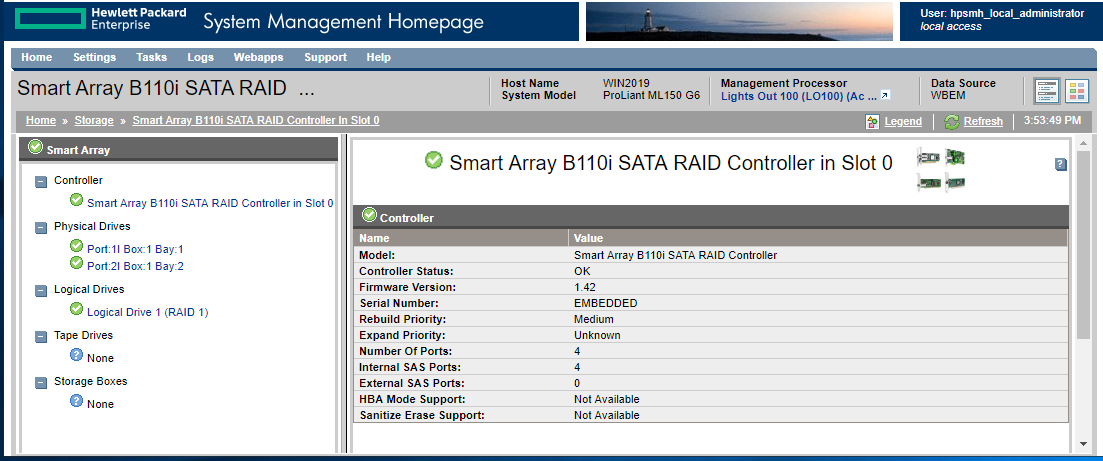
SMH recognizes the controller, the logical drive and the physical drives.
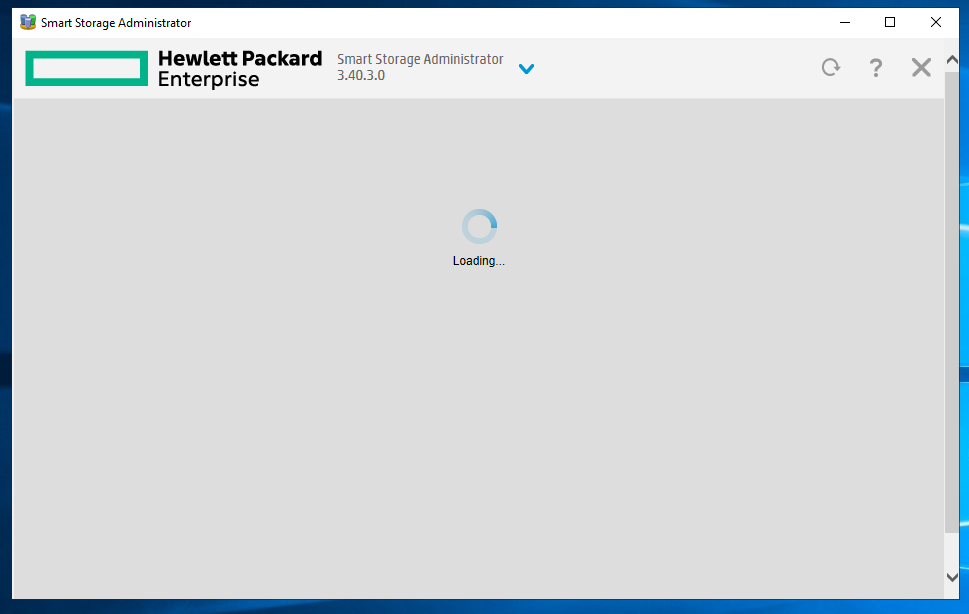
If I try to open SSA directly, it hangs like this:
My bigger problem is that I can't access the hyper-v manager since I installed SMH and friends.
- Mark as New
- Bookmark
- Subscribe
- Mute
- Subscribe to RSS Feed
- Permalink
- Report Inappropriate Content
07-02-2019 05:38 PM
07-02-2019 05:38 PM
Re: Smart Storage Administrator Stuck at "Loading"
The user guide for SSA references G6 controllers, presumably that's the B110i. It just doesn't mention Windows Server 2019.
- Mark as New
- Bookmark
- Subscribe
- Mute
- Subscribe to RSS Feed
- Permalink
- Report Inappropriate Content
07-02-2019 08:11 PM
07-02-2019 08:11 PM
Re: Smart Storage Administrator Stuck at "Loading"
@bimmerdriver wrote:The user guide for SSA references G6 controllers, presumably that's the B110i. It just doesn't mention Windows Server 2019.
I would assume the users guide is referencing the standard hardware based 'P' series Smart Array controllers. Like I said, it's just been to long since I've messed with hardware that old. Maybe someone else will chime in. Please keep in mind the B110i is a chipset SATA controller and the RAID function is actually in the driver and not the controller itself. It is a software based RAID configuration whereas the 'P' series Smart Array controllers are hardware based RAID controllers. I think the B110i was the first of the chipset SATA controllers that worked with ORCA and ACU. Server 2019 isn't supported on that system, and the driver you are loading is for an older version of Windows so it may or may not work with Server 2019
- Mark as New
- Bookmark
- Subscribe
- Mute
- Subscribe to RSS Feed
- Permalink
- Report Inappropriate Content
07-02-2019 09:02 PM
07-02-2019 09:02 PM
Re: Smart Storage Administrator Stuck at "Loading"
Here is an excerpt from the README:
Supported Controllers
---------------------
  Dynamic Smart Array B110i SATA RAID
Here is an excerpt from the release notes for the previous version (Version:3.30.14.0(A) (27 Nov 2018)):
Added support for Microsoft Windows Server 2019
The User Guide also references G6 controllers. Does that correspond to the system being a G6?
The RAID controller is supported. Windows Server 2019 is supported. Either I'm missing something or this should be working.
- Mark as New
- Bookmark
- Subscribe
- Mute
- Subscribe to RSS Feed
- Permalink
- Report Inappropriate Content
07-02-2019 09:47 PM
07-02-2019 09:47 PM
Re: Smart Storage Administrator Stuck at "Loading"
@bimmerdriver wrote:Here is an excerpt from the README:
Supported Controllers
---------------------
  Dynamic Smart Array B110i SATA RAID
Here is an excerpt from the release notes for the previous version (Version:3.30.14.0(A) (27 Nov 2018)):
Added support for Microsoft Windows Server 2019
The User Guide also references G6 controllers. Does that correspond to the system being a G6?
The RAID controller is supported. Windows Server 2019 is supported. Either I'm missing something or this should be working.
Yes, SSA supports Windows Server 2019. It also appears that SSA may still supports older G6 era Smart Array controllers
Windows Server 2019 is not a supported operating system for the ML150 G6 server.
There is not a Server 2019 driver available for the B110i controller. There is a version of the B110i driver available for Server 2012 and 2012R2 which means there was another server that used the B110i and also supported Server 2012 and 2012R2. So even though either Server 2012 or 2012 R2 are not listed as supported on the ML150 G6, it should work, but again they were never supported.
The ML150 G6 was retired in 2012, general support is normally offered for an additional 5 years after a server is retired. Later version of OS's are generally not tested or supported after a server is released. The last version of Windows server shown as supported in the support matrix on this server model was Server 2008 R2
HPE Servers Support & Certification Matrices
http://h17007.www1.hpe.com/us/en/enterprise/servers/supportmatrix/windows.aspx#.XRwud-hKiF4
- Mark as New
- Bookmark
- Subscribe
- Mute
- Subscribe to RSS Feed
- Permalink
- Report Inappropriate Content
07-07-2019 08:34 PM
07-07-2019 08:34 PM
Re: Smart Storage Administrator Stuck at "Loading"
Thank you for your reply. Understood that HP never supported Windows Server 2019 on this hardware. However, according to the release notes, SSA is supported on Windows Server 2019 and it supports this raid controller. The release notes don't say SSA only supports this raid controller on a specific version of Windows Server, so if SSA supports this raid controller on Windows Server 2019, it would have to be using the most recent driver, which is the one I have installed. It may be that I broke the system by installing an earlier version of SSA before I moved to the most recent version. I'll report back if that makes any difference.
- Mark as New
- Bookmark
- Subscribe
- Mute
- Subscribe to RSS Feed
- Permalink
- Report Inappropriate Content
07-08-2019 05:48 AM
07-08-2019 05:48 AM
Re: Smart Storage Administrator Stuck at "Loading"
Sorry I can't make it any clearer, you are answering your own question "Understood that HP never supported Windows Server 2019 on this hardware. " SSA supports a number of controllers and operating systems, that doesn't mean it supports every combination.

- Mark as New
- Bookmark
- Subscribe
- Mute
- Subscribe to RSS Feed
- Permalink
- Report Inappropriate Content
08-30-2019 01:11 AM
08-30-2019 01:11 AM
Re: Smart Storage Administrator Stuck at "Loading"
Had same issue w SPP 2019.03 install.
Changed default browser from Chrome to IE - Solved my problem (Stuck at "Loading ...")

- Mark as New
- Bookmark
- Subscribe
- Mute
- Subscribe to RSS Feed
- Permalink
- Report Inappropriate Content
02-08-2022 02:00 AM
02-08-2022 02:00 AM
Re: Smart Storage Administrator Stuck at "Loading"
This thread came up when I searched Google for hpe smart storage administrator freezes
I installed a Smart Array P410i in an ML110 G7 running Windows Server 2008 R2 and then installed Smart Storage Administrator 2.65.7.0 but it froze every time I tried to load it. The old HP Array Configuration Utility 9.10.22.0 ran fine.
The solution was to disable the (now unused) on-board B110i in the RBSU and this allowed the SSA to load fine. I guess SSA doesn't support B110i.

- Mark as New
- Bookmark
- Subscribe
- Mute
- Subscribe to RSS Feed
- Permalink
- Report Inappropriate Content
06-01-2022 04:33 AM
06-01-2022 04:33 AM
Re: Smart Storage Administrator Stuck at "Loading"
Disabling the on-board B110i also worked for me, thanks for mentionning this !
DL180 G6 with a Smart Array E200, running Windows Server 2019 and SSA 5.30.6.0
- Mark as New
- Bookmark
- Subscribe
- Mute
- Subscribe to RSS Feed
- Permalink
- Report Inappropriate Content
06-13-2025 08:49 PM
06-13-2025 08:49 PM
SolutionThis is an old thread, but I recently reinstalled Windows Server 2019 on my ProLiant ML150 G6 and with some experimenting I was able to find a version of SSA that loaded properly.
Below are all of the firmware, driver and software packages that I installed. In most cases, they are the most recent versions, but there are some exceptions.
Firmware:
cp014571 Online ROM Flash Component for Windows x64 - HP ProLiant ML150 G6 Server 2011.01.18
cp021013 Online Firmware Flash Component for Windows - HP ProLiant G6/G7 Lights-Out 100 Remote Management 4.26
cp024566 HP Broadcom Online Firmware Upgrade Utility for Windows Server x64 Editions 4.0.1.13
Drivers:
cp022401 HP ProLiant Smart Array Embedded SATA RAID Controller Driver for Microsoft Windows Server 2012 and Microsoft Windows Server 2012 R2 6.18.4.64(A)
cp023987 HP Broadcom 1Gb Driver for Windows Server x64 Editions 16.8.0.4
cp022262 HP ProLiant 100-Series Management Controller Driver for Windows Server 2012 1.7.3.0
With the above drivers installed, there should not be any devices without a driver.
Software:
cp033066 HPE Insight Management WBEM Providers for Windows Server x64 Editions 10.70.0.0 (This takes a while.)
cp030137 HP ProLiant Smart Array SAS/SATA Event Notification Service for Windows Server 2008 x64 Editions and Windows Server 2012 6.46.0.64
cp023902 HP Smart Storage Administrator (HP SSA) for Windows 64-bit 2.10.14.0 (This is not the most recent version of software for this specific computer. However, the most recent version would not load properly. I downgraded one version at a time until I found that this version worked.)
Use C:\Program Files\HP\hpssa\bin\hpssaprefs to set "HP System Management Homepage Integration" to "Enabled".
cp023904 HPE Smart Storage Administrator (HPE SSA) CLI for Windows 64-bit 2.10.14.0
cp023906 HPE Smart Storage Administrator Diagnostic Utility (HPE SSADU) CLI for Windows 64-bit 2.10.14.0
cp051825 HPE System Management Homepage for Windows x64 7.6.8.3
It may be that a modern browser will also work and possibly with a newer version of SSA, but by the time I got it working, I was done experimenting. If I was going to try one more experiement, it would have been IE11 Compatibility Mode using Edge Chromium.
I understant HPE can't be expected to support old hardware forever, but I think they could do better without much effort. These old computers are built like tanks and they last a long time. The problem is the software. Anyway, I hope someone finds this to be of use.