- Community Home
- >
- Servers and Operating Systems
- >
- HPE ProLiant
- >
- Server Management - Remote Server Management
- >
- Re: Can't upgrade to ILO2 2.12 on different server...
Categories
Company
Local Language
Forums
Discussions
Forums
- Data Protection and Retention
- Entry Storage Systems
- Legacy
- Midrange and Enterprise Storage
- Storage Networking
- HPE Nimble Storage
Discussions
Forums
Discussions
Discussions
Discussions
Forums
Discussions
Discussion Boards
Discussion Boards
Discussion Boards
Discussion Boards
- BladeSystem Infrastructure and Application Solutions
- Appliance Servers
- Alpha Servers
- BackOffice Products
- Internet Products
- HPE 9000 and HPE e3000 Servers
- Networking
- Netservers
- Secure OS Software for Linux
- Server Management (Insight Manager 7)
- Windows Server 2003
- Operating System - Tru64 Unix
- ProLiant Deployment and Provisioning
- Linux-Based Community / Regional
- Microsoft System Center Integration
Discussion Boards
Discussion Boards
Discussion Boards
Discussion Boards
Discussion Boards
Discussion Boards
Discussion Boards
Discussion Boards
Discussion Boards
Discussion Boards
Discussion Boards
Discussion Boards
Discussion Boards
Discussion Boards
Discussion Boards
Discussion Boards
Discussion Boards
Discussion Boards
Discussion Boards
Discussion Boards
Community
Resources
Forums
Blogs
- Subscribe to RSS Feed
- Mark Topic as New
- Mark Topic as Read
- Float this Topic for Current User
- Bookmark
- Subscribe
- Printer Friendly Page

- Mark as New
- Bookmark
- Subscribe
- Mute
- Subscribe to RSS Feed
- Permalink
- Report Inappropriate Content
09-18-2012 04:10 AM
09-18-2012 04:10 AM
Can't upgrade to ILO2 2.12 on different servers
Hi
I upgraded my 5 C7000 enclosures to OA 3.60, because I got a lot of errors on fans in the enclosures.
But I can't upgrade ILO2 to newest version.
I tried serveral servers, but one is Proliant BL465c G1 with ILO 2.07.
I have tried upgrade to 2.08, 2.09 and 2.12, but nothing is working.
It says Flash is Progress, and suddenly jumps to receiving Flash Image: 99%, and end with this screen:
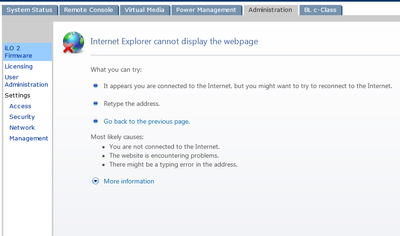
I have downgraded one enclosure to 3.56, but with the same result.
- Mark as New
- Bookmark
- Subscribe
- Mute
- Subscribe to RSS Feed
- Permalink
- Report Inappropriate Content
09-19-2012 01:07 AM
09-19-2012 01:07 AM
Re: Can't upgrade to ILO2 2.12 on different servers
I didn't find any solution, but I find a way to update ILO from OA with SSH.
It was very easy, so this is the way I will update ILO from now on:)

- Mark as New
- Bookmark
- Subscribe
- Mute
- Subscribe to RSS Feed
- Permalink
- Report Inappropriate Content
10-04-2012 12:40 PM
10-04-2012 12:40 PM
Re: Can't upgrade to ILO2 2.12 on different servers
Procedure is as follow
SSH using your client to the OA Chassis
login
update ilo ALL ftp://user:pass@ipaddress/ilo2_212.bin
you can do specific bays or http and you will have to set up a source, but I love this ALL capability.

- Mark as New
- Bookmark
- Subscribe
- Mute
- Subscribe to RSS Feed
- Permalink
- Report Inappropriate Content
10-05-2012 11:20 AM - edited 10-05-2012 11:26 AM
10-05-2012 11:20 AM - edited 10-05-2012 11:26 AM
Re: Can't upgrade to ILO2 2.12 on different servers
This is an issue with the "Content-Length" value in the HTTP header when uploading the iLO2 binary. It's started happening after MS updated Internet Explorer 8 and 9 earlier this year. It affects all the iLO2 firmware versions earlier than 2.09.
There are few workarounds:
Use Fixefox instead of Internet Explorer.
Use IE in "Compatibility Mode" when flashing iLO2 firmware.
Flash iLO2 firmware using an alternate method like, Online Flash from the OS or from the OA CLI.
In 2.09 we fixed the code to handle the content-lenght correctly so, once your iLO2s are 2.09 or later, you shouldn't have this problem anymore.
__________________________________________________
If you feel this was helpful please click the KUDOS! thumb below!
- Tags:
- IE8
- Mark as New
- Bookmark
- Subscribe
- Mute
- Subscribe to RSS Feed
- Permalink
- Report Inappropriate Content
03-13-2013 10:17 AM
03-13-2013 10:17 AM
Re: Can't upgrade to ILO2 2.12 on different servers
same problem!
updated 2.12 by IE
failed even do as suggestion:
Use Fixefox instead of Internet Explorer.
pop: there was a problem retreving the XML data
Use IE in "Compatibility Mode" when flashing iLO2 firmware.
still ....
- Mark as New
- Bookmark
- Subscribe
- Mute
- Subscribe to RSS Feed
- Permalink
- Report Inappropriate Content
03-13-2013 10:21 AM
03-13-2013 10:21 AM
Re: Can't upgrade to ILO2 2.12 on different servers
Is it caused by OA 3.6? I also just updated to 3.6 from 3.55

- Mark as New
- Bookmark
- Subscribe
- Mute
- Subscribe to RSS Feed
- Permalink
- Report Inappropriate Content
03-14-2013 01:59 AM
03-14-2013 01:59 AM
Re: Can't upgrade to ILO2 2.12 on different servers
Howdy, could you give it a try via a manual SPP boot and then upgrade the iLO fw? Just to see if that is at all working?
The other option that I use a lot is via the OA CLI using the "update iLO" command. Would that maybe work?
cheers, jeroen

- Mark as New
- Bookmark
- Subscribe
- Mute
- Subscribe to RSS Feed
- Permalink
- Report Inappropriate Content
02-04-2014 08:25 AM - edited 02-04-2014 08:30 AM
02-04-2014 08:25 AM - edited 02-04-2014 08:30 AM
Re: Can't upgrade to ILO2 2.12 on different servers
I have the same problem with a DL380 G5, ILO 2.23...I got it to work with FF 26.0.
- Mark as New
- Bookmark
- Subscribe
- Mute
- Subscribe to RSS Feed
- Permalink
- Report Inappropriate Content
05-25-2014 09:37 AM
05-25-2014 09:37 AM
Re: Can't upgrade to ILO2 2.12 on different servers
FireFox under MAC OSX is OK!
Successfully upgrade from 1.7 to 2.25. Both IE under Windows and Safari did 99% problem.
- Mark as New
- Bookmark
- Subscribe
- Mute
- Subscribe to RSS Feed
- Permalink
- Report Inappropriate Content
10-16-2014 01:54 AM
10-16-2014 01:54 AM
Re: Can't upgrade to ILO2 2.12 on different servers
Hello,
HP DL 360 G5, upgrade from 2.07 to 2.25 was failing with 99% bug. Thanks to this thread and your answer, I was able to upgrade using FF (v32.0.3 if it might matter). Please note that it didn't work at first attempt (not sure what exactly happened, but logged me out without success); 2nd attempt was fine. Also previous attempts to use various IE11 emulation (document) modes didn't succeed.
Thanks again and 1 up :-)
- Mark as New
- Bookmark
- Subscribe
- Mute
- Subscribe to RSS Feed
- Permalink
- Report Inappropriate Content
05-14-2019 03:09 AM - edited 05-14-2019 03:09 AM
05-14-2019 03:09 AM - edited 05-14-2019 03:09 AM
Re: Can't upgrade to ILO2 2.12 on different servers
Same problem this week on a blade in a c7000 - was just the browser
Regards,
Pete